
On this page
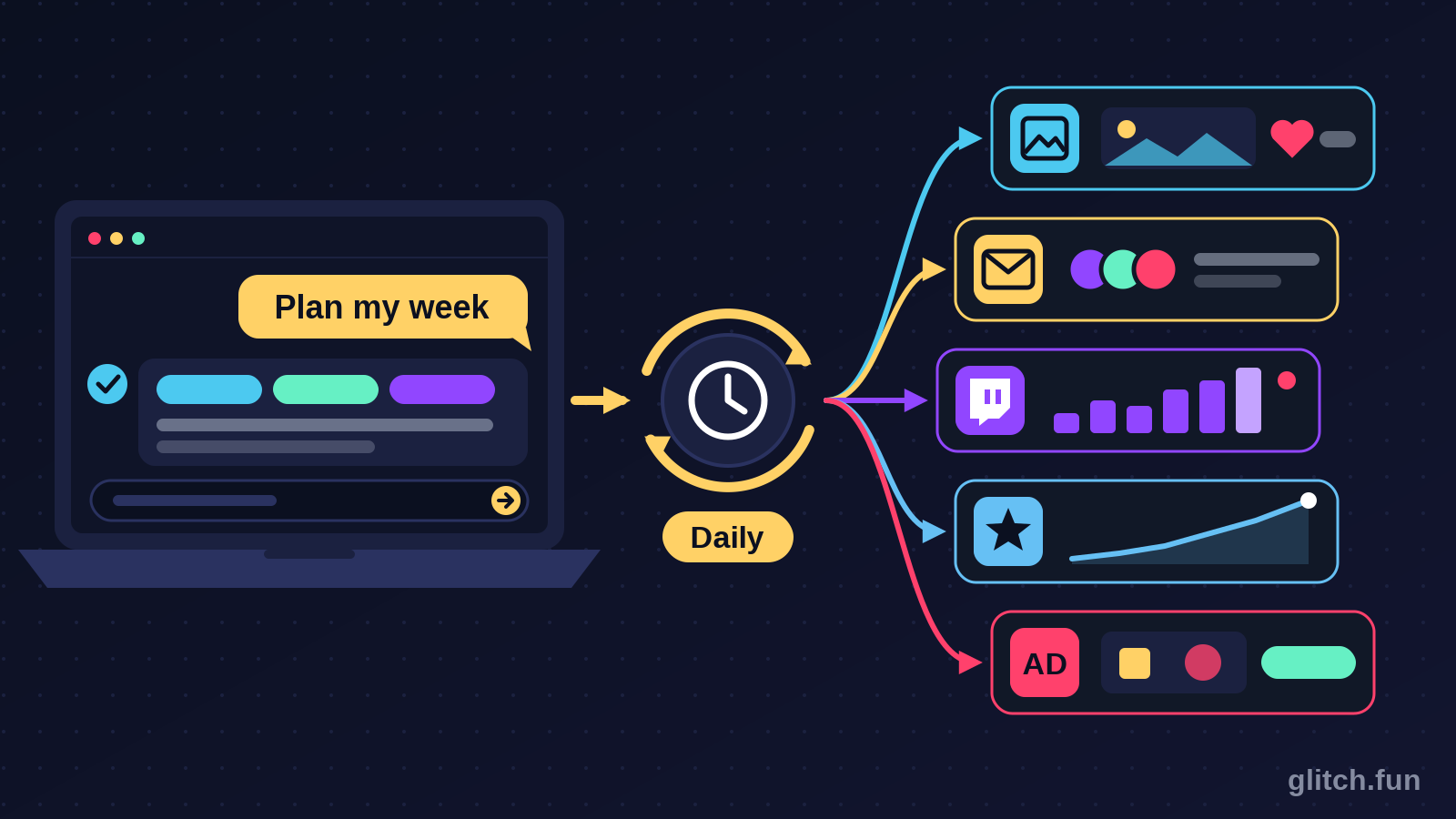
You just shipped a build at 1am. Now you are supposed to write three posts, email fifty streamers, answer the two who replied last week, and work out why your wishlists dipped. So you close the laptop and promise yourself you will do marketing next week. You are in good company: in a Glitch survey of developers, 54.5% said they spend zero hours a week on marketing.
The problem is rarely skill. It is time, context switching and the blank page. If you already build with Claude Code, Codex or Cursor, the fix is closer than you think. Connect your AI to Glitch with the Glitch MCP, and the same chat that writes your code can read your wishlists, source creators, draft posts and check which ads actually brought players. You give direction and approve. It does the busywork.
In this lesson, we are going to cover:
- Why an MCP changes the math for developers who hate marketing
- How to set it up in about 3 minutes
- The 12 most useful prompts, grouped by area
- How to put your marketing on a loop, with exact commands for five ways to run it
- A worked example, and where to go deeper in this track
1. Why an MCP Changes Marketing for Developers Who Hate Marketing
Here is how many hours a week developers told us they spend on marketing:
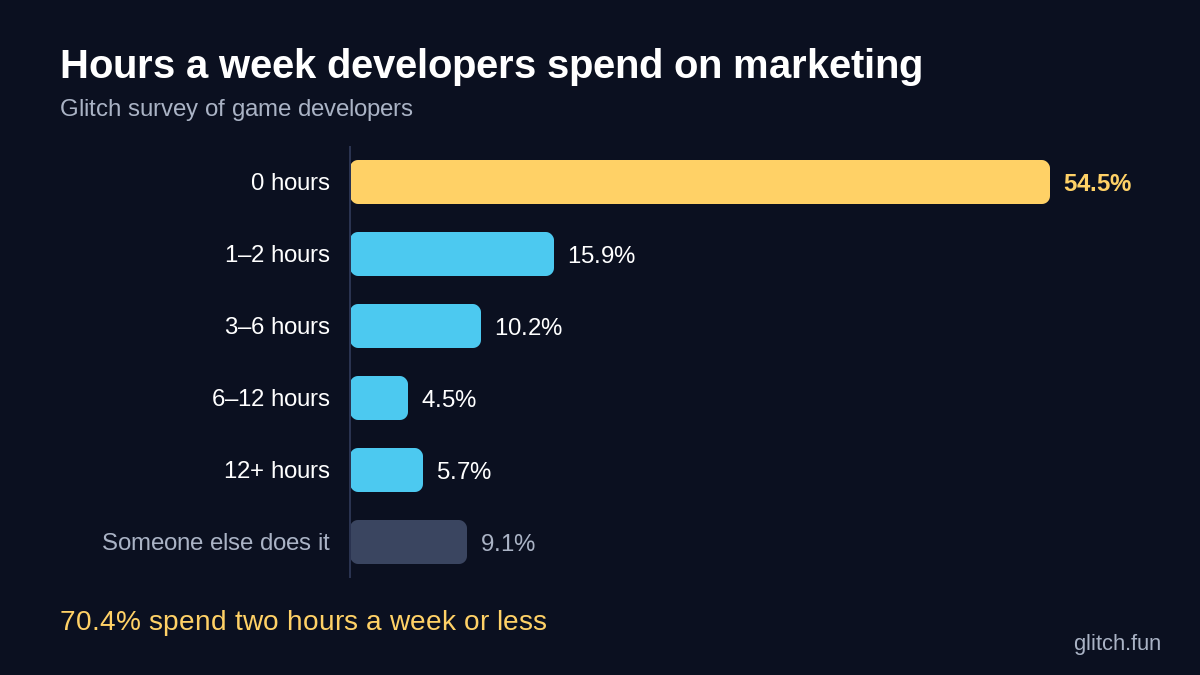
70.4% of developers spend two hours a week or less on marketing.
That is not laziness. Marketing is a pile of small, repetitive jobs that each need context. An MCP (Model Context Protocol) server gives your AI that context and the ability to act on it.
Do the math on one job, an influencer push (an example, not a benchmark). 100 creators, each with an invite and two follow-ups, is 300 emails. At three minutes each, that is 15 hours before you answer a single reply. With the MCP, your AI writes the sequence once, Glitch sources creators who stream games like yours and sends it, and you spend about ten minutes a day on replies.
Second, context. A generic chatbot gives every game the same advice. An AI connected to Glitch reads your traffic, Twitch lookalikes and Steam page first, so the output fits your game. Third, speed. AI development can outpace marketing. When your AI can build a game in weeks, marketing becomes the bottleneck.
A good rule: plan roughly three months of development, then three months of marketing before launch. If your AI is building your game, it should be doing your marketing too, or the game launches to nobody.
2. Set It Up in 3 Minutes
- Go to glitch.fun/mcp, pick your game and click Create Token.
- Copy the AI install prompt from that page and paste it into Claude Code, Codex, Cursor or any MCP client. It installs the open-source glitch-mcp package and checks the connection.
- Ask your AI to learn your game.
The page fills in your token and title ID for you. The install prompt looks like this:
Install and configure the Glitch MCP server for me so you can manage marketing for my game. Package: glitch-mcp (run it with: npx -y glitch-mcp). Docs: https://github.com/Glitch-Gaming-Platform/Glitch-MCP

Use these environment variables: GLITCH_API_BASE_URL=https://api.glitch.fun/api, GLITCH_API_TOKEN={your Glitch MCP token}, GLITCH_TITLE_ID={your game's Glitch title ID}

Add a server named "glitch" to your MCP configuration, keep the token out of git, reload, then call glitch_auth_status and glitch_get_title_context to confirm it works. Finish with a short summary of what you can now do for my game.Use Glitch to read my game's title context and list every analytics report you can run for it. Then tell me in five bullets who my game is for, how it is positioned, and what data we have to work with.
Tip: Anything that posts, emails, spends money or invites someone needs explicit confirmation, so your AI shows you a draft first. Give teammates read-only tokens so they can ask questions without being able to change anything.
3. The 12 Most Useful Prompts
These are the prompts we see developers come back to. Paste them as they are, then adjust the details.
Social Media
Set up the Glitch social asset folders in this project, scan them, and show me the 10 best screenshots and clips for social posts with a one-line reason for each. Wait for my picks before uploading.
Use it when you have a folder of screenshots and no idea which are worth posting.
Take the approved drafts in my Glitch scheduler and plan the next two weeks: 3 posts a week per platform, no duplicates on the same day, and a devlog-style post every Friday. Show me the calendar before scheduling anything.
Use it once drafts are approved and the calendar is empty.
Twitch
Use Glitch MCP to find 30 games similar to mine, then check which of them were streamed on Twitch in the last 7 days. Rank them by live streams and viewers, and tell me which 15 to target and why.
Use it before you source creators or pick positioning.
Influencers
Create a Glitch influencer campaign for my game. Deliverables: one stream or video with a link to the game. Compensation: a free Steam key plus commission. Keep it as a draft and show me the settings. After I approve the draft, set the campaign live.
Use it once you know which games to source from. Follow it with "Assign the 15 lookalike games we chose to my new Glitch campaign so it sources creators who stream them."
Read the latest replies on my influencer campaign, both through the Glitch MCP and my email. Group them into interested, asking for payment, and not interested. Draft a short, friendly answer for each interested creator and send the Steam keys to the ones who are interested.
Use it daily while a campaign is live. "My email" needs an email connector in your AI too. Until you trust the triage, end it with "wait for my approval before sending".
Steam
Run a Glitch Agent review of my Steam page. Tell me what is hurting wishlists, ranked by impact, with a concrete fix for each: capsule, short description, tags, trailer and screenshots.
Use it before you pay for any traffic.
Create a Steam launch readiness report for my game with Glitch Agent: store page, trailer, screenshots, tags, demo and wishlist risks. End with a checklist ordered by what to do first.
Use it six to eight weeks before a launch or a festival.
Analytics
Pull my Glitch wishlist, storefront and session reports for the last 14 days and compare them to the 14 days before. What changed, what likely caused it, and what is the one thing I should do this week?
Use it every Monday instead of opening five dashboards.
Use my Glitch attribution and cross-device reports to show which channels bring players who actually install and keep playing. Rank them and tell me where to spend my next two hours.
Use it when you are unsure which channel deserves your time.
Ads and Conversions
Create a draft Reddit ad campaign in Glitch for my game with a $20/day budget, targeting fans of games like {game 1} and {game 2}. Use my three best-performing social clips as creatives. Keep everything as a draft (draft_only) and show me the full setup.Use it when you want to test paid traffic without living in an ad manager.
Combine my Glitch attribution reports with my ad reports for the last 14 days. For each campaign and creative, show cost per install and cost per purchase, and tell me where to move budget. Do not change anything without my approval.
Use it weekly once ads are running.
Content
Take the script that I am giving you and turn it into an AAA-quality cinematic scene for my game, using only the game's assets to create the scene. Export it as an MP4 that I can post on social media. Make sure to end it with the name of my game and a call to action telling viewers where to play (on Glitch and Steam).
Use it when you have a script and need video. Expect a few revisions before it is good enough to post.
4. Put Your Marketing on a Loop
A prompt you remember to run once is nice. A prompt that runs every Monday whether you remember or not is a marketing department. The rule we follow at Glitch: automation drafts and reports; a human approves anything that publishes, sends or spends.
What to Automate and What to Approve
- Automate: reading reports, scanning for new screenshots and clips, drafting posts and replies, refreshing Twitch research, checking conversions, writing weekly notes.
- Approve: publishing posts, emailing creators, accepting creators, uploading assets, changing campaigns, and anything that spends.
Your Cadence
- Daily (about 10 minutes): triage creator replies and approve the post drafts waiting for you.
- Weekly (Monday, about 20 minutes): marketing sync, fill next week's posts, refresh Twitch lookalikes, review ads and conversions.
- Monthly (about 30 minutes): review 30 days of social and attribution results, re-check your Steam page, and update your plan.
- Always on (Glitch servers, no AI needed): creator auto-invites and follow-ups, the daily asset watch, and scheduled posts.
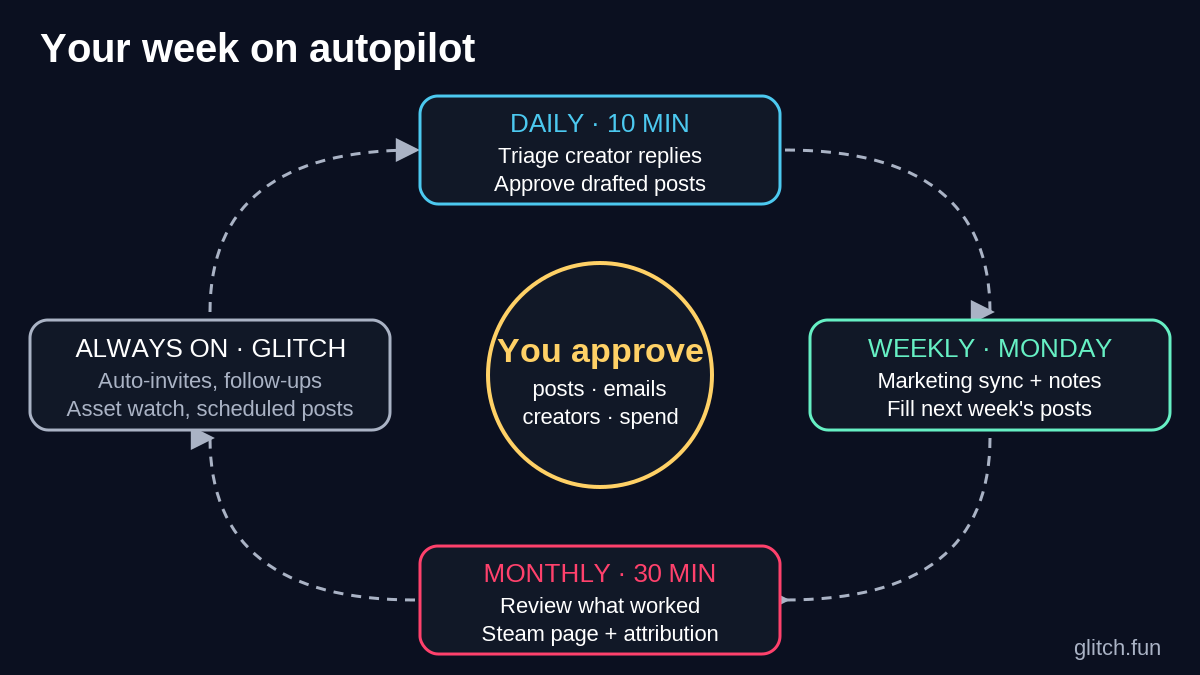
Your AI and Glitch do the rounds. You sit in the middle and approve.
Automate in Phases, Not All at Once
Automate creator outreach in this order. Do not jump straight to auto-send.
- Phase 1, draft mode: the loop fetches replies, triages them, checks the ledger and drafts every answer. You read and send.
- Phase 2, auto-send the clear yeses: after about a week of draft mode with no triage mistakes, let the loop answer clear yeses ("Steam", "I'd love to try it") on its own. You only handle escalations. In one example campaign, about 1 in 5 replies needed a human decision.
- Phase 3, inside Glitch: Glitch's own follow-ups and auto-invites run on its servers, and follow-ups stop when someone declines.
Two files make this safe:
- A key ledger: key, recipient, thread and date for every key sent. It is the source of truth that makes double-sends impossible. Check the creator has not already received a key, then take the next unused one.
- A do-not-email list: anyone who declined, said stop or was the wrong person. The loop checks it before every send.
What stays human in every phase: pricing and paid deals (anyone who names a price gets escalated, not answered), questions about how the game was made, including AI use, and loading new keys.
Common mistakes to avoid: review follow-ups after launch day so old dates stop sending, check every link in your templates, set a commission rate before creators ask, and read your inbox too, because the replies list returns only the latest 100.
Prompts to Put on a Loop
Two loop prompts do most of the work. First, weekly:
Use the Glitch MCP to find the most-played games on Twitch in the past week that are similar to my game. Update the influencer campaign to source creators from the most-played games.
Then daily, once you reach phase 2:
Respond to the influencers who have shown interest in playing my game for free. Use the keys in '/path/to/keys' and make sure duplicate keys are not being sent. If there are any questions, alert me so I can respond.
Together, these two handle most day-to-day creator management. For phase 1, use a draft-only version:
Check my Glitch influencer campaign for new creator replies since your last check. Group them into interested, asking for payment and not interested, check marketing/key-ledger.csv and marketing/do-not-email.txt, and draft an answer for each interested creator. Do not send anything. Give me a three-line summary.
Run my weekly marketing sync with Glitch: read last week's reports, list anything waiting for my approval, and give me three tasks for this week that each take under 15 minutes. Save the summary to marketing/weekly-notes.md.
Pull my Glitch social reports and attribution reports for the last 30 days. Tell me which platforms, posts, creators and ads brought players who installed and kept playing, what to stop, and what to do more of next month. Save it to marketing/monthly-review.md.
Five Ways to Run Them
Method 1: Claude Code /loop (while you work). Open Claude Code in your game's project, where Glitch MCP is configured, and type /loop with an interval and a prompt. It repeats for as long as the session is open. Leave out the interval and it paces itself.
/loop 30m Check my Glitch campaign replies and draft answers for my review. Do not send anything.
Method 2: cron + claude -p (on your own machine).
- In your project folder, run claude -p "Use Glitch to read my title context" once to confirm the MCP works headless.
- Run which claude and note the full path. Cron does not load your normal PATH.
- Run crontab -e and add a line like the one below. Headless runs cannot stop and ask for permission, so allow only the tools the job needs.
0 9 * * MON cd ~/my-game && /usr/local/bin/claude -p "Run my weekly Glitch marketing sync. Read last week's reports, draft next week's social posts as drafts only, and save the summary to marketing/weekly-notes.md." --allowedTools "mcp__glitch,Write" >> marketing/cron.log 2>&1
Method 3: Claude Code cloud scheduled tasks (laptop closed). In Claude Code, type /schedule and describe the job and when it runs, for example "every Monday at 9am, run my weekly Glitch marketing sync". It runs in Anthropic's cloud, not on your machine, so it cannot use the Glitch MCP you installed locally. Give it Glitch through the hosted connector (Method 4), or keep the server config in the project and put the token in the cloud environment's secrets, never in git.
Method 4: The hosted Glitch connector, for claude.ai and Claude Duet. Glitch MCP is also available as a hosted connector at https://api.glitch.fun/mcp, so your marketing no longer only works from the computer where you installed it. To add it:
- Open claude.ai and go to Settings, then Connectors.
- Choose Add custom connector and enter https://api.glitch.fun/mcp.
- Sign in on glitch.fun when asked and approve access for your game. The current steps are on glitch.fun/mcp.
Claude Duet, Anthropic's proactive assistant (research preview, US Pro, Max and Ultra plans), uses the connectors on your Claude account. It checks them every few hours, sends you a morning brief, and asks before it sends or posts anything. Give it the weekly Twitch refresh and the draft-mode reply triage as standing instructions, and creator replies show up in your morning brief with answers already drafted.
Method 5: Glitch's built-in server automation (no AI at all). Auto-invites go to sourced creators (up to 500 an hour by default, 20 an hour from a personal Gmail or Outlook), with up to five emails per creator about two days apart. Scheduled posts publish on time. The social asset watch rescans your folders daily and never uploads on its own.
Start the Glitch social asset watch for this project. Then turn on auto-invites for my Glitch influencer campaign with 3 emails per creator. Show me the settings before you confirm.
5. What This Looks Like in Practice
Here is an example of the numbers to expect. One small team ran this playbook for a game that launched after only a month on Steam, with about 1.5k wishlists at launch:
- About 8,000 creators emailed through Glitch
- About 100 said yes and received a key, 47 redeemed it, and 3 made content in the first weeks, the best of them about 20k views
- 25 lookalike games verified as streamed on Twitch, used to source those creators
- 103 press contacts researched and 43 pitches sent
What to take from it:
- Marketing is about awareness. The most well-known game wins more often than the best one. Ask yourself: has anybody even heard of your game?
- Creators are a numbers game. Email a lot, send a lot of keys, and a few creators produce outsized returns. You cannot force outcomes the way a paid contract can.
- Free coverage is uncontrolled. Some creators will roast your game. Most games get no coverage at all, so it is still worth it.
- Your time is small; the waiting is long. Setting up a creator campaign takes about 20 minutes with the MCP, then a week to a month before content appears. Start early.
- A month on Steam is too short. Plan three months of marketing before launch, so creators can cover your Steam page launch, your demo and your release, not just the release.
6. Go Deeper
Each lesson in this track takes one area further, with more prompts and its own loop.
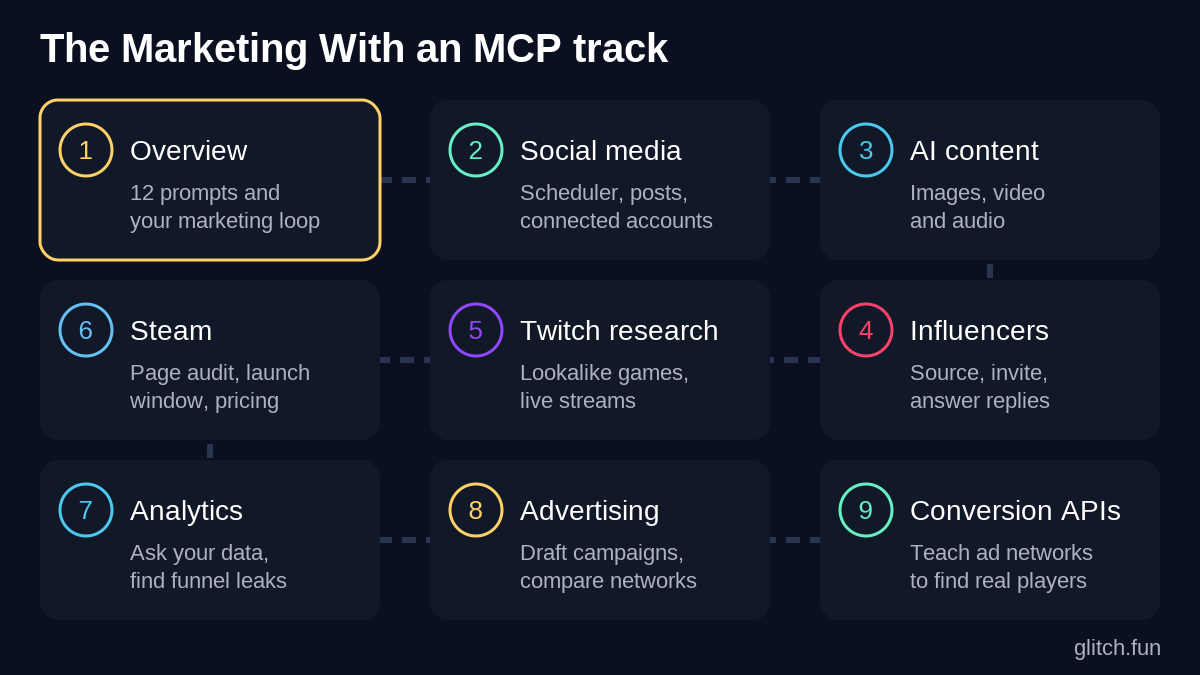
The Marketing With an MCP track, start to finish.
- Social Media Marketing With an MCP: set up a scheduler, turn screenshots and clips into platform-specific posts, connect accounts safely and learn from the results.
- Use Your AI to Create Images, Video and Audio for Your Game: make shorts, art and sound for marketing with your AI and hand them to Glitch.
- Influencer Marketing With an MCP: source creators from games like yours, write the invite sequence once and answer replies in minutes.
- Twitch Research With an MCP: find which games like yours are being streamed right now and who streams them.
- Steam Marketing With an MCP: audit your store page, compare it with similar games, and pick a launch window and price.
- Game Analytics With an MCP: ask your data questions instead of reading dashboards, and find where your funnel leaks.
- Advertising With an MCP: build ad campaigns as drafts, launch what you approve and compare networks from one chat.
- Conversion APIs With an MCP: send installs and wishlists back to ad platforms so they find real players, and verify it every week.
Glitch Tools Used
- glitch_get_title_context, glitch_get_analytics_capabilities
- glitch_setup_social_asset_folders, glitch_scan_local_social_assets, glitch_upload_social_asset_candidates, glitch_start_social_asset_watch
- glitch_social_operation (posts.create, schedulers.generate_content, schedulers.generate_hashtags, schedulers.reports)
- glitch_influencer_campaign_operation (create, update, templates.create, template.assign, replies.list, replies.get, replies.send, influencers.list, influencers.accept)
- glitch_research_campaign_lookalike_games, glitch_assign_campaign_lookalike_games
- glitch_start_agent_run, glitch_wait_for_agent_run, glitch_get_final_report
- glitch_get_wishlist_reports, glitch_get_storefront_reports, glitch_get_session_reports, glitch_get_attribution_reports, glitch_get_cross_device_reports
- glitch_marketing_operation (campaigns.create with draft_only, creatives.create, reports)
Wrap Up
Marketing does not need to eat your week. It needs a connected AI, the right prompts and a loop that keeps running when you forget. Here is what to do today:
- Create your token at glitch.fun/mcp and paste the install prompt into your AI.
- Run "Get up to speed" and "What changed this week".
- Pick one loop prompt and schedule it with /loop, cron or /schedule.
- Approve what comes back. That is your marketing for the week.
Before you move on, run through this checklist. Are you play testing? Building a community? Collecting data? Establishing a brand? Incorporating feedback? Tracking weekly results? If the answer to any of these is no, there is a prompt in this track for it.
Next, start with the channel most developers put off longest: Social Media Marketing With an MCP.