
On this page
You finished a feature at 2am, recorded a great clip of it, and three weeks later that clip is still sitting in a folder called "captures". Your last post was a month ago. You know you should be posting, but every time you open X or TikTok you lose an hour writing one caption and guessing hashtags, then you go back to coding because coding feels like progress.
You are not alone. When we surveyed developers on Glitch, 54.5% said they spend 0 hours a week on marketing. Another 15.9% spend 1 to 2 hours. Social media is usually the first thing that gets dropped, and it is also the cheapest channel you have.
Most of the work in social media is not creative. It is moving files, writing five versions of the same caption, picking times and checking numbers. With real in-game assets and the Glitch MCP, a month's social schedule takes about 30 minutes. There is no excuse for a game not to have a social media presence anymore. In this lesson, we are going to cover:
- Creating a social media scheduler for your game
- Setting up asset folders and turning screenshots and clips into posts
- Writing post copy and hashtags per platform, including TikTok hashtag research
- Connecting your accounts with OAuth through the MCP
- Scheduling weeks of content as drafts and approving them
- Posting often without spamming your audience, and handling people who hate AI
- Reading reports and creative performance, and adjusting
- Automating the daily, weekly and monthly loops
If you have not connected the Glitch MCP yet, start with Marketing With an MCP: The Prompts That Do the Work.
1. Create a Social Media Scheduler
On Glitch, a scheduler is the home for one game's social media. It holds your connected accounts, your posting frequency and your content library. Everything else in this lesson hangs off it, so it comes first.
You only need a name and a number of posts per week. Start low. Three posts a week that actually go out beat ten a week that you abandon in February. You can change it later.
Using Glitch, check whether my game already has a social media scheduler. If it does, show me its settings and connected accounts. If not, create one called "{Game Name} Social" with 3 posts per week and show me what you created. Then list the social operations you can run for it.Like every write in the Glitch MCP, creating the scheduler requires confirmation, so your AI tells you what it is about to do first.
2. Turn Your Game Assets Into Posts
Developers rarely lack content. It is buried in hundreds of screenshots and clips from playtesting and debugging.
Set up the folders once
Glitch can create a standard set of folders in your project: captures/, screenshots/, trailers/, builds/latest/social/ and marketing/. From then on, your only job is to drop files into them as you work.
Scan, review, then upload
The scan looks at every image and video in those folders and ranks them by folder, how recent they are, filename hints, size and type. It removes duplicates by file hash, so the same clip saved twice only shows up once. Scanning never uploads anything. It writes a list of candidates that you review.
Set up the Glitch social asset folders in this project, then scan them for anything from the last 14 days. Show me the 10 best screenshots and clips for social posts with a one-line reason for each and the platforms each one suits. Do not upload anything until I pick.
Notice what goes in: real screenshots and clips from your game. Players hate AI art. They do not hate real game assets, even if AI helped you build the game. Post what the game actually looks like.
Look at the list and cut anything that shows a bug, placeholder art or a spoiler you want to save. Then upload the ones you like. When a candidate is uploaded to your scheduler, Glitch stores the original file, creates a post entry for it and writes platform-specific draft captions you can edit. If a platform is not connected yet, it is skipped without blocking the others.
Upload candidates {candidate numbers} to my Glitch social scheduler for X, Bluesky, Reddit, Discord and TikTok so Glitch writes draft copy for each platform. Then list the drafts it created, grouped by asset, so I can review them.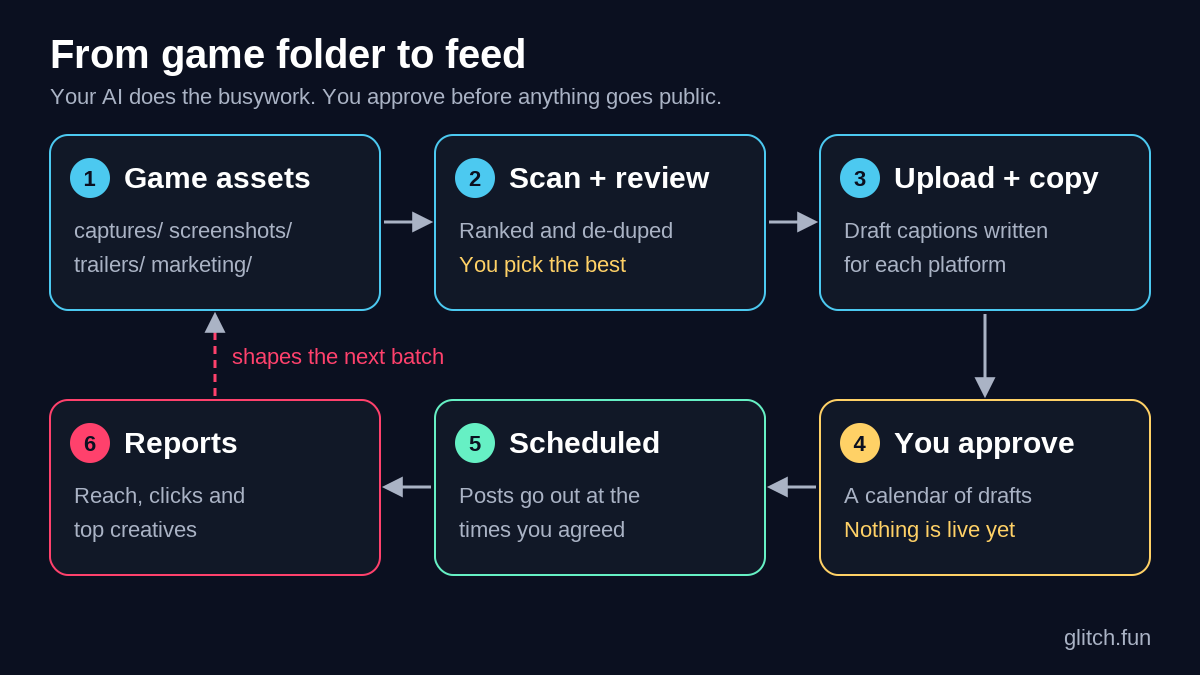
The whole pipeline: your folders go in, reports come out, and the reports shape the next batch.
Tip: Screenshots are fine, but short vertical video wins on TikTok, YouTube Shorts and Instagram Reels. If you want your AI to cut gameplay into 15 to 30 second clips, or create images, video and audio from scratch, that is covered in Use Your AI to Create Images, Video and Audio for Your Game.
3. Write Copy and Hashtags for Each Platform
A caption that works on X reads like spam on Reddit, and a Reddit title is useless on TikTok. Writing five versions of everything is boring. Your AI does not get bored. Glitch already knows your game from its title context, so schedulers.generate_content and schedulers.generate_hashtags write copy and hashtags for your game, not generic "check out my game!" posts.
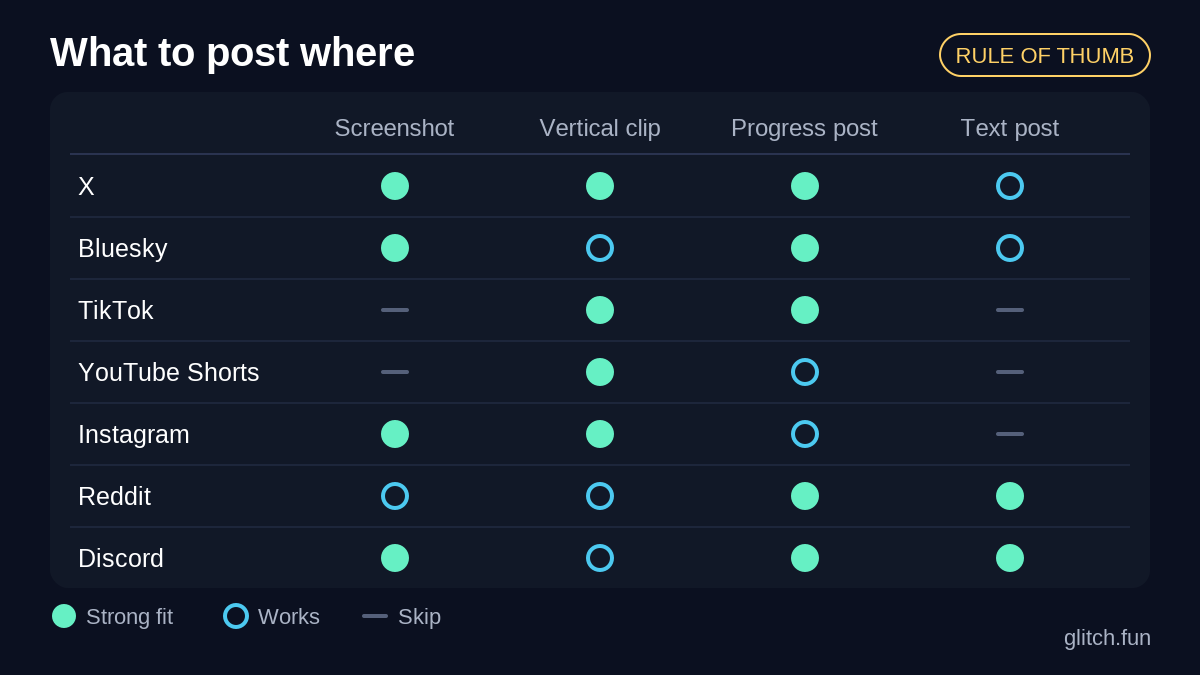
Rule of thumb for which formats to send where. Your own reports will refine it.
Read my game's Glitch title context, then review the draft posts in my scheduler. Rewrite each one for its platform: under 200 characters with a hook for X and Bluesky, a plain descriptive title with no hashtags for Reddit, a short casual line for Discord, and a first line that works as on-screen text for TikTok. Generate hashtags with Glitch for each platform, max 3 on X and 5 on TikTok. Show me before and after, and keep them as drafts.
TikTok hashtag research
TikTok is the one platform where hashtag choice really affects who sees you. Glitch has two TikTok operations. tiktok.hashtags returns TikTok's own hashtag suggestions for a keyword (this needs your TikTok Business account connected to the scheduler). tiktok.trending_hashtags returns trending hashtags by country and category, which needs a connected TikTok Ads account. Both are read-only.
Use Glitch to get TikTok hashtag suggestions for these keywords: "{genre}", "{main mechanic}", "game dev", and "{a game players compare mine to}". If my TikTok Ads account is connected, also pull trending hashtags in the US for the last 7 days. Give me three hashtag sets of 4 to 5 tags each, mixing one broad tag with specific ones, and tell me which of my TikTok drafts each set fits.4. Connect Your Accounts With OAuth
Your AI never sees your passwords. When you connect an account, the MCP starts a secure connection and gives you a link. You open it, approve access on the platform's own consent screen, and Glitch stores the connection. The link is single-use and expires after 15 minutes. If it expires, ask for a new one.
Glitch supports X, Reddit, Facebook, Instagram, TikTok, YouTube, Discord, Bluesky and Twitch, plus the ad and business versions of several of these. Connect the ones you will actually use. Two platforms done well beat seven done badly.
Connect my Glitch social scheduler to {platforms, e.g. X, Bluesky, TikTok and Discord}. Give me one consent link at a time, wait for me to say I approved it, check the connection status, and only then move to the next platform. Finish with a list of what is connected and what failed.One detail worth knowing: "connected" means the credentials were saved, not that a post went through. Look at your first scheduled post on each platform after it publishes to be sure.
5. Schedule Weeks of Content as Drafts
This is where you get your time back. Instead of posting every day, you sit down once a week (or once every two weeks) for ten minutes, review a calendar and approve it.
The rule is simple: your AI creates posts as drafts and shows you the plan. Nothing is scheduled to publish until you approve it. After approval it uses posts.reschedule to set the times.
Take the draft posts in my Glitch scheduler and plan the next two weeks: 3 posts a week per connected platform, never the same asset on two platforms on the same day, a devlog-style progress post every Friday, and posting times that suit each platform for players in {main country or time zone}. Show me the plan as a day-by-day calendar before scheduling anything.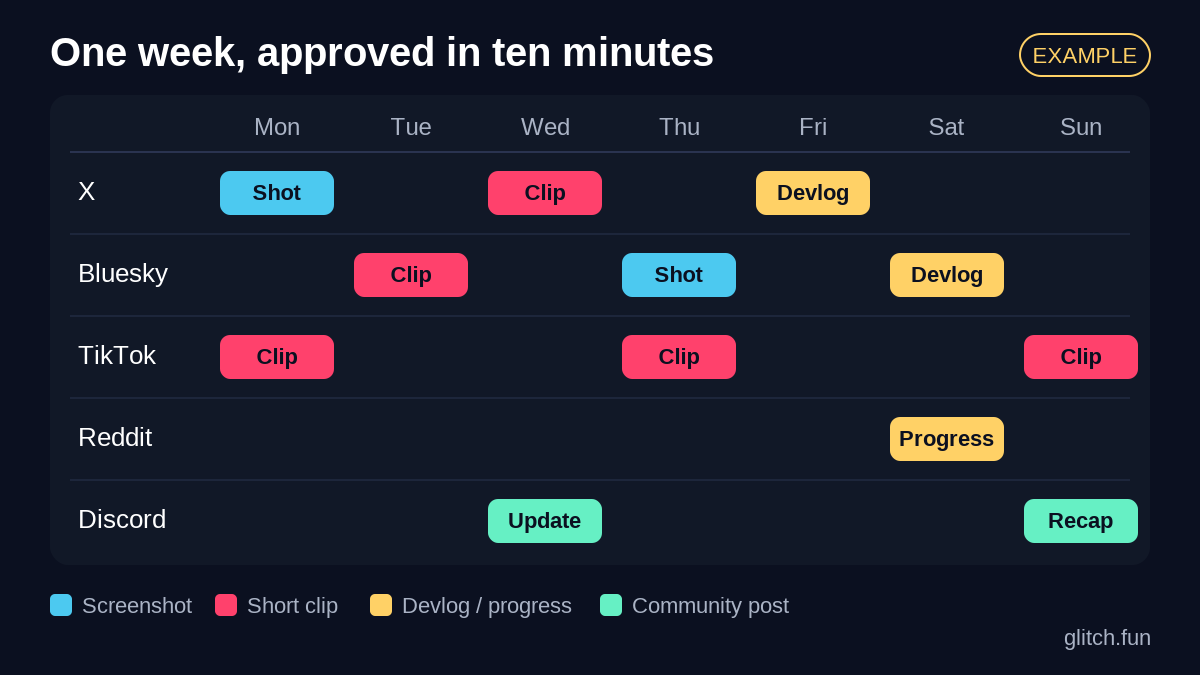
Example week. Spread assets across days so the same clip never hits every feed at once.
Read the calendar, change what you want in plain English ("move the boss clip to Saturday", "drop the Reddit post on Tuesday"), then approve.
I approve the calendar with these changes: {your changes}. Schedule the approved posts in Glitch at the planned times, then list every scheduled post with its platform, date, time and first line so I can double check.6. Post Often Without Spamming
The most common pushback we hear is "won't posting this much annoy people?" We covered this in depth in How To Use Social Media Without Spamming Audiences. The short version:
- Following is consent. People who follow your game asked to hear about it.
- Most followers never see a given post. Organic reach on feed platforms is low, so posting more often is how you reach the same people even once.
- Feeds are not forums. On X, TikTok, Instagram, Bluesky and Facebook the algorithm decides who sees what, so frequent posting rarely feels like spam. On Reddit and Discord your posts sit in a shared space, so slow down there.
A cadence that works for most small teams:
- X, Bluesky, TikTok: 3 posts a week to start, rising toward daily as a launch or event gets close.
- Reddit: one post a week at most per subreddit, and only when it is something people in that subreddit would want to see. Read each subreddit's rules.
- Discord: one or two updates a week in your own server. Your community is there for the game, not a feed.
In How To Market Your Game we suggest ramping up before a marketing beat: twice a week three months out, five times a week two months out, and daily in the final month. Tell your AI your next beat and it will plan the ramp.
My next marketing beat is {beat, e.g. demo launch} on {date}. Update my Glitch scheduler's posts per week so I post twice a week until 2 months out, five times a week until 1 month out, and daily in the final month. Keep Reddit at one post a week. Show me the new settings and the number of drafts I will need each week before changing anything.Talk to players, not developers
It is tempting to post where other developers hang out, because they are the ones who comment. But developers do not wishlist or buy other developers' games in meaningful numbers. Write for the people who play games like yours, and post in the places they spend time.
Deal with the AI haters before your best post
If AI was part of how you made your game, a loud minority will tell you about it. The silent majority does not care, as long as the game is fun. The fix: post other content first, see who shows up angry, and block them before you post your best content. Otherwise your best post gets buried under a pile-on that has nothing to do with the game. For example, one AI-made video series built only from game assets went on to reach 70k to 100k views a week once the pile-on was out of the way.
7. Read Your Reports and Adjust
Posting without reading results is just hoping. Glitch tracks reach, engagement, link clicks and which creatives perform, and your AI can read all of it. Give it two or three weeks of posts before you draw conclusions. One viral post or one dead day does not mean much.
The useful operations are schedulers.reports for the overall picture, schedulers.progression for growth over time, posts.creative_performance for which images and clips work, and posts.shortlink_reports for clicks on your links. Social post data updates daily.
Pull my Glitch social reports, progression and creative performance for the last 30 days. Which platforms, post types and specific creatives drove the most engagement and link clicks? Which drove nothing? Give me three concrete changes for next month and update my posting plan once I approve.
Ask for decisions, not dashboards. "Post more clips of the boss fight and fewer UI screenshots" is useful. A table of 40 metrics is not.
8. Automate It
Once the pieces work, put them on a schedule. The rule: automation drafts and reports, and you approve anything that publishes.
What Glitch already runs without your AI
- Scheduled posts publish at their times once you approve them.
- The daily asset watch rescans your local folders once a day and lines up new candidates. It never uploads on its own.
Start the Glitch social asset watch for this project so my folders are scanned every 24 hours, and run the first scan now. Tell me how many new candidates it found.
The watch runs in the MCP process on your machine. If you restart your AI client, start it again.
Weekly: fill next week
Once a week, your AI should take the new candidates from the watch, draft posts and lay out next week's calendar for you. If you keep a Claude Code session open while you work, a loop can keep the drafts topped up as new captures land:
/loop 24h Check the Glitch social asset watch for new candidates, show me the best ones, then draft posts in my Glitch scheduler for any empty days in the next 7 days, following my posting plan. Keep everything as drafts and give me the calendar to approve.
A loop only runs while that session is open. For the weekly fill, schedule it headless with cron instead. It uses the Glitch MCP already configured in your project:
0 9 * * MON cd ~/my-game && claude -p "Scan my Glitch social asset candidates and fill next week's social schedule with drafts for my review. Save a summary of the plan to marketing/social-plan.md."
Claude Code cloud scheduled tasks also work while your laptop is closed, using assets you have already uploaded (folder scans need your machine).
Monthly: what worked
Once a month, run the "what worked" review from section 7:
0 9 1 * * cd ~/my-game && claude -p "Pull my Glitch social reports and creative performance for last month. Write the three biggest lessons and three changes to marketing/social-review.md. Do not change the scheduler until I approve."
Claude Duet
Claude Duet is Anthropic's proactive agent app (a research preview for US Pro, Max and Ultra plans). It uses the connectors on your Claude account, checks them every few hours, sends a morning brief and asks before sending or posting anything. Glitch has a hosted connector at https://api.glitch.fun/mcp for claude.ai and Duet: in claude.ai go to Settings, then Connectors, then Add custom connector, and sign in with your Glitch account. Setup steps are on glitch.fun/mcp. Because it is hosted, it works even when your laptop is closed.
Glitch Tools Used
- glitch_get_title_context and glitch_get_social_capabilities
- glitch_social_operation: schedulers.create, schedulers.generate_content, schedulers.generate_hashtags, oauth.connect.start, oauth.connect.status, posts.create, posts.add_media, posts.reschedule, posts.list, schedulers.reports, schedulers.progression, posts.creative_performance, posts.shortlink_reports, tiktok.hashtags, tiktok.trending_hashtags
- glitch_setup_social_asset_folders, glitch_scan_local_social_assets, glitch_upload_social_asset_candidates, glitch_start_social_asset_watch
Wrap Up
Social media does not need to eat your week. Thirty minutes gets you a month of posts from real game assets. After that it is ten minutes a week approving a calendar and ten minutes a month reading what worked. Here is what to do today:
- Run the "Create the scheduler" prompt.
- Set up the asset folders and run "Find my best moments".
- Connect two platforms you will actually use.
- Plan two weeks of drafts and approve them.
- Start the daily asset watch and set up the weekly fill loop.
Screenshots will only get you so far. Next, learn how to have your AI make short videos, images and audio for your game in Use Your AI to Create Images, Video and Audio for Your Game.