
On this page
- 1. Three Ways to Get Pictures
- 2. Start With One Prompt, Then Build a Pipeline
- 3. In-Engine Capture Driven by Your AI
- 4. Prompt Patterns for Pictures
- 5. Voice, Sound Effects and Music
- 6. Keeping It Consistent
- 7. One Edit, Two Formats
- 8. What It Actually Cost
- 9. Hand It to the Glitch MCP
- 10. The Weekly Content Loop
- Glitch Tools Used
- Wrap Up
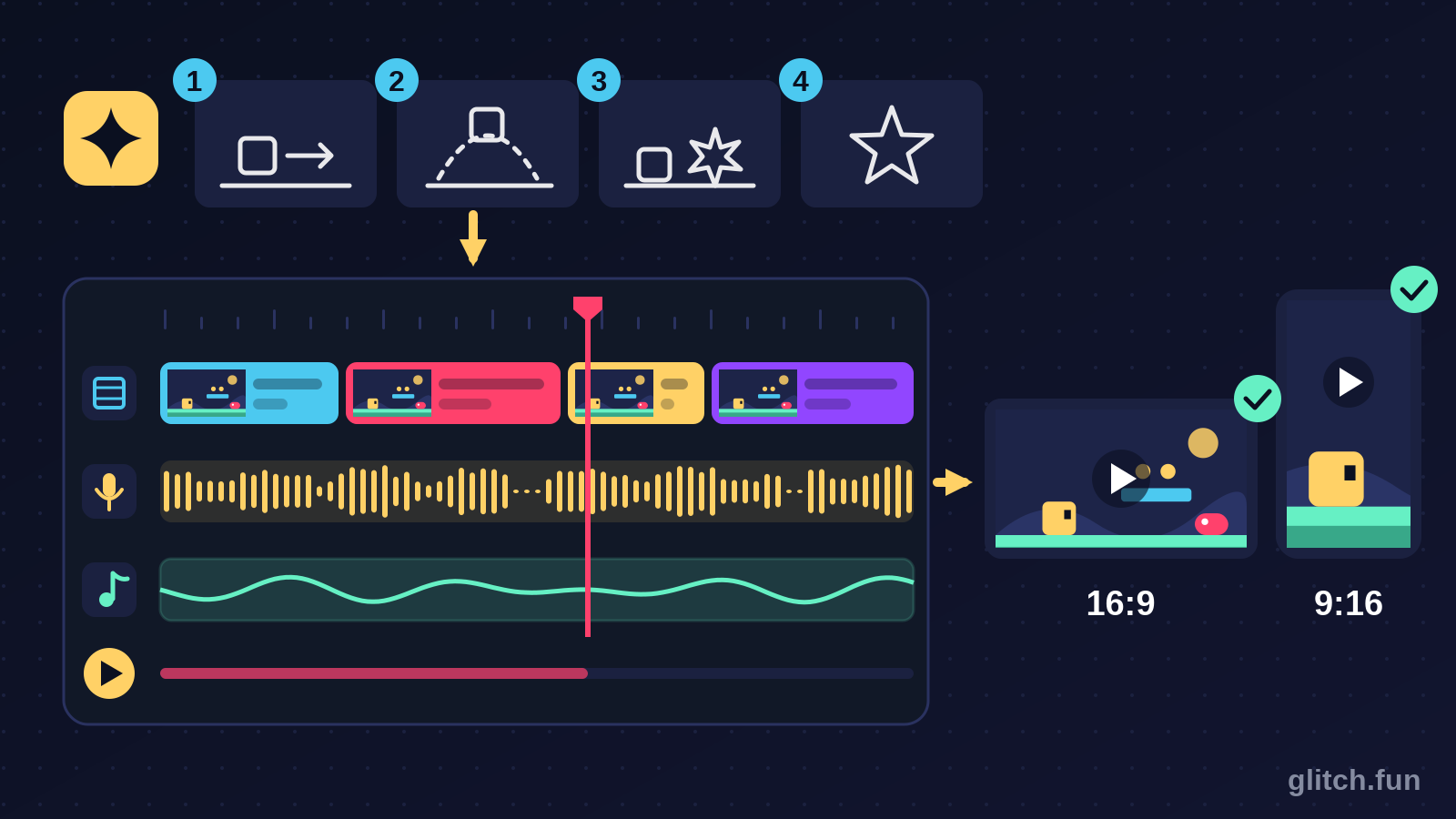
You need a trailer, twenty short clips a month for social, key art, a few character portraits and maybe a voice-over. A professional trailer alone can cost anywhere from $200 to $5,000, and your social feed has been silent for three weeks because every clip takes an evening in a video editor you barely know.
An AI coding agent can run most of a content studio from a folder of small scripts and data files. For example, one game used the pipeline in this lesson to produce trailers, key art, portraits, social cuts and a 6-episode mini-series of about 5 minutes per episode, built from the game's own assets, with all of the sound made with ElevenLabs. The mini-series drew 70k to 100k views a week. Players don't care if it's AI or not, as long as it entertains them.
In this lesson, we are going to cover that pipeline step by step, with the prompts you give your AI coding agent:
- Three ways to get pictures, and when to use each
- The one-prompt version, and the full pipeline when you need more control
- Prompt patterns for image sets, portraits, key art, video shots, voices, sound effects and music
- Keeping everything consistent
- One edit, two formats: 16:9 and 9:16 from the same cut
- Real costs, times and the mistakes that cost hours
- Handing finished content to the Glitch MCP, and a weekly content loop
1. Three Ways to Get Pictures
- In-engine capture: your AI drives the real game and records it. The most honest footage and usually the best. Use it for trailers, gameplay clips and Steam screenshots.
- AI still images: made through an image API. Use them for icons, portraits, key art for social posts and menus, and art you want to test before paying an artist.
- AI text-to-video: short concept clips from a storyboard file and a few style reference stills. Use them for teasers, mood pieces and story moments the game cannot show yet.
Default to the first one. Players hate AI art, not real game assets. Our Steam lessons say not to use AI-generated video as your Steam trailer, and we still agree. What changes is who does the work: your AI drives the capture, the cut and the mix.
2. Start With One Prompt, Then Build a Pipeline
The simplest version is a single prompt. Give your AI a script and this:
Take the script that I am giving you and turn it into an AAA-quality cinematic scene for my game, using only the game's assets to create the scene. Export it as an MP4 that I can post on social media. Make sure to end it with the name of my game and a call to action telling viewers where to play (on Glitch and Steam).
It will take a few revisions, but you'll get something decent. One prompt and done is how you get slop. Review every cut like a director. When you want more control, break the job into steps, and follow one rule: edit data, not code. Scripts, shot lists and cuts are small text files. The AI changes a line, and only that shot re-renders.
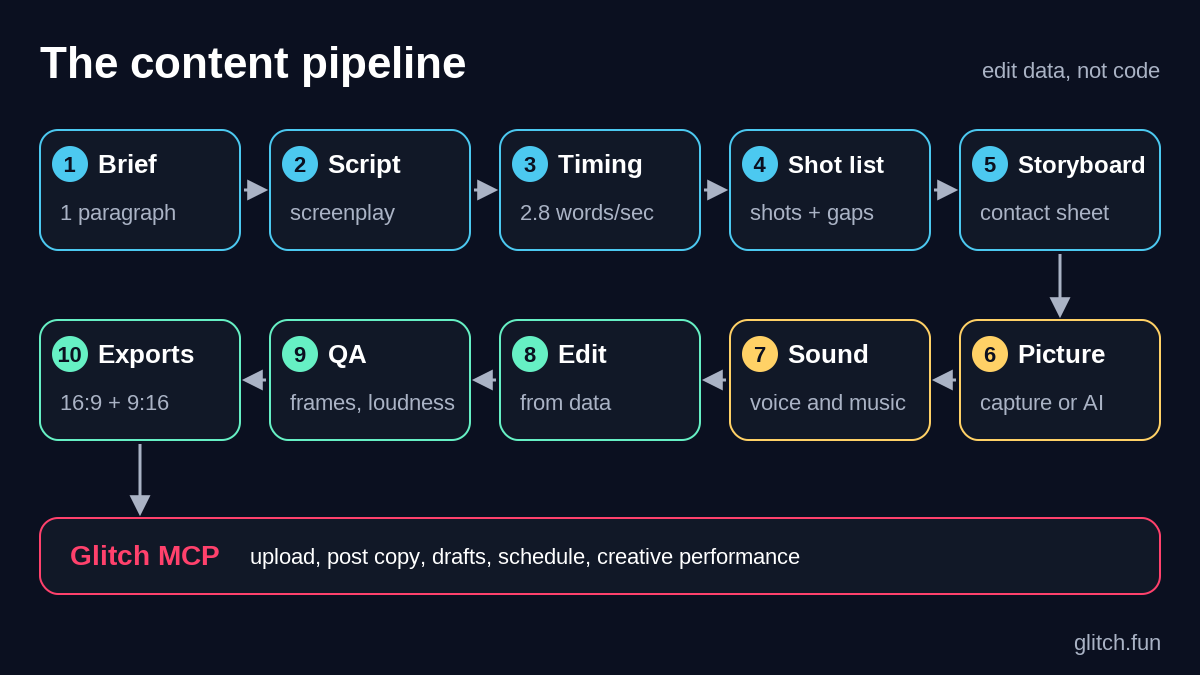
Ten steps, each one a file your AI can read and change.
Create a marketing/studio/ folder for a {length} {deliverable} for my game. My brief: {brief}. Write plan.md with the deliverables, which method each uses (in-engine capture, AI stills or AI video), quality gates, a sound spec and a status log. Keep scripts, shot lists and edits as small data files. Read API keys only from environment variables and never write them to files or logs.Check timing before you make a single frame: about 2.8 spoken words per second, and subtitles no faster than 17 to 20 characters per second. For example, one 4:50 target measured over 6:00 on paper, which is the cheap place to find out.
Read marketing/studio/script.md. At 2.8 spoken words per second, estimate each scene's runtime and flag subtitle lines over 20 characters per second. Do not rewrite my lines; put suggestions in a polish table. Then write shotlist.csv (shot number, start, duration, camera, action, set, source asset) and an inventory marking every asset "exists" or a numbered gap for me to approve or cut. Render one to three stills per shot into a contact sheet for review.
Episodes in that example ran 34 to 96 shots each, so review the contact sheet before full renders.
3. In-Engine Capture Driven by Your AI
For a web build, the AI can drive a real browser with Playwright on a GPU machine and replace the game's clock with a virtual one, so every frame advances exactly 1/30 or 1/60 of a second. Footage comes out smooth even if the game only runs at 20 fps while recording.
Build a capture script that renders the shots in marketing/studio/shotlist.csv from my game. Use a fixed virtual clock so each frame advances exactly 1/30 second, hide the HUD, script the camera and inputs per shot, and pin one game build for every capture. Before full renders, prove animations actually advance and that no frame is black, frozen or repeated.
Common problems: busy-wait loops hang under a frozen clock, GPUs present stale frames, cinematics start black, and walk cycles can fail silently unless you check them.
4. Prompt Patterns for Pictures
One shared base prompt per set, one subject line per item, and a manifest of model, size, prompt and file hash so anything can be regenerated.
Generate 1024x1024 icons through {image_api} with this base prompt: "One square inventory illustration for a {genre} game. {rendering_style}, tactile materials, bold readable silhouettes, {accent_colour} highlights, {shadow_colour} shadows. Three-quarter isometric view, 25 degrees down. One centred subject fills about 78% of the frame with 10% margins. Flat {hex} background with a soft contact shadow. No frame, border, UI, labels, numbers, text or watermark. Match the same art style and scale as a cohesive set. Subject: {item}." Items: {item_list}. Save WebP copies, record everything in manifest.json and show me a contact sheet.Create 1024x1024 portraits for each character in marketing/studio/cast.md: "{genre} character portrait; painterly cinematic realism; {palette}; warm key and cool rim light; shallow depth of field; waist-up three-quarter, looking toward the {side} where dialogue text sits; consistent dark studio background. No frame, lettering, logo or celebrity likeness." Add one line per character (age, role, face, costume, prop, expression). Then make 2560x1440 key art of {setting}: keep the left 38% calm for menu text, faces and brightest action centre-right, with a long negative list.Write marketing/studio/storyboard.json for a {seconds}-second concept clip at 1920x1080, 24 fps, with shots of 4 to 7 seconds. Each shot prompt: "{tone} cinematic {shot_purpose} in {setting} at {time_of_day}. {hero_subject} {action}. {secondary_action}. {camera_move}. Photoreal cinema, volumetric light. No modern objects, no text, no logos." Add audio cue tags per shot, title cards between shots, one global visual-direction paragraph and the style reference stills to send with every shot.5. Voice, Sound Effects and Music
AI voices sound robotic when you send the subtitle text with a generic voice description. The fix: every line gets two texts (the exact subtitle and a performance script written for speech), voices get explicit descriptions with the accent first, and you score at least three takes. In one pipeline, pitch variability went from 3.35 to 4.84 semitones, the difference between reading and acting.
With the ElevenLabs API, design a voice for {character}: "{accent}. {age, gender, role}. {timbre}, {pace}, {persona}. Not {unwanted_trait}. Clear, natural, close studio recording, no music, no reverb, no background noise." Make 6 candidates, preview each with 2 to 3 real lines and keep the best. Store each line as "text" (exact subtitle) and "tts" (contractions, numbers written out, ellipses for pauses, at most one [direction] tag). Make at least 3 takes per line, check each with speech-to-text for match, leaked tags, added words, pitch variability and pace, keep the best, and master to -18 LUFS, 48 kHz WAV with word timings.At the time of writing, ElevenLabs' newest expressive model only honored stability (0, 0.5 or 1) and ignored speed and style, so pace comes from punctuation. For creatures, cut and resequence the game's own vocal sounds and let subtitles carry the meaning.
For marketing/studio/shotlist.csv, use the game's own sound banks first and list only the gaps. Generate each gap with ElevenLabs sound effects as "{exact action with count and rhythm}, {material}, {distance}, {environment}, {what is absent}", with a duration and loop flag, and save each prompt next to its file. Keep ambience about 12 LU under dialogue. For music, write a composition plan per act cue (quiet riser, action, sting): global styles "{genre}, {ensemble}, {mood}, {room}, instrumental, sparse enough to sit under dialogue", global negatives "vocals, lyrics, {unwanted}", then named sections with durations. Check each cue's loudness and tempo with a script.Short cues beat one long track; long generated tracks went flat after the first section. And music API versions differ: one accepted a composition plan, a newer one rejected it.
6. Keeping It Consistent
- One base prompt per image set, reviewed on a contact sheet.
- Style reference stills plus one visual-direction paragraph for every video shot.
- A cast file with one locked look per character, and fixed voice IDs, seeds and stability.
- One pinned game build, one color grade per series, title cards in your game's own fonts.
- One source moment per shot. Trailers tend to repeat moments; a perceptual hash check catches it.
7. One Edit, Two Formats
The edit is data too: one line per shot becomes an edit decision list, and an assembler normalizes shots (cached by content hash), joins them, mixes audio and adds title cards.
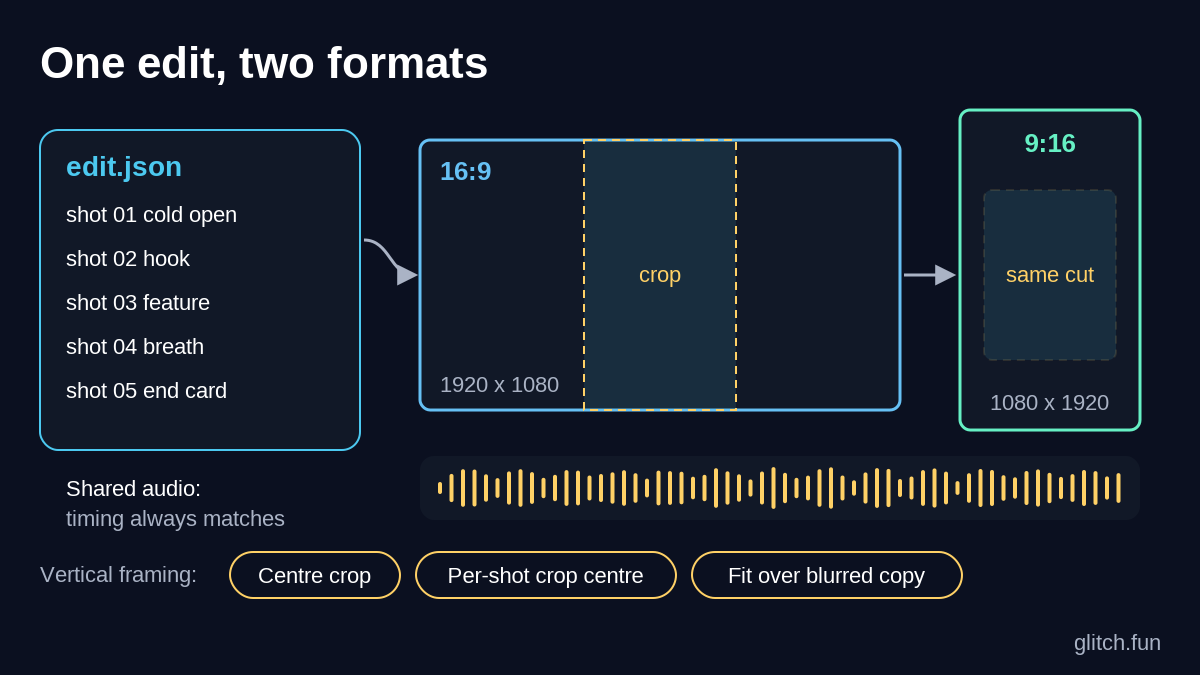
Same cut, same audio, two frames. Timing always matches.
Every shot renders at 1920x1080 and 1080x1920. Vertical framing uses a centre crop, a per-shot crop centre from one lookup table, or "fit": the full frame over a blurred copy of itself. Trailers came in 120, 90 and 60 second versions with the same acts: cold open, inciting moment, feature sections, a breath where the music drops under one line, a climax montage of about one-second shots, and an end card with a call to action.
From marketing/studio/edit.json, render the {length}-second cut at 1920x1080 and 1080x1920 with shared audio, framing vertical shots from crops.json or fit over a blurred copy. Burn in subtitles (2 lines max, 42 characters per line, 20 characters per second max, 1.2 seconds minimum) and write an .srt. Run QA for resolution, loudness, true peak, black or frozen frames, flashes and repeated shots. Export H.264, AAC 256k, -14 LUFS for trailers, plus 1080x1350 and 1080x1920 stills.Use two-pass loudness normalization, because one pass overshoots. And always cap audio commands with a duration: an uncapped pad once wrote an 86 GB file in five minutes.
8. What It Actually Cost
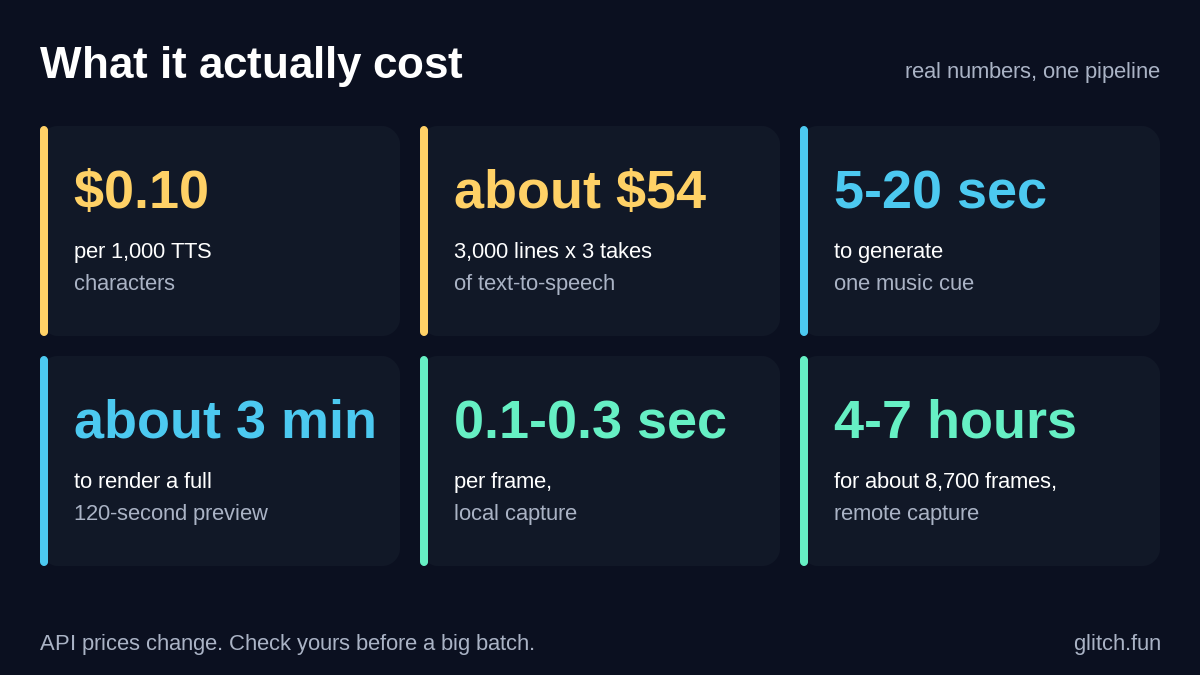
Real numbers from one pipeline. Your API prices may differ.
- Text-to-speech: about $0.10 per 1,000 characters. 3,000 lines of 60 characters with 3 takes is about $54.
- One 3.5-minute episode: about 5,400 TTS characters, 138 speech-to-text checks, about 3,000 sound-effect credits and 7 music cues.
- A music cue took 5 to 20 seconds; a 120-second preview render about 3 minutes.
- Capture: 0.1 to 0.3 seconds per frame locally. Remotely, about 8,700 frames took 4 to 7 hours, so run long jobs in the background.
9. Hand It to the Glitch MCP
One warning before you post. There is a loud minority that hates anything touched by AI and a silent majority that doesn't care as long as the game is fun. Post your other content first, block the haters, then post your best piece.
The handoff works like Social Media Marketing With an MCP. Trailers and capsule drafts go to the review flow in Steam Marketing With an MCP.
Set up the Glitch social asset folders if they do not exist, copy this week's approved exports from marketing/studio/exports/ into them, and scan them. Show me the best candidates with a one-line reason each and wait for my picks. Upload the ones I approve to my Glitch scheduler, generate post copy and hashtags for each platform, and create the posts as drafts. Show me the drafts before scheduling anything.
Pull Glitch creative performance and shortlink reports for the last 30 days. Compare 16:9 and 9:16 versions of the same cut, trailer lengths, and AI stills versus in-engine clips. Tell me what drove the most engagement and link clicks, and add three requests for next week to marketing/studio/plan.md.
10. The Weekly Content Loop
Start the Glitch social asset watch once and Glitch rescans your folders every day on its own, lining up candidates but never uploading. Then put the AI side on a schedule. In Claude Code, /loop repeats a prompt in your open session:
/loop 7d Read marketing/studio/plan.md and last week's Glitch creative performance. Render three new cuts in 9:16 and 16:9 from moments we have not used yet, run QA, and copy the ones that pass into the Glitch asset folders. List them for my review. Do not upload or post anything.
For runs while your laptop is closed, use cron with headless Claude Code or a Claude Code cloud scheduled task. Claude Duet can reach Glitch through the hosted connector at https://api.glitch.fun/mcp.
0 9 * * MON cd ~/my-game && claude -p "Scan the Glitch social asset folders, upload the candidates I approved last week, and fill next week's Glitch schedule with draft posts for my review. Summarize what is waiting for me in marketing/weekly-notes.md."
Glitch Tools Used
- glitch_setup_social_asset_folders, glitch_scan_local_social_assets, glitch_upload_social_asset_candidates
- glitch_start_social_asset_watch
- glitch_upload_file
- glitch_social_operation: schedulers.generate_content, schedulers.generate_hashtags, posts.create, posts.reschedule, posts.creative_performance, posts.shortlink_reports
Wrap Up
You do not need a studio. You need a script, a folder of small data files and the patience for a few revisions. This week:
- Run the one-prompt cinematic scene on a short script.
- For anything longer, run the studio setup and timing check prompts.
- Review the contact sheet before full renders.
- Export 16:9 and 9:16, run QA, and hand them to Glitch as drafts.
- Turn on the weekly content loop.
Then put those clips in front of creators who stream games like yours in Influencer Marketing With an MCP.