
On this page
- 1. Find Active Creators Who Stream Games Like Yours
- 2. Create the Campaign and Assign the Lookalikes
- 3. Write an Invite That Is Easy to Say Yes To
- 4. Pick a Sender, Test It, Turn On Auto-Invites
- 5. Answer Replies Fast: The Daily Loop
- 6. Known Issues Worth Knowing Before You Start
- 7. Signups, Onboarding and Tracking Links
- 8. Automate It in Phases
- Glitch Tools Used
- Wrap Up
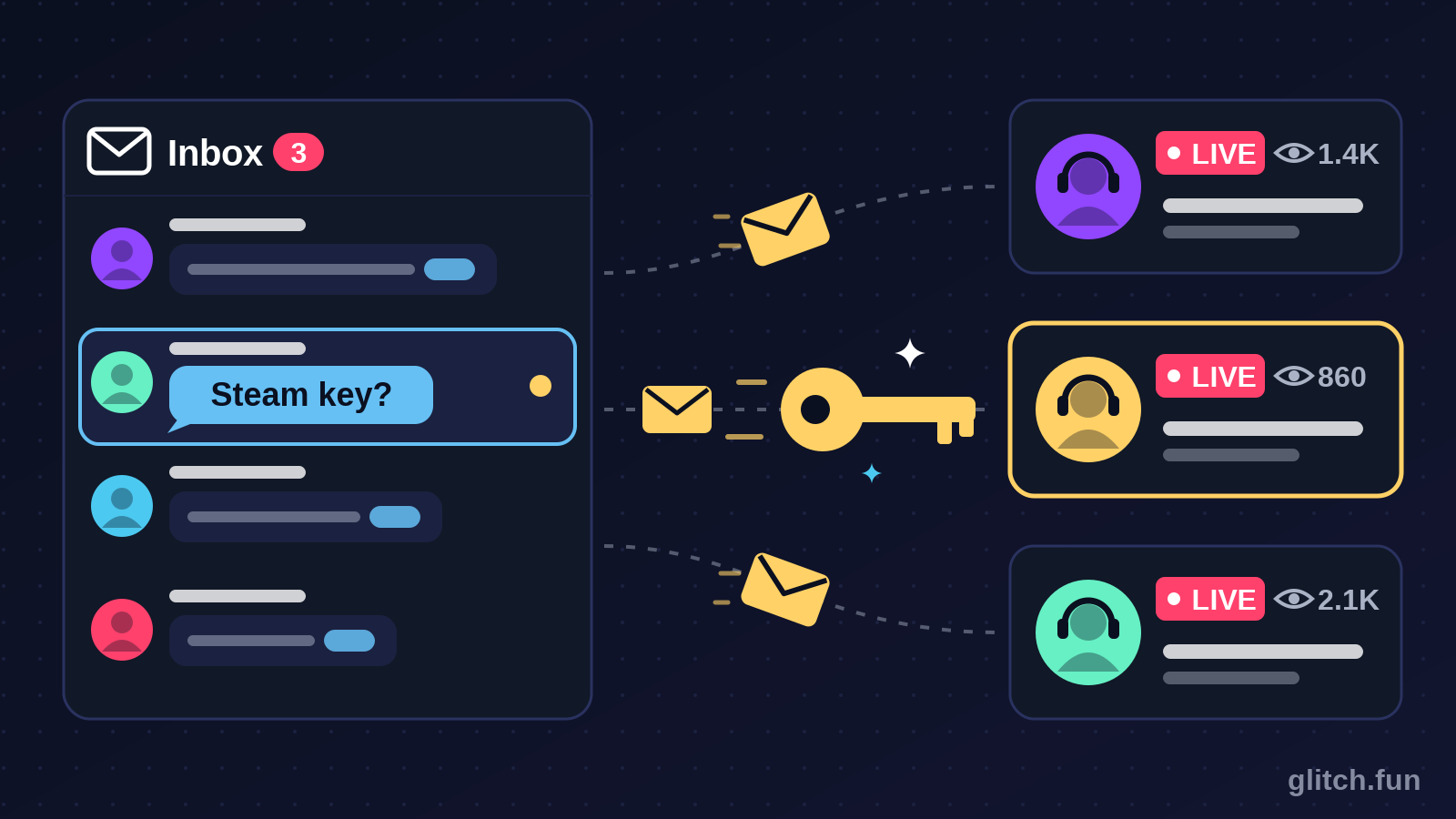
You spent a weekend finding streamers, copied 20 email addresses into a spreadsheet, wrote a careful pitch and sent it. Two people replied. One asked for $500. The other asked for a key, and you never heard from them again. Three weeks later you have no idea who you already followed up with.
Here is what the same job can look like through the Glitch MCP. For example, one launch emailed about 8,000 creators. About 100 replied and got a free Steam key. 47 redeemed it. 3 made content in the first weeks (the top video reached about 20k views) and 2 more were scheduled. The work was about 20 minutes of prompting, then a week to a month of waiting.
Look at those numbers again: 8,000 emails for 3 videos. Creators are a numbers game. You email a lot, send a bunch of keys, and a few produce outsized returns. That only works if a machine does the volume and the follow-ups. In this lesson, we are going to cover:
- Finding active creators through lookalike games and live Twitch data
- Creating the campaign and assigning lookalikes so Glitch sources creators
- Writing an invite that makes replying trivially easy, plus follow-ups
- Choosing an email sender, sending a test and turning on auto-invites
- The daily reply loop, the triage rules and the mistakes to avoid
- Website signups, onboarding and tracking links
- Automating it in phases, and what stays human
If the Glitch MCP is not connected yet, start with Marketing With an MCP: The Prompts That Do the Work.
1. Find Active Creators Who Stream Games Like Yours
The best creators for your game are the ones playing games like it right now. Not the biggest names, and not a "top streamers" list from two years ago. Active means streaming this week, not months ago. Glitch looks up games similar to yours and checks Twitch, which refreshes about every 30 minutes.
Use Glitch MCP to find 30 games similar to mine, then check which of them were streamed on Twitch in the last 7 days. Rank them by live streams and viewers, and tell me which 15 to target and why.
A campaign can hold up to 25 lookalike games; the example launch above used 25, all verified as streamed on Twitch. How to pick and balance that list is covered in Twitch Research With an MCP.
2. Create the Campaign and Assign the Lookalikes
A campaign holds the deliverable, the compensation, your emails, your sender and the creators Glitch finds. Keep the ask small. Compensation can be a free key, a flat fee, a commission per install or sale through the creator's tracking link, or a mix. With no budget, a free key plus commission is honest, and the creator earns more when their video does well. Set the actual commission rate in the campaign before you launch. Creators will ask, and your AI should never quote a rate that is not configured.
Create a Glitch influencer campaign for my game. Deliverables: one stream or video with a link to the game. Compensation: a free Steam key plus commission. Keep it as a draft and show me the settings. After I approve the draft, set the campaign live.
Then hand Glitch the games. Assigning lookalikes is what makes Glitch source creators who stream them. If auto-invites or automated sourcing are already on, saving games can lead to invitations, so your AI has to confirm that outreach impact before saving.
Assign the 15 lookalike games we chose to my new Glitch campaign so it sources creators who stream them. Confirm the assignment and tell me how many creators it starts finding.
3. Write an Invite That Is Easy to Say Yes To
The invite that works best is short and removes every step between "sounds cool" and having the game. Use this structure:
- A one-line personal intro from the developer.
- The offer: a free Steam key.
- What the game is, in three bullets.
- "Just reply 'Steam' and I'll send your key. You don't need to sign up or fill out a form."
- That they can also play in the browser on Glitch.
- "There's no obligation to stream or post." If they do cover it, they can earn commission with their own link.
Making the reply one word long is the whole trick. Most creators are not going to fill out your form.
Then follow up. In How To Email Influencers To Promote Your Game we found the first email had the lowest reply rate, while the second and third drove the most replies. Glitch sends up to 5 emails per creator, about two days apart, as replies in the same thread, and stops when they answer.
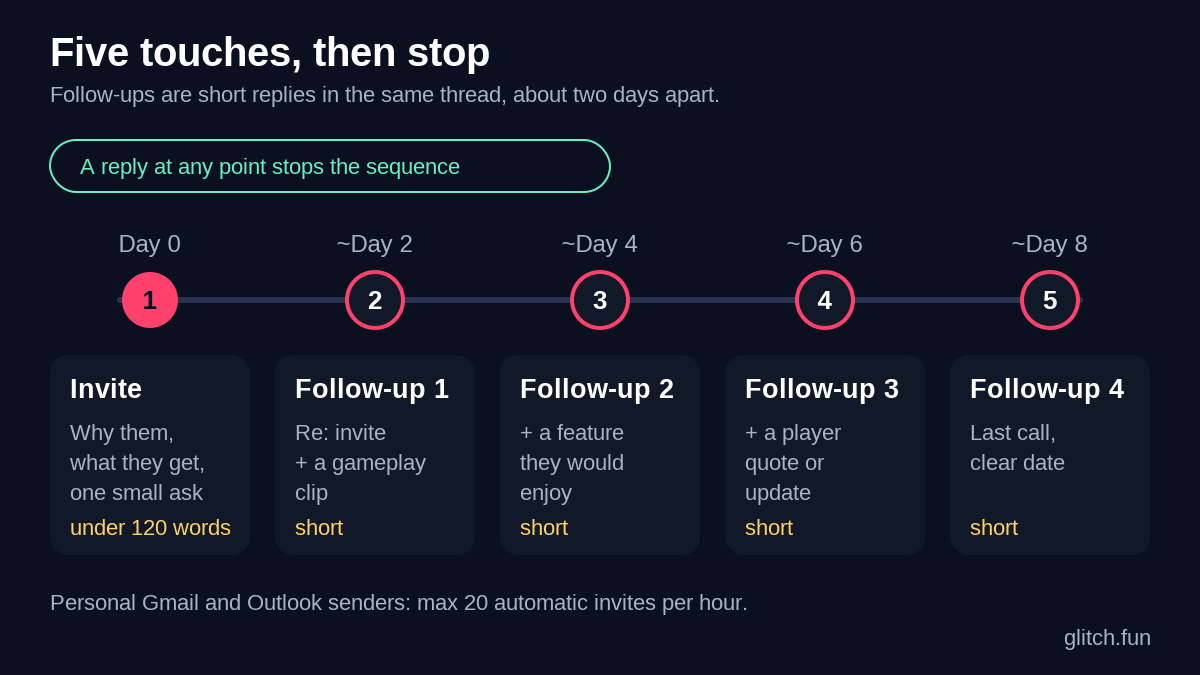
Five touches, about two days apart. A reply at any point stops the sequence.
List the placeholders for my Glitch campaign, then write an invitation plus 4 follow-ups. The invite follows this structure: one-line intro from me, a free Steam key, the game in three bullets, "Just reply 'Steam' and I'll send your key. You don't need to sign up or fill out a form.", that it is playable in the browser on Glitch, no obligation to post, and commission with their own link. Each follow-up is under 80 words, references the last email and adds one new reason to play. Use placeholders for the creator's name and links. Validate them with Glitch, open every link to check it works, and save and assign them once I approve.
4. Pick a Sender, Test It, Turn On Auto-Invites
Glitch can send from Glitch (the default), your own Gmail or Outlook, any SMTP server, or Mailgun, SendGrid, Postmark or Azure. Opens, clicks and replies are tracked for all of them. Auto-invites go out at up to 500 per hour by default; personal Gmail and Outlook are capped at 20 per hour. Sending from a warmed-up domain matters at 8,000 emails, and bounces are the first sign your domain setup is wrong.
Show me which email sender my Glitch campaign uses, whether it is ready and what is missing for {my sender choice}. Walk me through the setup, then send one test email to me. Once I confirm it looks right, turn on auto-invites with 5 emails per creator and tell me how many invitations can go out per hour.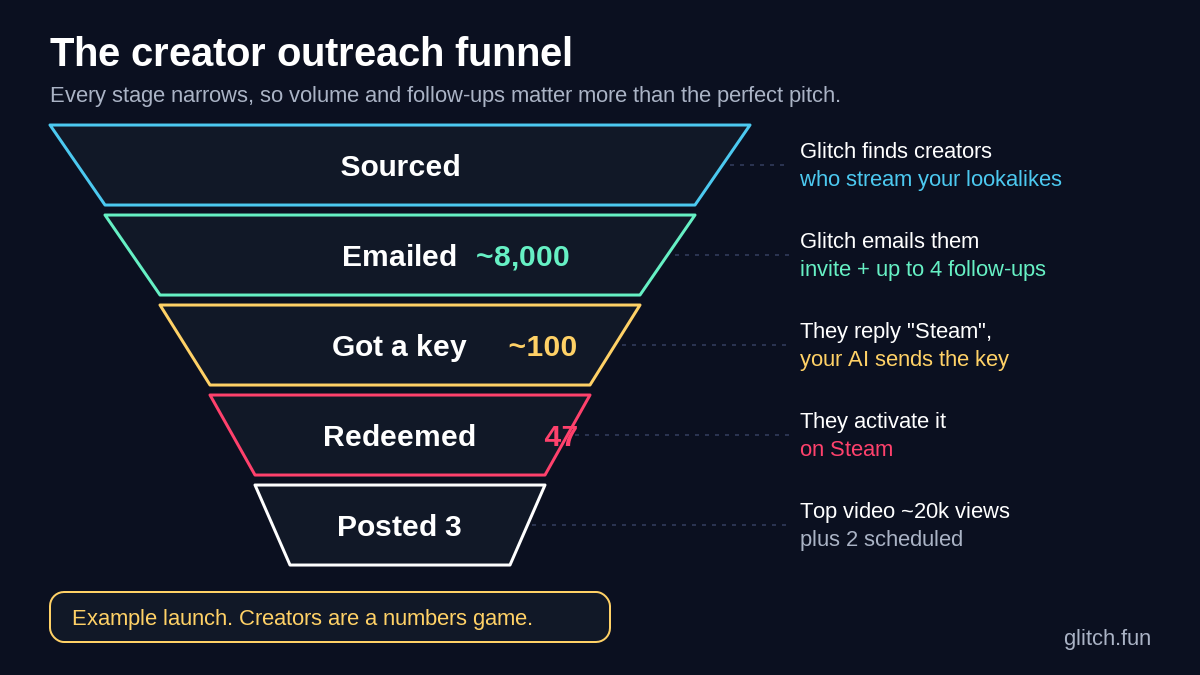
Example numbers from one launch. Every stage narrows, so volume matters more than the perfect pitch.
5. Answer Replies Fast: The Daily Loop
A creator who replies "Steam" on Tuesday and hears back on Friday has moved on. Run this loop every day. Steps 3, 6 and 7 are the ones that prevent mistakes.
- Pull new replies with replies.list (it returns the latest 100), and also search your inbox, because some replies only show up there.
- Pull pending website applicants with influencers.list. Skip your own test account.
- Find the creator's real email address. Glitch forwards replies to you, so a plain "reply" from your inbox can go back to Glitch instead of the creator. Use the sender address from replies.list, the Reply-To header or invitations.list, and always set the To address explicitly.
- Read and triage each reply. Open the full text when the preview cuts off or asks a question.
- De-duplicate. One creator may reply twice or in two threads. Answer the latest, once.
- Check the person. Search your Sent mail. If they already got a key, do not send another.
- Check each key. Take the next unused key and search for that one key on its own. Never batch keys into one OR search; that search is unreliable.
- Send in the existing thread, one key per person, using your template.
- Approve applicants with influencers.accept, which emails them, creates their tracking links and sends onboarding if it is on.
- Verify and report. If a send errors, check Sent before retrying. Report keys sent, keys left, declines and anything that needs you.
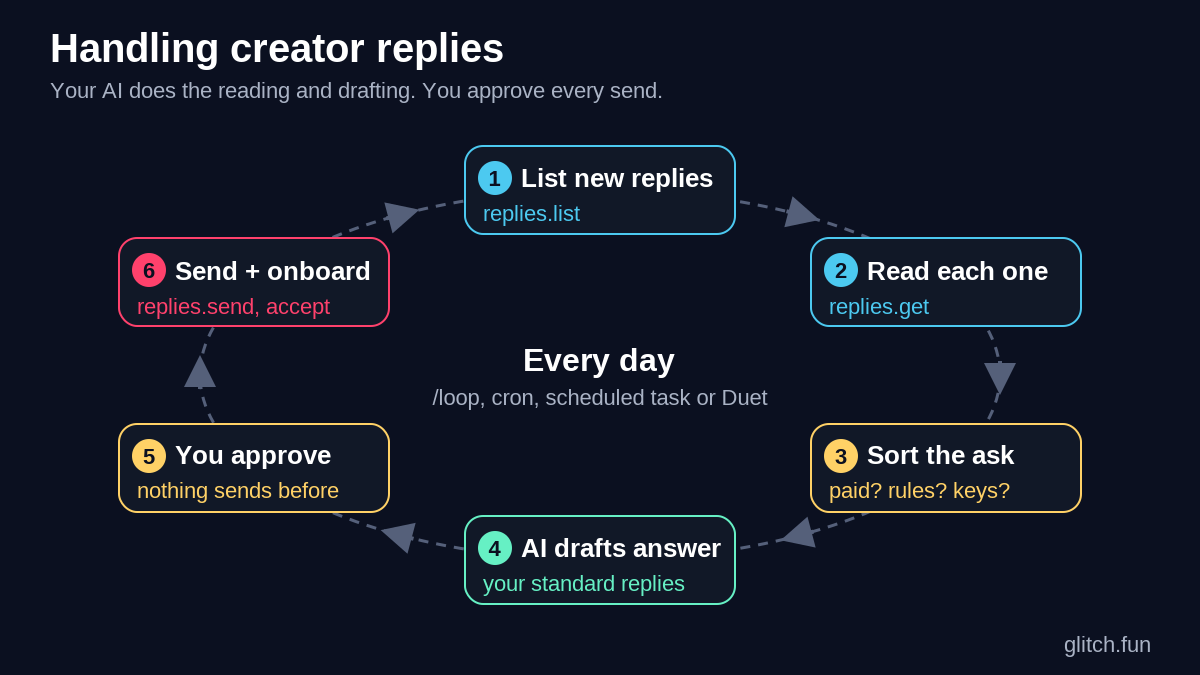
The reply loop. Approval is the only step that needs you.
The reply template: one opening line that answers their question, thanks, the key (as plain text if they ask), your guides link with one gameplay tip, and "Want to earn commission? Join the campaign (free) and get your own referral links." Creators already in the campaign get their referral links instead. Write in the creator's language, use linked text instead of raw URLs, and always reply in the existing thread.
Read the latest replies on my influencer campaign, both through the Glitch MCP and my email. Group them into interested, asking for payment, and not interested. Draft a short, friendly answer for each interested creator and send the Steam keys to the ones who are interested.
Reading "my email" needs your AI connected to your inbox as well as Glitch. If you want to approve before anything goes out, add "show me the drafts first."
The triage rules
- Clear yes ("Steam", "I'd love to try it"): send a key.
- Yes plus a simple question: send the key and answer in the opening line.
- A manager asks if posting is required: free access, no required posts. Send once they confirm.
- Asks about budget or paid sponsorship: no paid deals, commission only. Escalate anything with a price.
- Names a price or conditions: escalate to the developer. Do not reply.
- Asks whether AI was used to make the game: escalate to the developer.
- Unclear: escalate.
- "I'll look on Steam myself": no reply needed.
- Declines, wrong person, or "stop": never email again.
- Bounce or auto-reply: ignore and log.
Expect about 1 in 5 replies to need a human decision. Give your AI one prompt per common question so answers stay consistent:
Draft replies for creators asking if this is paid. Be honest: no flat fee, a free key plus the commission rate configured in my Glitch campaign through their own link. Thank them and say we understand if they only take paid work. Under 70 words. Escalate to me anyone who names a price.
Draft replies for creators asking about conditions: free access, no required posts, and if they cover it, include their link. For creators asking for extra keys for friends or a giveaway, apply my policy: {your policy, e.g. up to 3 giveaway keys after their content is live}. Show me every draft before sending.6. Known Issues Worth Knowing Before You Start
- Follow-ups go stale. A sequence that says "launching next week" keeps sending after launch. Review it on launch day.
- Stop follow-ups when someone declines. Then add them to your do-not-email list.
- Check every link in your templates. A single broken link in a template goes out to every creator.
- Set a commission rate before creators ask.
- Watch bounces. A rising bounce rate usually means your sender domain needs fixing.
- replies.list returns only the latest 100. Read your inbox too.
- Keep helper scripts in your repo, not a temp folder that disappears.
One more thing to be honest about: free creators cannot be controlled. You are not paying for a contract, so you do not get to approve the video. Some creators cover a game to roast it. Most games get no coverage at all, and even a critical video can bring players who leave positive reviews. Take the coverage, learn from it and fix what they found.
7. Signups, Onboarding and Tracking Links
Creators can also join your campaign from the Glitch website, separately from email. Accepting them emails their acceptance, creates their personal tracking links and sends your onboarding email if auto-onboarding is on. Clicks and installs through tracking links show up in real time.
List pending website signups for my Glitch campaign with their socials and follower counts, and recommend who to accept. Make sure the campaign has an onboarding email with auto-send on. Then use the campaign's tracking links and my attribution reports to show clicks and installs per accepted creator for the last 30 days, and flag anyone who has not posted yet.
8. Automate It in Phases
Glitch already runs sourcing, auto-invites and follow-up emails on its own servers. What is left is keeping the lookalike list fresh and answering replies. These are the two loop prompts to run:
Use the Glitch MCP to find the most-played games on Twitch in the past week that are similar to my game. Update the influencer campaign to source creators from the most-played games.
Respond to the influencers who have shown interest in playing my game for free. Use the keys in '/path/to/keys' and make sure duplicate keys are not being sent. If there are any questions, alert me so I can respond.
And just like that, 90% of your influencer campaign management is done. Run the daily one with /loop in an open Claude Code session, headless with cron (for example 0 9 * * * cd ~/my-game && claude -p "{daily prompt}"), or as a Claude Code cloud scheduled task. Even better, connect Glitch to Claude Duet with the hosted connector at https://api.glitch.fun/mcp (sign in with Glitch; setup steps are on glitch.fun/mcp). Duet checks your connected apps every few hours, sends a morning brief and asks before sending anything.
Roll it out in phases
- Draft mode: the AI fetches, triages, runs the checks and drafts every reply. You send.
- Auto-send clear yeses: after a week of draft mode with no triage mistakes, let it send keys to clear yeses. You handle escalations only.
- Inside Glitch: the direction we are building toward, where Glitch answers "Steam" from a key pool itself and stops follow-ups on any decline.
Two files make this safe. A key ledger (key, recipient, email, thread, date) is the source of truth and makes double-sends impossible. A do-not-email list is checked before every send. Keep both in your repo with the helper script, and have the daily run send a summary to your phone.
What stays human in every phase: pricing and paid deals, questions about how the game was made (including AI use), and loading new keys.
Glitch Tools Used
- glitch_research_campaign_lookalike_games: settings, search, similar, active-lookalikes, live-streams, verify-games
- glitch_assign_campaign_lookalike_games
- glitch_influencer_campaign_operation: create, get, update, placeholders.list, templates.validate, templates.create, template.assign, onboarding.assign, email_sender.get, email_sender.test, invitations.list, replies.list, replies.get, replies.send, influencers.list, influencers.accept, influencers.send_onboarding, links.list
- glitch_get_attribution_reports
Wrap Up
There is no excuse for a game to have zero creators anymore. The process takes minutes. The waiting takes weeks. Do this:
- Run the four prompts: research, create, assign, triage.
- Write a one-word-reply invite and four follow-ups, and check every link.
- Test your sender, then turn on auto-invites.
- Start a key ledger and a do-not-email list.
- Run the daily loop in draft mode for a week before letting it send.
Everything above depends on the lookalike list. Learn how to build and refresh it in Twitch Research With an MCP.