
On this page
- 1. Check the Page Before You Pay for Traffic
- 2. Connect Your Ad Accounts Through a Scheduler
- 3. Draft the Campaign, Never Launch It
- 4. First Get 100 Clicks and Limit Your Variables
- 5. Read Results and Kill Losers
- 6. Judge Ads on Players, Not Clicks
- 7. Budget Guardrails: The AI Drafts, You Approve Spend
- 8. Automate the Daily Check and the Weekly Refresh
- Glitch Tools Used
- Wrap Up
You put $200 into ads last month. You picked five countries, six creatives, both feed and sidebar placements, and two age ranges, because more options felt safer. Two weeks later the ad manager says you got 140 clicks and the Steam dashboard says you got 9 wishlists. You do not know which country, creative or placement those 9 came from, and you are not sure the ads did anything at all.
Ads are not magic and they are not a scam. They are math, and the math only works if you test one thing at a time, wait for enough data, and judge the result on players instead of clicks. That is tedious work in an ad manager. It is quick work for an AI that can draft the campaign, read the reports every morning and tell you what to pause.
In this lesson, we are going to cover how to run game ads from your AI chat with the Glitch MCP, without ever letting the AI spend money you did not approve:
- Connecting ad accounts through your Glitch scheduler
- Drafting campaigns, ad groups and creatives as drafts only
- Building creatives from your best clips and targeting from Twitch lookalikes and your analytics
- The "first get 100 clicks and limit your variables" rule, done by prompt
- Reading results and killing losers
- Tying ads to real installs and purchases with conversion APIs
- Budget guardrails: the AI drafts, a human approves spend
- A daily spend check and a weekly creative refresh you can schedule
1. Check the Page Before You Pay for Traffic
Ads send people somewhere. If that somewhere is a Steam page that turns 2% of visitors into wishlists, every dollar you spend is buying a lesson about your page, not wishlists. Before your first campaign, run the page review from Steam Marketing With an MCP and ask for an ad readiness score.
Give me my Glitch Steam ad readiness score and pull my wishlist and storefront reports for the last 30 days. Is my store page ready to convert paid traffic? List anything I must fix before I spend money on ads, and tell me honestly if I should wait.
Price matters too. In our lesson How To Market Your Game we show why games priced under $10 have very little room for paid acquisition. If the AI tells you to wait, waiting is the cheapest result an ad test can give you.
Know which audience you are buying
Different audiences pay for different things. For example, one game had 13k web players and 1.1k Steam demo players. Its web version earned $0 at launch, while Steam made $839 in its first 13 days. Web players are usually better monetized with microtransactions and ads. Steam players pay a premium price. So decide where an ad sends people before you write it, and judge it on that destination's money: wishlists and purchases for Steam, sessions and in-game revenue for the web.
Use my Glitch session, attribution and earnings reports plus my Steam wishlists and sales to compare my web and Steam players for the last 30 days: how many, how long they play and what each group earns. Recommend whether my first ad test should send people to the web version or to Steam, and which result to judge it on.
2. Connect Your Ad Accounts Through a Scheduler
In Glitch, ads run through the same social media scheduler you use for posts. If you followed Social Media Marketing With an MCP, you already have one. Connect each ad account (Reddit, Meta, TikTok, Google or X) once in the Glitch dashboard under that scheduler. Your AI never sees ad platform passwords or tokens, and the Glitch MCP does not accept them.
Use glitch_get_marketing_capabilities and my Glitch scheduler's ad accounts to show which ad platforms are connected for my game, which ad accounts are available on each, and anything missing before I can run ads. Do not create anything yet.
3. Draft the Campaign, Never Launch It
This is the most important rule in the lesson: your AI creates drafts, you approve spend. The Glitch MCP is built for this. Campaigns are created with glitch_marketing_operation using campaigns.create with draft_only, which saves the campaign in Glitch, paused, without pushing it to the ad platform. Ad groups (groups.create) and creatives (creatives.create) are added the same way. Every change also needs confirm=true, so your AI has to ask first.
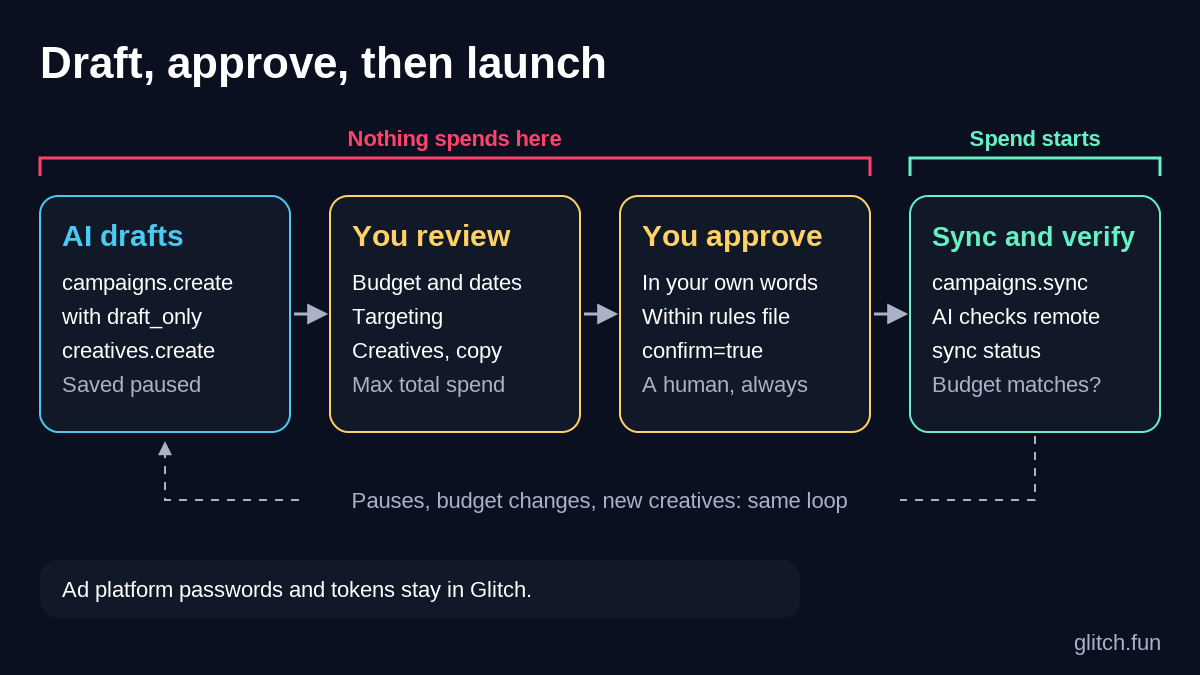
Nothing spends until a human says yes and the campaign is synced.
Creatives from your best clips
Do not make new ad creatives from scratch for a first test. Use what already worked organically. Glitch tracks how each of your social posts performed, so your AI can pick the clips people actually watched and clicked.
Use Glitch creative performance and shortlink reports for my social scheduler over the last 60 days. Pick the three clips or images with the best engagement and link clicks, explain why each one worked, and suggest a short headline and one line of ad copy for each. Do not create any ads yet.
If you do not have clips yet, Use Your AI to Create Images, Video and Audio for Your Game covers making them.
Targeting from Twitch and your own data
"Gamers aged 18 to 34" is not targeting. Two better sources: games your audience is watching right now, and where your current players already come from. The first comes from Twitch lookalikes (see Twitch Research With an MCP). The second comes from your Glitch analytics: which countries and devices bring players who keep playing.
Use Glitch to find the games similar to mine that were streamed on Twitch in the last 7 days, then pull my attribution, cross-device and session reports. Write a one-page targeting brief: the five interests or games to target, the one country to test first and why, and whether to test mobile or desktop. Save it to marketing/ads-targeting.md.
Using marketing/ads-targeting.md and the three creatives we picked, create a draft {platform} campaign in Glitch with glitch_marketing_operation: one campaign, one ad group, one country, the three creatives, and a ${daily_budget}/day budget for 7 days. Use draft_only so nothing goes to {platform}. Show me the full setup, the total maximum spend, and anything you were unsure about, and wait for my approval.Tip: Always say "draft_only" in your prompt, even though Glitch defaults to drafts. It costs nothing, and it makes the intent obvious to any AI reading the conversation later.
4. First Get 100 Clicks and Limit Your Variables
This rule comes from our lesson How to Debug Your Game Marketing Ad Campaigns, and it is the one most developers skip. Click-through rates can be as low as 0.2% and as high as 10%. At a 1% click-through rate, 1,000 impressions is 10 clicks. If a few of those wishlist, you have learned nothing yet.
Set a baseline of at least 100 clicks before you decide whether something works, and aim for closer to 1,000, which depending on the platform can cost around $100. Every variable you add (country, device, placement, creative) splits those clicks into smaller piles. For a small budget, test:
- 1 ad platform
- 1 country
- 2 to 3 creatives
- 1 to 2 placements
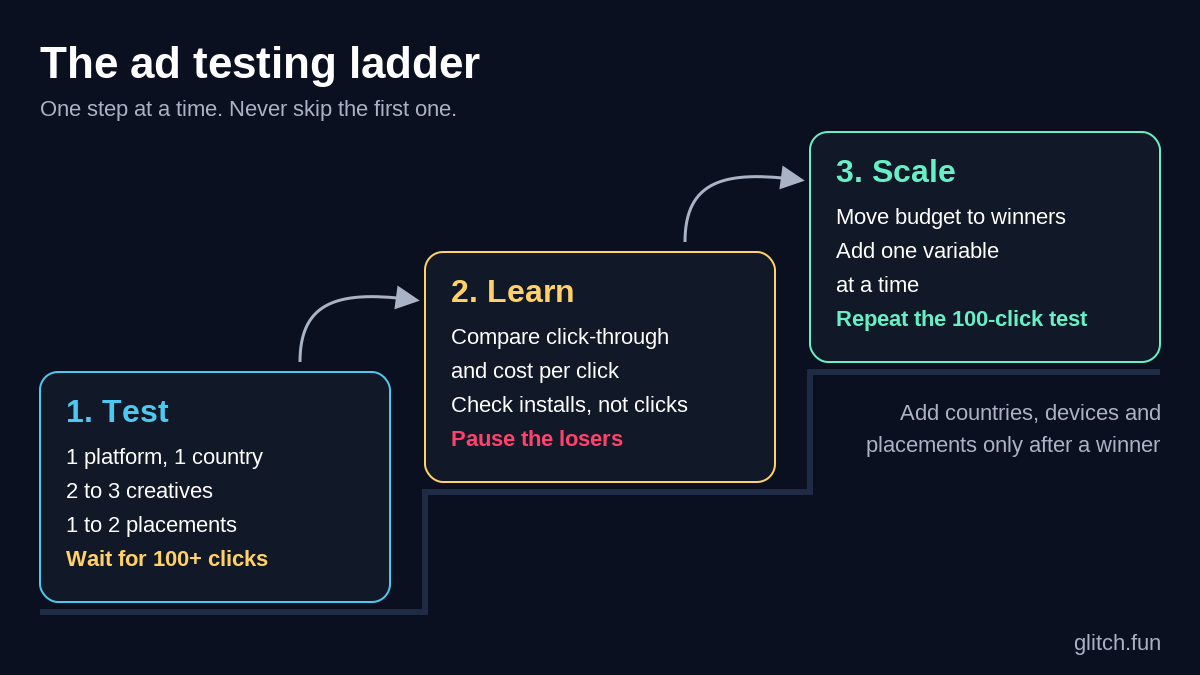
Climb one step at a time. Scaling a test that never reached 100 clicks is guessing with a bigger budget.
Look at my draft campaign in Glitch and check it against the rule "1 platform, 1 country, 2 to 3 creatives, 1 to 2 placements, at least 100 clicks before judging." Using the budget and a realistic cost per click range for {platform}, estimate how many days it will take to reach 100 clicks. If I have too many variables, tell me which to cut.5. Read Results and Kill Losers
Once you approve and sync a campaign, the reports become your daily job, or your AI's. Glitch reports cover spend and delivery, a performance summary, platform comparison, creative performance, time of day and a detailed breakdown, for any window up to 90 days. The debugging lesson gives three quick diagnoses:
- Paying over $5 for a single click: the targeting or the creative is wrong.
- Fewer than 100 clicks in a segment: give it more time before judging.
- Good click-through rate, bad conversion: the problem is the landing page or Steam page, not the ad.
I approve the draft {platform} campaign with a ${daily_budget}/day budget for 7 days. Sync it to {platform} through Glitch, then check the remote sync status and confirm it is live with that exact budget. If anything differs from the draft, stop and tell me.Pull my Glitch ad reports for the last 7 days: summary, spend and delivery, and creative performance. For each creative show impressions, clicks, click-through rate, cost per click and spend. Mark anything under 100 clicks as "too early." Recommend what to pause, keep and scale, with one sentence of reasoning each. Do not change anything without my approval.
Killing losers is the part people put off. A creative with 100 clicks that costs twice as much per click as the others will not turn around. Pause it and move the money; your AI makes the change with campaigns.update once you say yes.
6. Judge Ads on Players, Not Clicks
Clicks are cheap. Players are not. Ad platforms optimize for whatever you tell them counts, so if you only feed them clicks, they will find you people who like clicking. Conversion APIs send real events (installs, wishlists, purchases) back to the platform server to server, and the platform learns to find more people like your real players. Glitch forwards conversions to Meta, Google, TikTok, Reddit and X with cross-device attribution. One game in our existing lessons got its cost per conversion down to $0.36 this way.
Platforms usually need a minimum number of conversions before their optimization kicks in (for Meta and Google, often around 50), so set this up before your test, not after. The full setup is in Conversion APIs With an MCP.
Combine my Glitch attribution and cross-device reports with my ad creative performance for the last 14 days. For each campaign and creative, show cost per install and cost per purchase where we have them, not just cost per click. Tell me where to move budget, and do not change anything without my approval.
7. Budget Guardrails: The AI Drafts, You Approve Spend
An AI that can spend money needs rules written down, not remembered. Put them in a file in your project so every prompt, loop and scheduled run reads the same limits.
Create marketing/ads-rules.md with my advertising rules and read it before every ad task from now on: maximum daily budget per campaign ${max_daily}, maximum total monthly spend ${max_monthly}, every new campaign starts as draft_only, never sync, raise a budget or launch a new creative without my written approval in this chat, pause requests must show me the campaign name and current spend first, and always report the remote sync status rather than assuming something is live.The Glitch MCP already enforces part of this: ad changes require confirm=true, drafts stay in Glitch until synced, and ad platform credentials stay in Glitch. If a teammate only needs to read results, give them a read-only token.
8. Automate the Daily Check and the Weekly Refresh
Two loops do most of the work: a daily spend and results check, and a weekly creative refresh. Both report and draft. Neither spends.
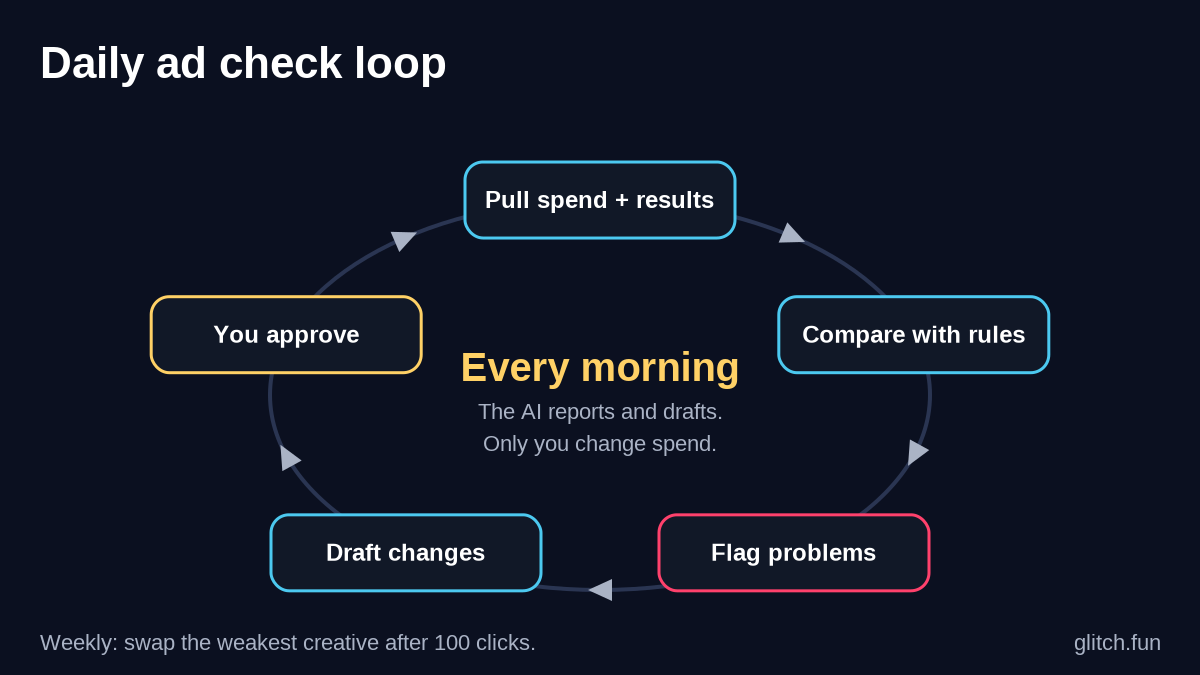
The loop runs every morning; the only step that changes money is yours.
In an open Claude Code session, /loop repeats a prompt on an interval:
/loop 24h Read marketing/ads-rules.md, then pull yesterday's Glitch ad spend, delivery and creative performance. Flag any campaign over its daily cap, any creative costing over $5 per click after 100 clicks, and any campaign that is not delivering. Add a five-line summary to marketing/ads-daily.md and draft, but do not make, any pause or budget changes.
To run it when your laptop is closed, use cron with headless Claude Code or a Claude Code cloud scheduled task. This one refreshes creatives every Monday:
0 9 * * MON cd ~/my-game && claude -p "Read marketing/ads-rules.md. Pull last week's Glitch ad creative performance and my social creative performance. Name the weakest ad creative that has at least 100 clicks, pick the best-performing social clip not yet used in ads, and create it as a draft_only creative for my review. Write the reasoning to marketing/ads-weekly.md. Do not sync anything."
If you use Claude Duet, add the Glitch connector at https://api.glitch.fun/mcp (claude.ai, Settings, Connectors, Add custom connector). Duet checks connected apps every few hours and asks before it sends or posts anything; your ad rules file still decides what it may propose.
Tip: Read the daily summary, not the ad manager. If the five lines look normal, you are done in a minute. If they do not, open the drafted changes and approve or reject them.
Glitch Tools Used
- glitch_get_marketing_capabilities
- glitch_marketing_operation: campaigns.create (draft_only), groups.create, creatives.create, campaigns.update, campaigns.sync, reports.summary, reports.spend_delivery, reports.platform_comparison, reports.creative_performance
- glitch_social_operation: schedulers.ad_accounts, posts.creative_performance, posts.shortlink_reports
- glitch_research_campaign_lookalike_games (active-lookalikes)
- glitch_get_attribution_reports, glitch_get_cross_device_reports, glitch_get_session_reports, glitch_get_earnings_reports
- glitch_get_steam_financials
- glitch_get_wishlist_reports, glitch_get_storefront_reports
Wrap Up
Ads reward patience and punish guessing. The AI makes the patient part cheap: it drafts, counts clicks, reads reports and suggests cuts every morning. You keep the only job that matters, which is saying yes to spend. Here is what to do next:
- Run the ad readiness prompt. If it says wait, fix the page first.
- Write marketing/ads-rules.md with your caps.
- Pick three creatives from your best social clips and write the targeting brief.
- Draft one campaign: one platform, one country, three creatives, draft_only.
- Approve it, then let the daily loop watch it until it reaches 100 clicks.
Then teach the ad platforms who your real players are in Conversion APIs With an MCP.