
On this page
- Why Launching Too Early Hurts
- 1. Read Your Page as a Funnel First
- 2. Run a Glitch Agent Review of Your Steam Page
- 3. Test New Art Before Steam Sees It
- 4. Compare Against Games Launching Near You
- 5. Get a Launch Readiness Report
- 6. Read Your Steam Sales and Wishlists
- 7. Plan NextFest and Post-Launch Sales
- 8. Put It on a Schedule
- Glitch Tools Used
- Wrap Up
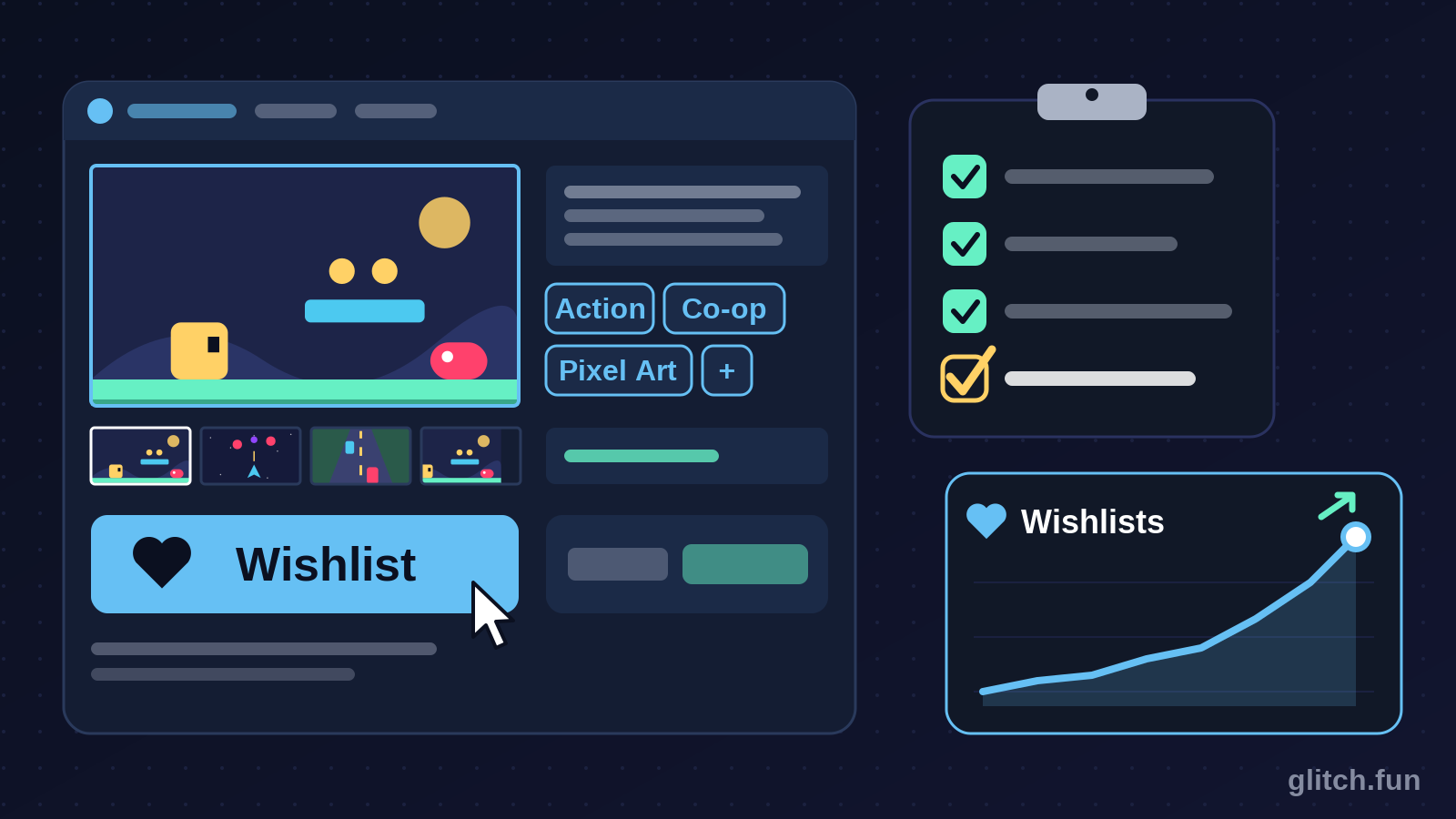
Your Steam page has been live for four months and it has 300 wishlists. You changed the capsule twice because someone on Discord said it looked "muddy," you rewrote the short description at 1 a.m., and you still have no idea whether any of it helped. Meanwhile your game is almost done, because AI development can outpace marketing, and launch is coming whether the page is ready or not.
Social posts, creators, ads and press all send people to your Steam page. If the page does not turn visitors into wishlists, every other channel is pouring water into a bucket with a hole in it. The good news: reviewing a Steam page is exactly the kind of work an AI is good at, as long as it can see your page, your competitors and your real numbers.
In this lesson, we are going to cover how to run your Steam marketing from your AI chat with the Glitch MCP:
- How to read your page as a funnel, so you know which part to fix first
- Running a Glitch Agent review of your capsule, descriptions, tags, trailer, screenshots and call to action
- Testing new capsule art and screenshots before Steam shoppers ever see them
- Comparing your page against similar games launching near you
- Getting a launch readiness report
- Reading your Steam sales and wishlists in plain language
- Planning NextFest and post-launch sales with prompts
- Putting the weekly wishlist check and the monthly page review on a schedule
If you have not connected the Glitch MCP yet, start with Marketing With an MCP: The Prompts That Do the Work. It takes about five minutes.
Why Launching Too Early Hurts
For example, one game that spent 3 months in development and 1 month on Steam before launch collected about 1.5k wishlists and made about $500 in its first 48 hours. Another 3 months of marketing could plausibly have taken it to 10k to 50k wishlists. Most games spend 7 to 14 months collecting wishlists.
After launch, that same game made $839 on Steam in 13 days at $14.99 while wishlists kept growing by 20 to 50 a day. Many of those people were likely waiting for a discount. That is normal: it is common for PC games to do $60k in revenue during a single sales event. Launch day is one beat, not the finish line. Give the page time to collect wishlists, then plan the sales.
1. Read Your Page as a Funnel First
Before you change a single pixel, find out where the page is leaking. A Steam page is a funnel with four steps: people see your capsule (impressions), some click through (visits), some of those wishlist, and later some of those buy.
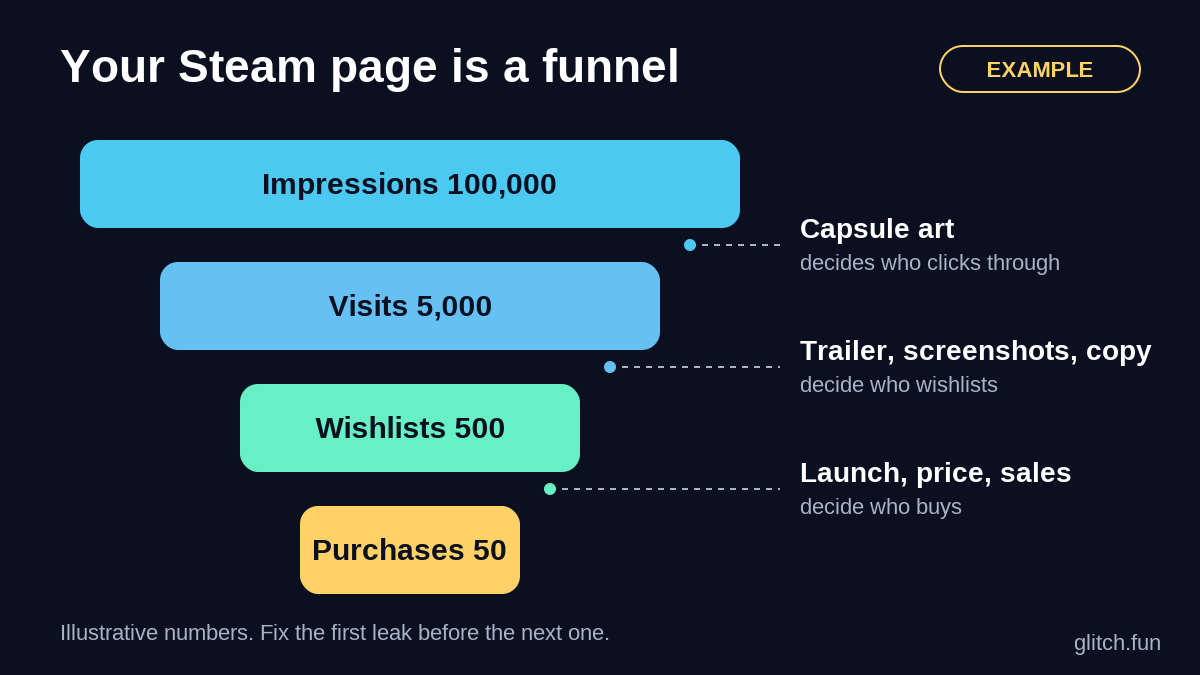
Example values only. Your capsule decides the first drop; the rest of the page decides the second.
In our lesson How To Analyze and Optimize Your Steam Page we use two simple checks:
- Impression click-through rate: above 5% is generally healthy. If it is low, your capsule is not standing out in search results and lists.
- Visits to wishlists: wishlists divided by unique visits. Above 5% is healthy, around 15% is top tier. If it is low, the trailer, screenshots or description are not closing the deal.
If both are low, fix the capsule first, because nobody sees the trailer if nobody clicks. Your AI can do this math every week once your numbers are connected (section 6).
2. Run a Glitch Agent Review of Your Steam Page
Glitch Agent runs longer research jobs and writes a report. Your AI starts one with glitch_start_agent_run, waits with glitch_wait_for_agent_run and reads it with glitch_get_final_report. You just ask.
The review looks at the page the way a shopper meets it. It covers seven parts of the page, and Glitch's localization and platform reports cover the eighth:
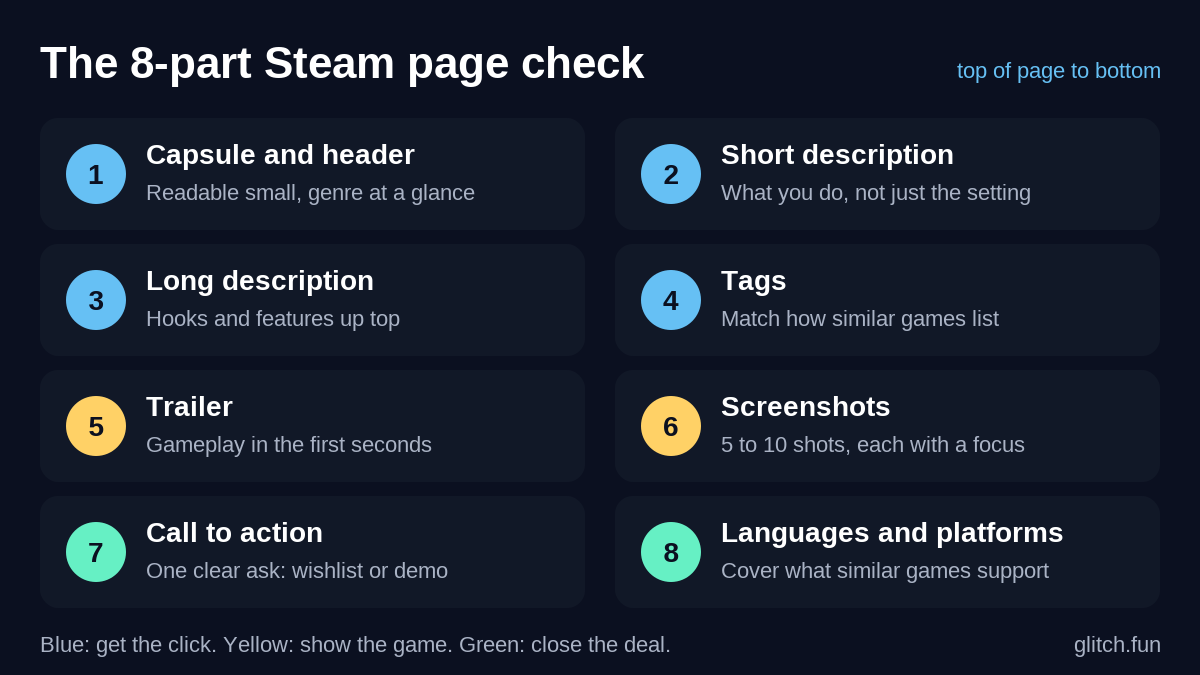
The eight parts of a Steam page worth reviewing, in the order a shopper meets them.
Before you run it, make sure your game in Glitch has its Steam page linked, and that the page is public or reachable by link. Agent runs use your Glitch agent plan or credits.
Run a Glitch Agent review of my Steam page. Check the capsule and header, short description, long description, tags, trailer, screenshots, call to action, and supported languages and platforms. Rank the problems by how much they likely hurt wishlists, give a concrete fix for each, and tell me which three fixes to make this week.
If you use Claude Code, Codex or Cursor, you can also type /glitch_steam_page_review and the AI runs the same flow.
Common findings: a logo that disappears at small sizes, a short description that explains the setting but not what you do, a trailer that opens on a studio logo, and screenshots of empty rooms. None need a big budget to fix.
Use Glitch Steam reports to give me my store page health score, completeness score and conversion score. Compare my screenshots, trailers and capsule sizes with Steam store asset standards, list what is missing, and save the scores to marketing/steam-scores.md so we can compare next month.
3. Test New Art Before Steam Sees It
Every capsule swap on a live page is an experiment real shoppers see. Run it in private first. Keep drafts in a folder like marketing/steam/, upload them with glitch_upload_file, and ask Glitch Agent to compare them with what is live.
Upload marketing/steam/{capsule_file} to Glitch and ask Glitch Agent to compare it with my current Steam capsule. Is the logo readable at the small capsule size used in search results? Does it signal my genre within a glance? Is anything important sitting under where Steam puts price and wishlist overlays? Tell me which one to use and what to change.Upload every image in marketing/steam/screenshots/ to Glitch and have Glitch Agent review them as a set. Pick the strongest 5 to 10, put them in the order a shopper should see them, and tell me which ones are empty, repetitive or hard to read. Explain each choice in one line.
Our capsule lesson, How to Create High-Converting Steam Capsule Artwork for Your Game, covers what good capsule art looks like. The AI review does not replace an artist; it tells you quickly whether the new version is better.
4. Compare Against Games Launching Near You
A shopper sees your page next to every other game in the same tag, in the same week. Glitch tracks store pages, reviews, prices, players, followers, release dates, demos and languages for games on Steam, so your AI can build a competitive set and show you where you blend in.
To see roughly how many wishlists and sales similar games have, look them up on Gamalytic. Compare yourself with games players buy, not games other developers like. Developers do not buy other developers' games.
A lookalike list from Twitch Research With an MCP makes a good competitive set.
Use Glitch to compare my Steam page with the five most similar games launching within six weeks of {launch_date}. Compare price, release timing, tags, capsule message, short description and trailer opening. Show me where my page looks the same as everyone else and give me two ways to stand out.Run the Glitch genre and category check on my game and tell me which tags help discoverability and which hurt it. Then score my launch window: show release calendar density for the eight weeks around {launch_date} and how saturated my genre is, and suggest the best two weeks to launch.5. Get a Launch Readiness Report
About a month before launch, you want one document listing what is still broken. Glitch Agent pulls together the store page, trailer, screenshots, tags, demo and wishlist risks into a launch readiness report, plus an ad readiness score if you plan to pay for traffic.
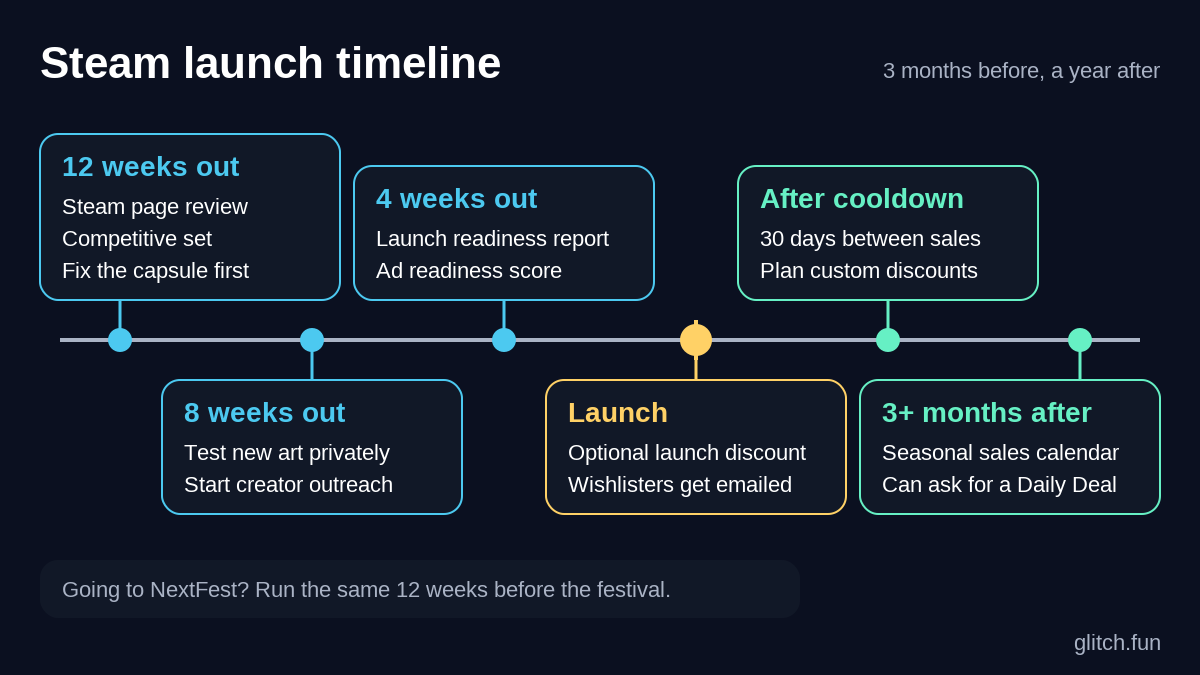
A three-month runway before launch, then Steam's own sales do the heavy lifting after it.
Create a Steam launch readiness report for my game with Glitch Agent: store page, trailer, screenshots, tags, demo, languages and wishlist risks. End with a checklist ordered by what to do first, with a rough time estimate for each item, and save it to marketing/launch-readiness.md.
In Claude Code, Codex or Cursor, /glitch_launch_audit runs a wider audit that also covers social, creators, community and paid media. Planning ads? Ask for the ad readiness score too, covered in Advertising With an MCP.
6. Read Your Steam Sales and Wishlists
The Steamworks dashboard has your numbers, but it does not explain them. Connect a Steamworks Financial API Group key in the Glitch dashboard (Reports, then Wishlists and Sales, then Steam). Glitch verifies it with Steam, stores it encrypted and syncs every six hours. Your AI can read the data through glitch_get_steam_financials but can never see or change the key.
Ask it for ready-made reports (sales by country, platform, discount and price point, wishlists by country or language, and the wishlist-to-sales funnel), raw sales line items, or daily wishlist rows. Revenue is in USD. Sales dates are Pacific Time and wishlist dates are GMT, as Steam reports them, so do not panic if a day looks off by one.
Pair it with glitch_get_wishlist_reports and glitch_get_storefront_reports, which show where traffic came from before it reached Steam.
Use glitch_get_steam_financials to pull my wishlist activity for the last 30 days by country and compare them to the 30 days before. Then use my Glitch storefront and wishlist reports to match the spikes to what caused them: posts, creators, press or Steam events. Tell me what worked and what to repeat.
Use glitch_get_steam_financials to show my sales and revenue for the last 90 days, my top 10 countries, sales by discount and my wishlist-to-sales funnel. In plain language: where am I losing people, which discount level sold best, and what should I fix first?
7. Plan NextFest and Post-Launch Sales
Steam gives you a calendar of marketing beats: NextFest before launch, and seasonal sales, your own discounts and Daily Deals after. Your AI can turn each one into a dated plan, using your real numbers.
NextFest
In How To Prepare Your Game For NextFest we recommend planning at least 3 months ahead, and we show that games entering NextFest with existing wishlists do better than games that hope the festival will find them an audience. Next Fest now has around 8,000 games, many of them low effort, so the plan starts with wishlists, not the festival.
NextFest starts on {nextfest_date}. Using my Glitch title context, Steam page review and wishlist numbers, build a 12-week plan working backwards from that date: page fixes first, then social posting, creator outreach starting early enough for videos to land, and a demo playtime check. Put each task on a week, mark which ones Glitch can do for me through the MCP, and save it to marketing/nextfest-plan.md.After launch
Launch is not the finish line. As we cover in How To Use Steam Post Launch To Maximize Revenue, a few Steam rules shape the whole year:
- Steam runs seasonal sales (Spring, Summer, Autumn and Winter), and wishlisted players buy a large share during them.
- A discount of at least 20% triggers a wishlist email.
- After a discount or a price increase there is a 30-day cooldown before your next discount.
- A Daily Deal needs strong revenue, more than three months since launch, and Steam's approval, and runs at most once a year.
My game launched on {launch_date} at {price}. Using glitch_get_steam_financials (sales by discount and wishlist trends), plan my next 12 months of Steam discounts: seasonal sales, my own custom discounts and when I could ask Steam for a Daily Deal. Respect the 30-day cooldown and the 20% minimum for wishlist emails. Show it as a month-by-month table and explain each discount level.8. Put It on a Schedule
Two loops cover most of Steam marketing: a weekly wishlist check and a monthly page re-review. The AI reports; you decide what changes on the page.
In Claude Code, the quickest way is /loop, which repeats a prompt in your open session:
/loop 7d Pull my Steam wishlists and sales from glitch_get_steam_financials for the last 7 days, compare them with the week before, check my Glitch storefront reports for where traffic came from, and add a five-line summary to marketing/steam-weekly.md. Flag any week where wishlists dropped more than 20%.
If you want it to run when your editor is closed, use cron with headless Claude Code, or a Claude Code cloud scheduled task, which runs in Anthropic's cloud even with your laptop shut. This one runs on the first of every month:
0 9 1 * * cd ~/my-game && claude -p "Run a Glitch Agent review of my Steam page and my store page scores. Compare them with marketing/steam-scores.md from last month, list what improved and what got worse, and write the top three fixes to marketing/steam-review-next.md. Do not change anything on Steam."
If you use Claude Duet, add the Glitch connector at https://api.glitch.fun/mcp (claude.ai, Settings, Connectors, Add custom connector) so its morning brief can include your Steam numbers.
Tip: Automation should report, never edit your store page. Steam changes are yours to make, and you should be able to say why each one happened.
Glitch Tools Used
- glitch_start_agent_run, glitch_wait_for_agent_run, glitch_get_final_report (Steam page review, page scan, competitive review, launch readiness)
- glitch_upload_file (draft capsules and screenshots)
- glitch_get_steam_financials (sales, wishlists, wishlist-to-sales funnel)
- glitch_get_wishlist_reports and glitch_get_storefront_reports
- glitch_research_campaign_lookalike_games (competitive set)
- glitch_get_title_context
Wrap Up
Your Steam page is the one marketing asset that every other channel depends on, so it deserves the first hour you give marketing. Here is what to do today:
- Run the Steam page review prompt and save the scores to a file.
- Fix the top three items it finds, starting with the capsule if your click-through rate is low.
- Connect your Steamworks Financial API key so your AI can read real wishlists and sales.
- Run the competitive review against games launching near your date.
- Turn on the weekly wishlist loop and the monthly re-review.
Next, go deeper on what players do after they arrive in Game Analytics With an MCP.