
On this page
You picked your target streamers by gut. You remembered a few games that feel like yours, looked up who played them, and emailed those people. Half of them stopped streaming that game a year ago. The other half are variety streamers who have never touched your genre. Nobody replied, and you decided influencer marketing does not work for small games.
The problem was not the emails. It was the list. Guessing tells you what was popular when you last paid attention. Twitch tells you what people are watching this week. Agents perform a lot better when you give them data, and Twitch is some of the best data you can give an AI that is marketing your game. For example, one creator campaign ran on 25 lookalike games, all verified as streamed on Twitch, and sourced every creator from them.
The Glitch MCP gives your AI direct access to that research: similar games, recent stream activity and live streams, without a Twitch login. In this lesson, we are going to cover:
- Why Twitch data beats guessing, and what "active" really means
- The six research operations and what each one tells you
- The top-100-streams caveat that trips everyone up
- Curating a lookalike pool in three rounds
- Using Twitch research for positioning, timing and ad targeting
- The weekly refresh loop
If you have not connected the Glitch MCP yet, start with Marketing With an MCP: The Prompts That Do the Work.
1. Why Twitch Data Beats Guessing
Every marketing channel needs an answer to the same question: who already likes games like mine? You can guess, you can read old articles, or you can look at what people are choosing to watch right now. Twitch is the last one, in public, every day.
Twitch data is useful for three reasons:
- It is current. Glitch samples live streams about every 30 minutes. What you see reflects this week, not last year's hype.
- It comes with people attached. Every stream has a creator. A game that is being streamed is a list of creators who already play your kind of game.
- It shows demand, not opinions. Viewers spend hours watching a game. That says more than any survey.
The most important word in this lesson is active. Active means streaming now, not months ago. A perfect lookalike that nobody streamed this week gives you nobody to email. Glitch's active-lookalikes check only returns similar games with verified Twitch streams in the past 7 days for exactly this reason.
2. The Research Operations and What Each Tells You
All of this runs through one tool, glitch_research_campaign_lookalike_games, attached to an influencer campaign (a draft campaign is fine). Each operation answers a different question.
settings: where am I starting from?
Shows the games already on your campaign, whether auto-sourcing and auto-invites are on, when the list was last verified, and a version number your AI needs before it can save changes. Always run this first.
search: what exists in my space?
Finds games by name or keyword, with recent Twitch activity and Steam player data where available. Search for specific game titles and for descriptive keywords ("survival horror", "mech combat") separately. Search results are candidates, not qualified lookalikes.
similar: what is like this game?
Returns games similar to one confirmed game. Use it on your own game and on the two or three games players compare yours to.
active-lookalikes: what is similar and being streamed?
A strict list of similar games with at least one stream seen in the past 7 days. Recent evidence, not necessarily live right now. It changes nothing on your campaign.
live-streams: who is live right now?
A fresh Twitch request for current live streams across the games you pass in, with public streamer names, channel links and viewer counts. This is the one that shows you actual people.
verify-games: does my hand-picked list hold up?
Checks a list you chose yourself, even games that never showed up in the automatic suggestions, against real game records and recent or current Twitch activity. Games without stream evidence can still be kept, but they are marked unverified.
A good first prompt chains several of these in one go:
Use Glitch MCP to find 30 games similar to mine, then check which of them were streamed on Twitch in the last 7 days. Rank them by live streams and viewers, and tell me which 15 to target and why.
Then widen the net with searches, because the automatic similarity list misses things:
Read my Glitch campaign's lookalike settings first. Then search Glitch for these titles: {game 1}, {game 2}, {game 3}, and separately for these keywords: "{genre}", "{main mechanic}", "{setting or theme}". For each result, show recent Twitch activity and Steam players where available, and tell me whether it really fits my game in one line. Do not change the campaign.Use Glitch to check live Twitch streams right now for the 10 strongest games on my list. List the streamers with their channel links, current viewers and which game they are playing, and group them by game. Note when the sample was taken.
3. The Top-100-Streams Caveat
This is the one detail that trips everyone up. The live-streams sample reads the top 100 live streams across all the games you ask about in one request. If you ask about one giant game and five small ones together, the giant game fills most of the 100 slots, and the small games look dead even when they are not.
Two rules follow from that:
- Treat small-game numbers as minimums. Stream and viewer counts are lower bounds, not totals.
- Check small games on their own. Do not put a huge game in the same request as niche ones.
On my lookalike list, split the games into large and small by viewers. Run the Glitch live-streams check for the small games in a separate request without the large ones, and show me how their numbers change. Treat all small-game counts as minimums in your summary.
4. Curate the Pool in Three Rounds
Your lookalike pool is the list of games Glitch uses to source creators. A campaign takes 1 to 25 games. Where a campaign requires active-stream lookalikes, at least five need Twitch evidence, and your own game cannot be its own lookalike.
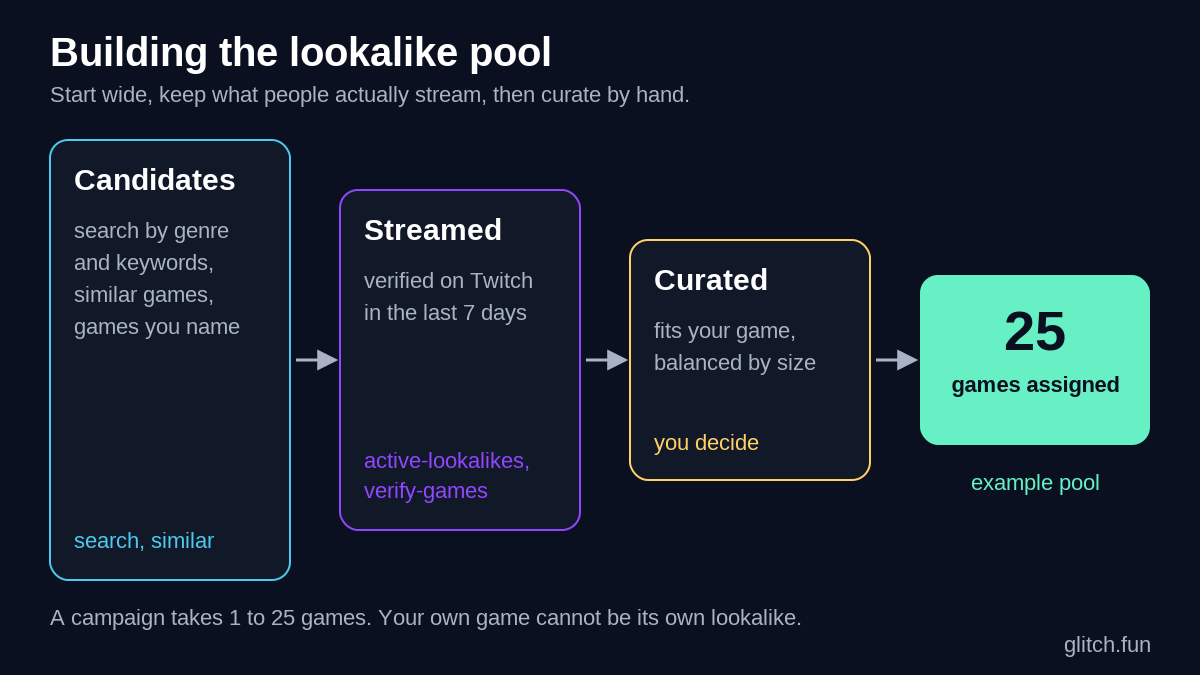
Start wide, keep what is actually streamed, then curate by hand.
Build it in three rounds. Each round is one prompt.
- Most-streamed in your genre. Start with the games in your genre that have the most streams this week. These guarantee there are creators to find.
- Most similar. Add the games closest to yours in mechanics, setting and tone, even if they are smaller. These creators are the most likely to say yes.
- Rebalance for the largest audiences. Swap out games that are similar but barely streamed, and keep a few large games where the fit is real, so the pool reaches enough viewers.
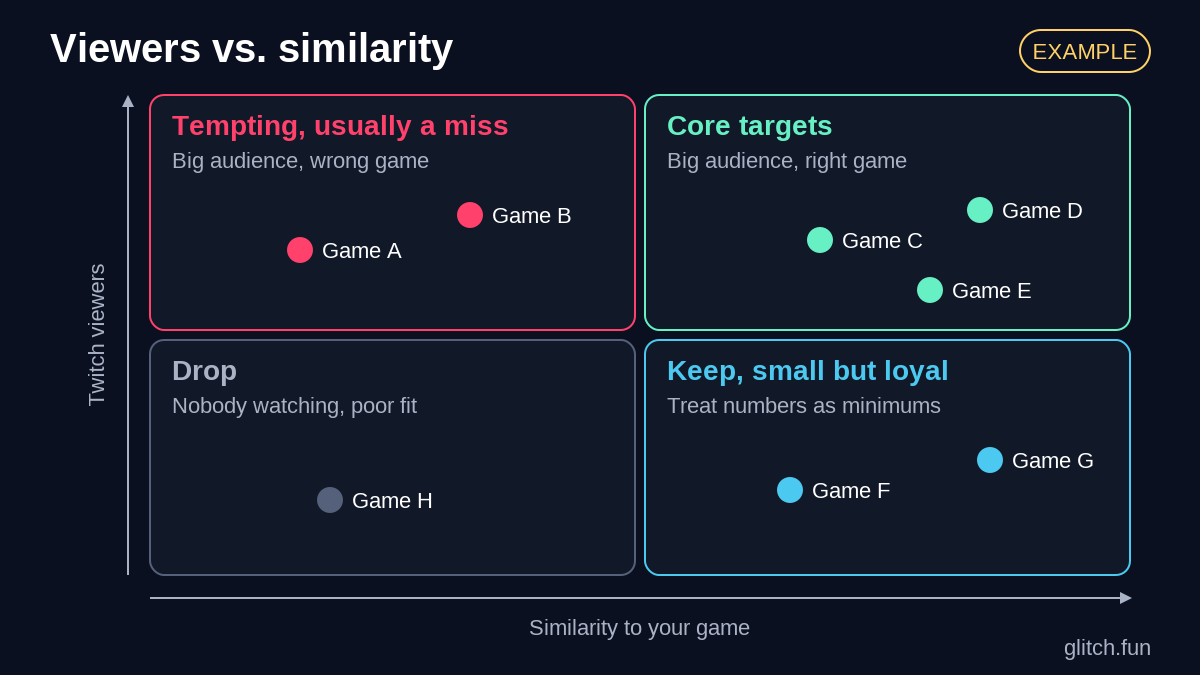
Example only. High viewers and high similarity are your core targets; big but unrelated games are the classic trap.
The top-left box is where most developers go wrong. A huge game with a different audience brings lots of streamers who will never play yours.
Take my curated list of {number} games and run Glitch verify-games on it. Show me which have Twitch evidence from the last 7 days and which are unverified, and plot them as high or low viewers versus high or low similarity to my game. Recommend the final list of up to 25. Before assigning, read the campaign settings and tell me whether auto-sourcing or auto-invites are on and could trigger emails. Assign only after I approve, then read the settings again to confirm.The full creator workflow that uses this pool is in Influencer Marketing With an MCP.
5. Use It for Positioning, Timing and Ads
The same research is useful far beyond creator outreach.
Positioning
The games that stream well tell you what their audiences enjoy watching. Find what your game shares with them and lead with it in your store page, posts and emails.
Based on the lookalike games streaming best on Twitch this week, what do their audiences enjoy that my game also offers? Use my Glitch title context. Give me three one-line hooks for creator emails and social posts, and one thing my game does that none of them do.
Timing
Check stream activity in your genre before you pick dates for a demo, an event or a creator push. A week when your genre is busy on Twitch is a week when its creators are live and looking for things to play.
Ad targeting
The games in your pool are also your targeting list. Many ad platforms let you target interests related to specific games. Have your AI draft a campaign aimed at fans of your core targets, as a draft only. See Advertising With an MCP for the full process.
Using the core targets from my lookalike pool, show me which ad platforms are connected to my Glitch scheduler, then create a draft campaign on {platform} with a {daily budget} daily budget targeting fans of those games. Keep it draft_only and show me the full setup. Do not sync anything live.6. Automate It: The Weekly Refresh
What people stream changes every week. A game that was huge last month can go quiet, and a new release in your genre can take over. If you set your list once and forget it, Glitch keeps sourcing creators from games nobody is watching. Run this weekly:
Use the Glitch MCP to find the most-played games on Twitch in the past week that are similar to my game. Update the influencer campaign to source creators from the most-played games.
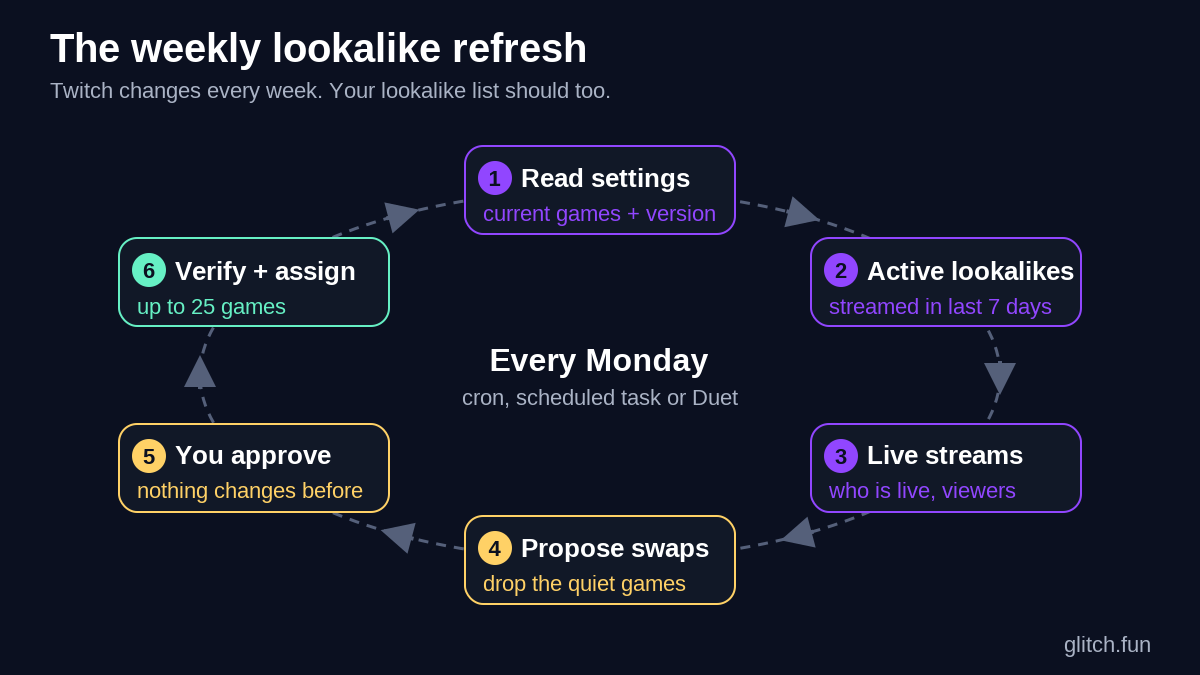
The Monday loop. Your list follows what people are watching.
Updating the campaign can lead to new invitations if auto-invites are on, so for a fully unattended run, use a version that proposes changes and waits:
0 9 * * MON cd ~/my-game && claude -p "Use the Glitch MCP to find the most-played games on Twitch in the past week that are similar to my game. Compare them with my campaign's current lookalike games and write the proposed swaps, with viewer numbers and one-line reasons, to marketing/twitch-weekly.md. Do not change the campaign."
Then open your AI on Monday, read the file and approve. Other ways to run it:
- /loop in Claude Code: for example /loop 24h with the propose-only prompt, while a session is open.
- Claude Code cloud scheduled tasks: run in Anthropic's cloud while your laptop is closed.
- Claude Duet: add the hosted Glitch connector at https://api.glitch.fun/mcp in claude.ai under Settings, Connectors, Add custom connector, and sign in with Glitch (setup steps on glitch.fun/mcp). Duet checks connected apps every few hours, puts it in a morning brief and asks before changing anything.
Glitch Tools Used
- glitch_research_campaign_lookalike_games: settings, search, similar, active-lookalikes, live-streams, verify-games
- glitch_assign_campaign_lookalike_games
- glitch_get_title_context
- glitch_get_marketing_capabilities and glitch_marketing_operation (campaigns.create with draft_only)
Wrap Up
Stop guessing who likes games like yours. Twitch tells you every 30 minutes. Here is what to do today:
- Create a draft influencer campaign if you do not have one, and read its settings.
- Run "Find streamed lookalikes" and "Search my space".
- Check small games separately and treat their numbers as minimums.
- Curate in three rounds, verify, and assign up to 25 games.
- Set up the Monday refresh.
Twitch tells you what people watch. Steam tells you what they buy. Next, use the same data-first approach on your store page in Steam Marketing With an MCP.