Your AI is smart but blind. On its own it only knows what it learned in training and what you paste in. It cannot see who is streaming games like yours tonight, which post brought you players, or which creators opened your email. Glitch collects that data from more than 15 sources, connects it to your game, and hands it to your AI through MCP, so it can make good decisions and then act on them.
See
Live data from Twitch, Steam, social platforms, ad networks, creators and your own game.
Act
Real tools to post, send outreach, create ads and answer creators, with your approval.
Learn
Results flow back into Glitch, so the next decision is better than the last.
Data sources
Players and storesSteam store and player counts · Your Steam partner reports · Glitch store, wishlists and sales · Your website · Your game (sessions and retention)
Creators and streamingTwitch live streams · Creator profiles: Twitch, YouTube, TikTok, Instagram, X, Reddit, Bluesky · Creator email replies
Social and communityYour social accounts and posts · Reddit communities · TikTok trends · Discord
Paid adsMeta · Google · TikTok · Reddit · X
DiscoveryIGDB similar games · Press directory
Glitch
One profile per gameJoins creators, clicks, visits, installs and sales, and filters bots
Glitch MCP
Scoped to your gameReports, research and tools. Secrets never leave Glitch
Your AI
Claude Code, Codex or CursorDecides, drafts and asks you to approve
ActionsPosts, creator outreach, ads, Steam fixes
Results flow back into Glitch, so every next decision uses what just happened.
Same AI, different answers
Your AI alone vs your AI with Glitch.
The model is the same. What changes is what it can see and what it can do.
Task
AI alone
AI with Glitch
Find creators for my game
Guesses big names from memory, many of them out of date.
Ranks games like yours by live Twitch activity and sources creators who stream them, with follower counts and contact details.
Decide what to post
Writes generic posts that could be about any game.
Starts from your own screenshots and clips, and reads which of your past posts drove engagement and clicks.
Judge my ads
Can only read the clicks the ad network shows.
Connects ad clicks to installs, sessions, wishlists and purchases in your game.
Improve my Steam page
Gives the same checklist every game gets.
Compares your page with similar games and their player activity before suggesting fixes.
Follow up with creators
Cannot see who opened, replied or signed up.
Reads replies and website signups, and knows who already got a key or an onboarding email.
The advanced explanation
Where the data comes from.
Glitch keeps 16 sources fresh with scheduled syncs, webhooks and tracking. Each one is tied to your game, so your AI asks about your game and gets your numbers.
How fresh each source is
Real time
Tracking linksYour gameInstallsGlitch store
Every 30 minutes
Twitch live streams
Hourly
Meta adsGoogle adsTikTok adsReddit adsSteam playersX posts
Daily
Your social postsX ads
Weekly
Creator profilesReddit communitiesPress directory
Source
What Glitch knows
How fresh
How your AI uses it
Twitch live streams
Viewers, games, language and start time for live streams, plus category trends.
Every 30 minutes
Lookalike research (live-streams, active-lookalikes)
IGDB
Game metadata and a similar-games graph.
About every 1.5 days
Lookalike research (search, similar)
Steam store and player counts
Tags, genres, price, reviews, release dates and concurrent players over time.
Store every 1.5 days; players hourly
Glitch Agent runs
Your Steam partner reports
Wishlist adds and deletes, sales by country, playtime and traffic sources.
When you import a report or add a Financial API key
Glitch Agent runs
Creator database
Profiles on Twitch, YouTube, TikTok, Instagram, X, Facebook, Reddit and Bluesky: followers, engagement, language, email and games played.
Refreshed weekly; emails re-checked hourly
Influencer campaigns (sourcing, influencers.list)
Your social accounts
Views, comments, shares and engagement per post; followers and impressions; comments and DMs.
Daily, X hourly
Social operations (reports, comments, conversations)
Reddit communities
Subscribers, rules, allowed post types, promotion policy and fit with your genre.
Weekly
Social operations (reddit.*)
TikTok discovery
Trending hashtags, keywords and music.
On request
Social operations (tiktok.*)
Ad networks (Meta, Google, TikTok, Reddit, X)
Spend, impressions, clicks, reach, conversions, CTR, CPC, CPM and CPA.
Hourly, X daily
Marketing operations (reports.*)
Tracking links
Every click with its source, location and device.
Real time
Social and attribution reports
Your website
Sessions, pageviews, referrers, UTM sources and visitor journeys.
Real time
Web reports
Your game
Daily and monthly players, D1 to D30 retention, cohorts and session length.
Real time
Session reports
Cross-device attribution
Which click, site visit and device led to an install, with bot and fraud filtering.
Real time
Attribution and cross-device reports
Glitch store
Wishlists, purchases, playtime earnings and ad revenue, with the source of each.
Real time; ad revenue daily
Wishlist, storefront and earnings reports
Creator email replies
Replies to your outreach, matched to the campaign and the creator.
As they arrive
Influencer campaigns (replies.*)
Press directory
Publications, writers and the stories they cover.
Weekly
Glitch Agent runs
The part AI cannot do alone
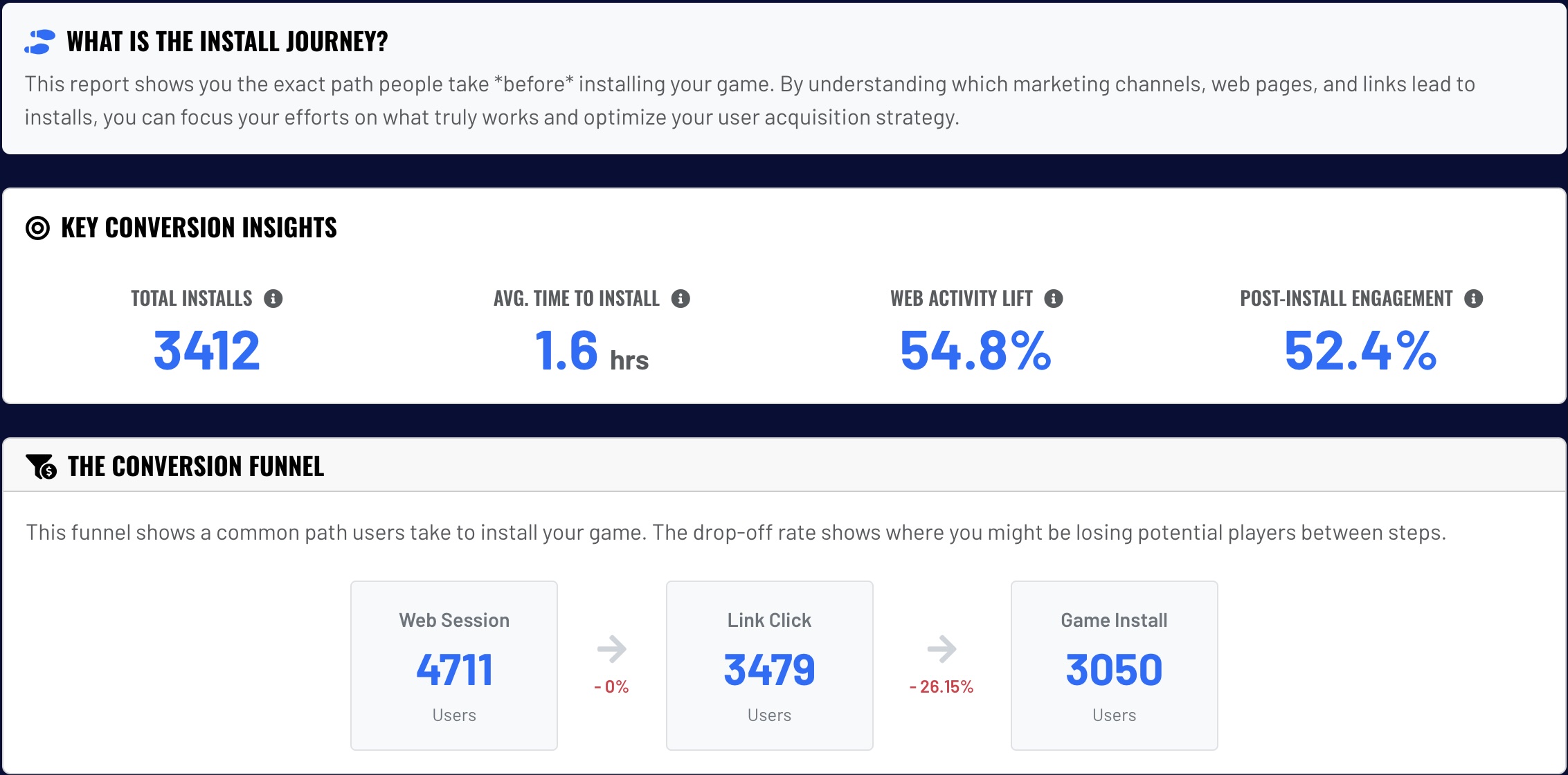
Connecting a click to a player.
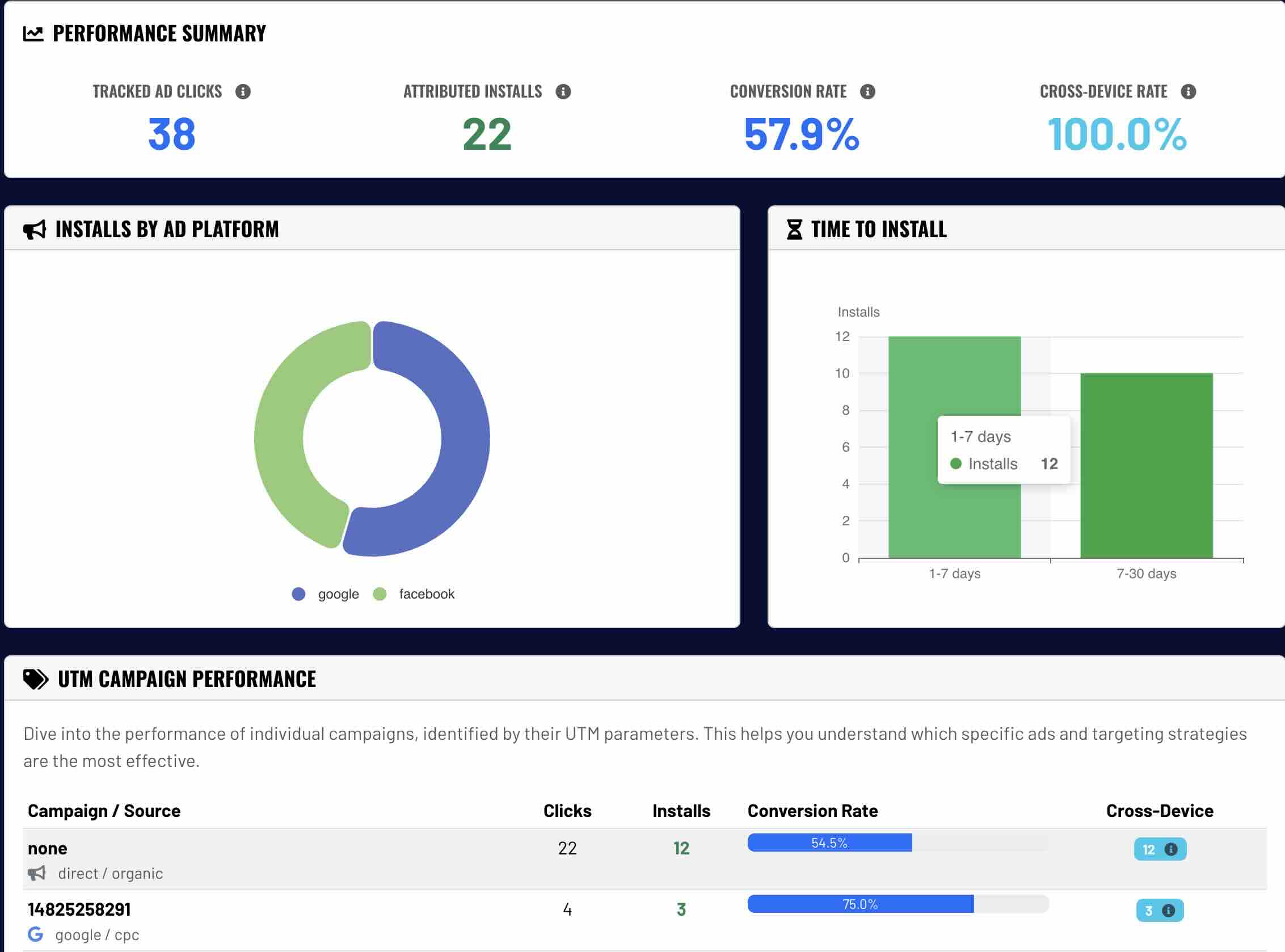
Ad networks and social platforms only see their own clicks. Glitch follows the whole path, even when someone clicks on their phone and installs on their PC, so your AI can tell which creator, post or ad actually brought players.
1A creator, post or adEvery link Glitch creates is a tracking link.
2A clickGlitch records where it came from and on which device.
3A visitYour website or store page session is linked to that click.
4An installYour game reports the install, even on a different device.
5A wishlist or purchaseThe result is credited back to the creator, post or ad.
Glitch install journey report
Glitch ad install attribution report
Your own game's numbers
Every game gets three analytics dashboards.
Market data tells your AI what is happening out there. Your game analytics tell it what is happening with your players. Glitch MCP gives your AI the same web, cross-device and session reports you see in the dashboard, with filters for dates, countries, devices and campaigns.
Visitor landsPages & eventsSource & UTM
Web analytics
Who visits your site, and where did they come from?
Steam wishlist and sales data needs your Steam partner report import or a Steam Financial API key.
Twitch live numbers come from the top 100 streams per check, so treat them as minimums.
Steam reports and the press directory are reached through Glitch Agent runs, which use your agent plan or credits.
Your AI only sees the game its token belongs to. Provider passwords and secrets are never returned to it.
Try it
Prompts that use your data.
Get up to speed
Use Glitch to read my game's title context and list every analytics report you can run for it. Then tell me in five bullets who my game is for, how it is positioned, and what data we have to work with.
What changed this week
Pull my Glitch wishlist, storefront and session reports for the last 14 days and compare them to the 14 days before. What changed, what likely caused it, and what is the one thing I should do this week?
Where players come from
Use my Glitch attribution and cross-device reports to show which channels bring players who actually install and keep playing. Rank them and tell me where to spend my next two hours.
Weekly marketing sync
Run my weekly marketing sync with Glitch: read last week's reports, list anything waiting for my approval, and give me three tasks for this week that each take under 15 minutes. Save the summary to marketing/weekly-notes.md.
Next guide
Keep every feed active in minutes a week.
Set up a scheduler once, let your AI turn your game's screenshots and clips into posts, connect your accounts, schedule a few weeks at a time, and learn from the results.