
On this page
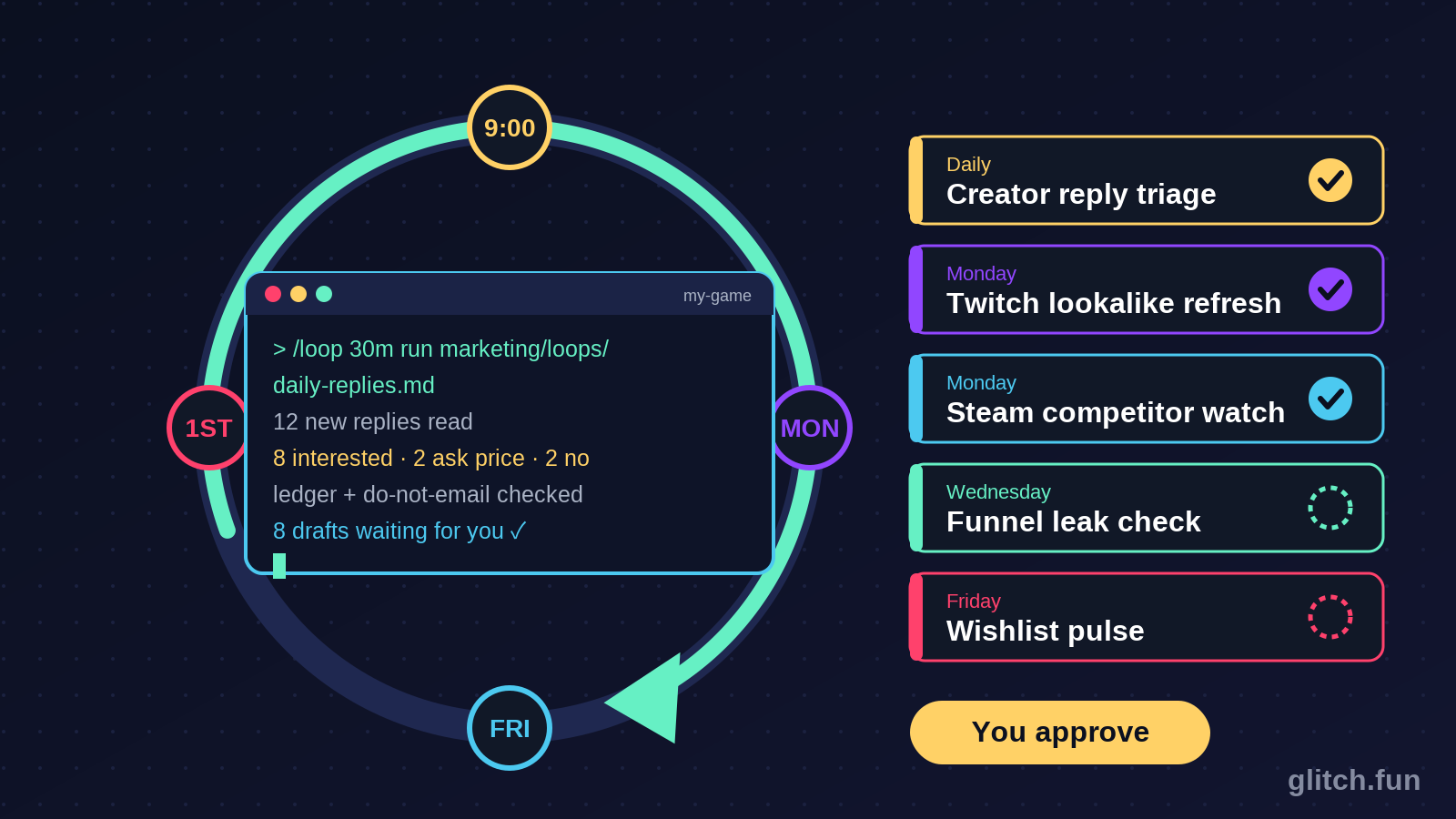
You wrote a great marketing prompt. It found 15 games like yours, drafted creator replies and gave you three posts for the week. You ran it once, felt productive, and forgot about it. Two weeks later the replies are still unanswered, the lookalike list is stale and your social calendar is empty again.
A prompt you run once is a to-do. A prompt that runs every morning whether you remember or not is a marketing department. Both Claude and Codex can now run prompts on a schedule, on your machine or in the cloud, and with the Glitch MCP connected, those prompts can read your real campaign replies, Twitch and Steam data, analytics and ad results. You stop doing marketing and start approving it.
In this lesson, we are going to cover:
- What turns a repeated prompt into a loop that actually works
- Writing a loop once so both Claude and Codex can run it
- Every way to run loops in Claude: /loop, desktop scheduled tasks, cloud routines, cron and Claude Duet
- Every way to run loops in Codex: thread automations, scheduled automations and codex exec
- The 10 best loops to run with the Glitch MCP, with prompts you can copy
- Keeping unattended loops safe: tokens, approvals, ledgers and a pause switch
If you have not connected the Glitch MCP yet, start with Marketing With an MCP: The Prompts That Do the Work. It takes about five minutes.
1. What Makes a Loop Work
Putting a prompt on a timer is easy. Getting something useful every time it fires takes five parts. Leave one out and the loop either does nothing useful or does something you did not want.
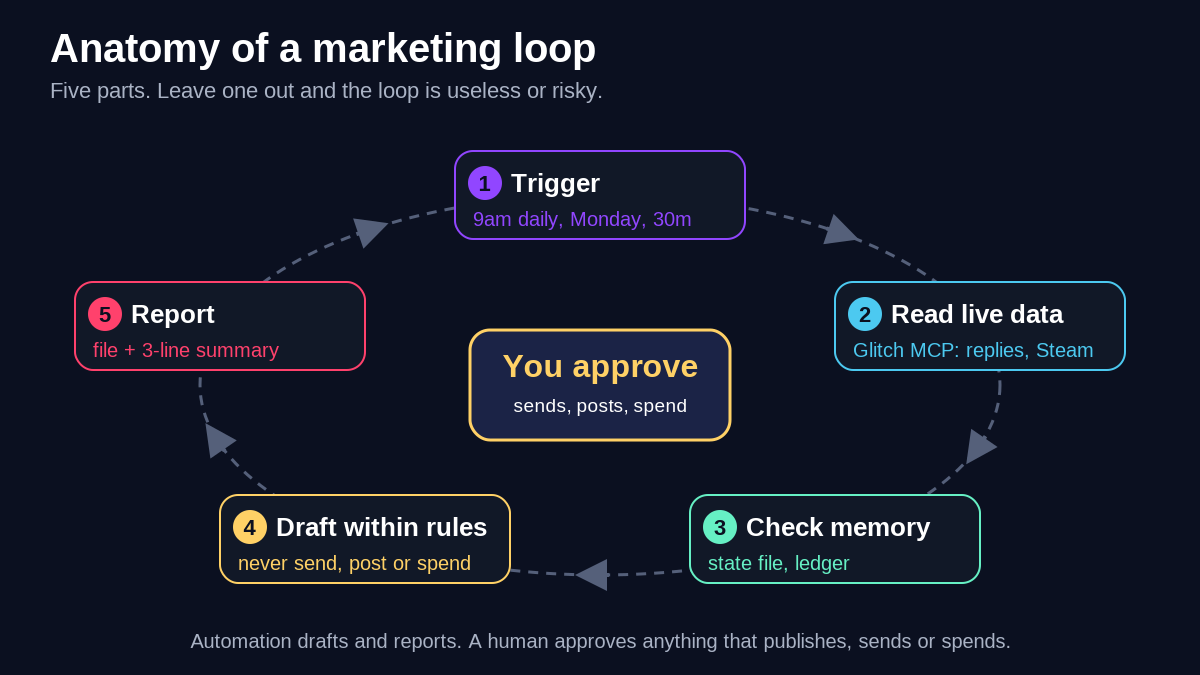
Every good loop has the same five parts. The state file is the one people forget.
- A trigger. A time (every morning at 9, every Monday), an interval (every 30 minutes) or an event. Match it to how fast the data changes: replies change hourly, Twitch weekly, your Steam page monthly.
- Live data. The loop reads something real through the Glitch MCP: replies, streams, Steam games, wishlists, ad spend. A loop with no new data writes the same answer every time.
- Memory. "Since your last check" only works if the loop knows when that was. Keep a state file, like marketing/state/last-run.md, that the loop reads first and updates last. The key ledger and do-not-email list are memory too.
- Guardrails. Say exactly what the loop may do on its own and what it only drafts. The rule we follow at Glitch: automation drafts and reports; a human approves anything that publishes, sends or spends.
- An output you will read. A file in your repo plus a three-line summary. If the loop writes a 2,000-word essay every day, you will stop reading it by Thursday.
2. Write the Loop Once, Run It Anywhere
Do not bury your loop prompts in a scheduler's settings screen. Keep each one as a file in your game's repo, in a folder like marketing/loops/. The scheduler only needs one short line: "Run the loop in marketing/loops/daily-replies.md." Now you can change a loop with a normal edit, see its history in git, and run the same loop from Claude or Codex without copying text between apps.
Every loop file follows the same template:
Goal: {one sentence, e.g. answer interested creators within a day}.
First: if marketing/loops/PAUSE exists, stop and say so. Read marketing/state/{loop-name}.md for what happened last run.
Data: use the Glitch MCP to {read replies / check Twitch / research Steam / pull reports}.
Allowed on your own: {read, compare, draft, write files in marketing/}.
Needs my approval: {sending, posting, assigning games, changing campaigns, spending}. Draft these and list them.
Output: update marketing/state/{loop-name}.md, append to marketing/reports/{loop-name}.md, and end with a three-line summary and anything that needs me.
Put your standing marketing rules where both tools look for them. Claude Code reads CLAUDE.md and Codex reads AGENTS.md in your project. Add a short marketing section to AGENTS.md (never send a key twice, check marketing/do-not-email.txt before every email, never state a commission rate that is not configured, escalate anyone who names a price), and have CLAUDE.md point to it, so both tools follow the same rules.
One sender per loop. Run a given loop in Claude or in Codex, not both. Two tools answering the same creator replies is how people get two keys and two slightly different emails.
3. Running Loops in Claude
Claude gives you five ways to run a loop, from "while I am working" to "while my laptop is closed".
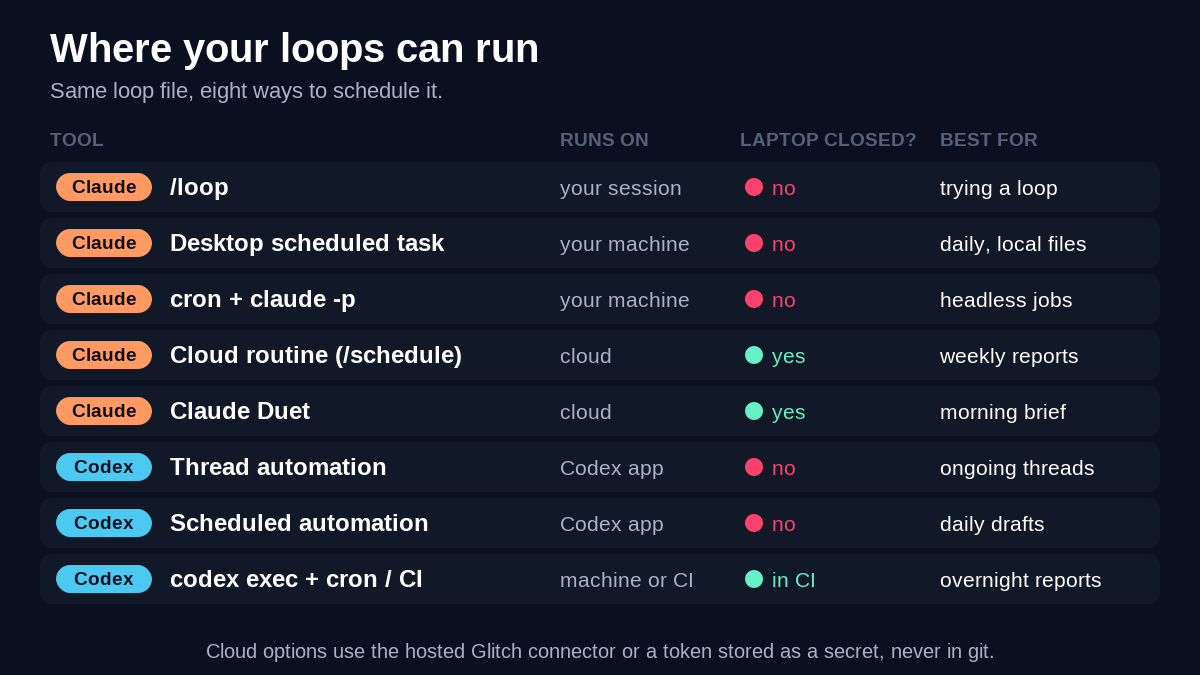
Pick by one question: does this loop need to run while your laptop is closed?
/loop: while you work
In Claude Code, open your game's project and type /loop with an interval and a prompt. It repeats inside that session until you close it. Leave out the interval and Claude paces itself. It is the fastest way to try a loop before you schedule it for real.
/loop 30m Run the loop in marketing/loops/daily-replies.md. Draft only, do not send anything.
Desktop scheduled tasks: on your machine, on a schedule
The Claude desktop app can run a task on a schedule as a fresh Claude Code session in your project. It uses the Glitch MCP you already installed and your local files, like the key ledger. The app has to be open, so this suits a daily loop on a computer that is on during the day.
cron + claude -p: headless on your machine
claude -p runs one prompt without the chat window, so your system scheduler can start it. Cron does not load your normal PATH, so use the full path from which claude. Headless runs cannot stop and ask permission, so allow only the tools the loop needs.
0 9 * * * cd ~/my-game && /usr/local/bin/claude -p "Run the loop in marketing/loops/daily-replies.md" --allowedTools "mcp__glitch,Read,Write" >> marketing/reports/cron.log 2>&1
Cloud routines (/schedule): laptop closed
Type /schedule in Claude Code and describe the job and when it runs, for example "every Monday at 9am, run the loop in marketing/loops/weekly-twitch.md". It runs in Anthropic's cloud on a copy of your repo, so it keeps going when your laptop is shut, and you manage it at claude.ai/code/routines. Because it does not run on your machine, it cannot use the Glitch MCP you installed locally. Give it the hosted Glitch connector, or put a Glitch token in the cloud environment's secrets, never in git. Routines need a paid Claude plan.
Claude Duet: a morning brief
Add the hosted Glitch connector at https://api.glitch.fun/mcp in claude.ai under Settings, Connectors, Add custom connector, and sign in with Glitch (current steps on glitch.fun/mcp). Claude Duet, Anthropic's proactive assistant, checks your connected apps every few hours and asks before it sends or posts anything. Give it your daily reply triage and weekly Twitch refresh as standing instructions, and they arrive in your morning brief with drafts ready.
4. Running Loops in Codex
Codex reads the Glitch MCP from ~/.codex/config.toml. If you used the install prompt on glitch.fun/mcp, it is already there:
[mcp_servers.glitch]
command = "npx"
args = ["-y", "glitch-mcp"]
env_vars = ["GLITCH_API_BASE_URL", "GLITCH_API_TOKEN", "GLITCH_TITLE_ID"]
default_tools_approval_mode = "prompt"
Run npx -y glitch-mcp install-codex-prompts once to get the bundled slash prompts, such as /prompts:glitch_weekly_marketing_sync and /prompts:glitch_launch_audit. Then pick how the loop runs.
Thread automations: come back to the same conversation
In the Codex app, a thread automation wakes the current conversation on a schedule, so Codex keeps everything it already knows about your campaign. Use it for work that builds on itself, like following a creator thread through a negotiation or tracking a launch day by day.
Scheduled automations: a fresh run every time
A Codex automation runs your prompt on a schedule, either from the presets or with a custom schedule in cron syntax, as a new run each time. In a git project it can run in your project folder or in its own background worktree, which keeps its file changes away from the code you are editing. Project automations need the Codex app running and the project on disk, and they work best while your laptop is awake. Keep the sandbox at workspace-write rather than full access for anything that runs unattended.
Run the loop in marketing/loops/weekly-steam-watch.md. Use only the Glitch MCP and files in marketing/. Do not change anything in Glitch or on Steam.
codex exec: headless, for cron or CI
codex exec runs one prompt without the interactive interface, so cron, launchd or a scheduled GitHub Actions workflow can start it. In CI, store the Glitch token as a repository secret and pass it in as GLITCH_API_TOKEN. Like claude -p, a headless run cannot stop to ask you, so keep CI loops to reports and drafts.
0 9 * * MON cd ~/my-game && codex exec "Run the loop in marketing/loops/weekly-twitch.md. Propose changes only." >> marketing/reports/cron.log 2>&1
5. The 10 Best Loops to Run With the Glitch MCP
These are the loops that save the most time for the least risk. Start with the first three. Add one a week.
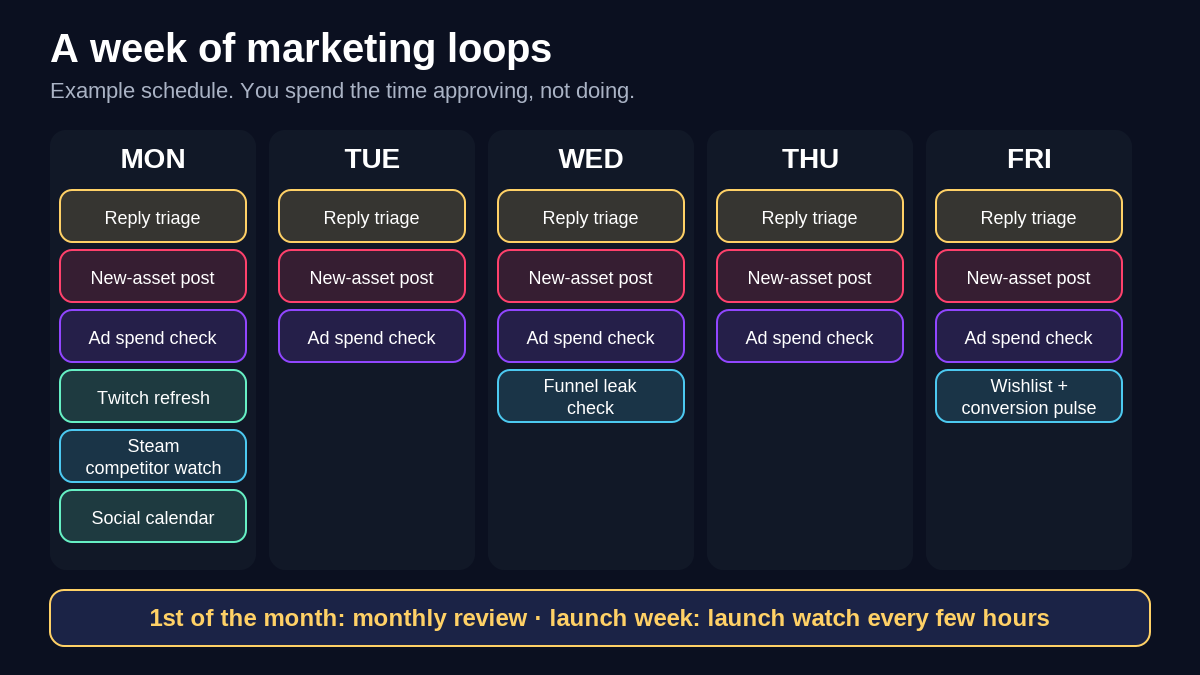
Example schedule. Daily loops take you about 10 minutes to approve; weekly ones about 20.
1. Daily creator reply triage (draft mode)
Every morning. The loop most people need first: creators who reply and hear nothing for three days move on.
Check my Glitch influencer campaign for new creator replies since the time in marketing/state/replies.md, and search my inbox too, because the replies list returns only the latest 100. Group them into interested, asking for payment, and not interested. Check marketing/key-ledger.csv and marketing/do-not-email.txt, and draft an answer for each interested creator in the same thread. Do not send anything. Update the state file and give me a three-line summary.
2. Daily key sender (after a clean week of drafts)
Every morning, once a week of draft mode had no triage mistakes. In one example campaign, about 1 in 5 replies still needed a human, so escalations stay with you.
Respond to the influencers who have shown interest in playing my game for free. Use the keys in marketing/keys.txt and make sure duplicate keys are not being sent. If there are any questions, alert me so I can respond.
3. Weekly Twitch lookalike refresh
Monday. What people stream changes every week, and your campaign sources creators from this list.
Use the Glitch MCP to find the most-played games on Twitch in the past week that are similar to my game. Compare them with my campaign's current lookalike games and write the proposed swaps, with viewer numbers and one-line reasons, to marketing/reports/twitch-weekly.md. Do not change the campaign.
4. Weekly Steam competitor watch
Monday. Glitch tracks hundreds of thousands of Steam games, with player counts sampled every few hours, so your AI can see which games like yours are taking off without scraping anything.
Use glitch_research_steam_games comparables to find games similar to mine that released in the last 14 days, sorted by peak players. Show price, reviews, positive rate and peak players for the top 10, compare with last week's table in marketing/reports/steam-competitors.md, and tell me which games are taking off and what their store pages promise that mine does not. Append this week's table. Do not change anything.
Before launch, point the same loop at your release date with window_days set to 30, and it tells you how crowded your launch window is getting.
5. Weekly social calendar fill
Monday. A full week of posts as drafts, made from your real game assets.
Scan my social asset folders for screenshots and clips added since marketing/state/social.md. Use the Glitch scheduler to draft next week's posts for each connected platform from those assets, one per day, as drafts only. List them with dates so I can approve them in one pass, and update the state file.
6. Daily new-asset posts
Every evening, if you capture a lot of footage while you build. New clips become draft posts while they are still fresh.
Check marketing/assets/inbox/ for new screenshots and clips since the last run. Pick the best one, upload it to my Glitch media, and draft one post for my strongest platform with a caption that says what the player does in the clip. Draft only.
7. Daily ad spend check
Every weekday, only while ads are running. The loop recommends; you change budgets.
Pull yesterday's Glitch ad reports for every live campaign: spend, installs, cost per install and wishlists. Flag any campaign whose cost per install is more than 50% above its 7-day average, or that spent with zero installs. Recommend pause, keep or raise for each, with one line of reasoning. Do not change any campaign.
8. Weekly funnel leak check
Wednesday. Find the step where players drop off before you spend more money sending them there.
Use my Glitch session and storefront reports for the last 7 days: visits, plays, session length, day-1 return and wishlists. Compare with the week before in marketing/reports/funnel.md, tell me which step lost the most people and one change to test this week. Append the numbers.
9. Weekly wishlist and conversion pulse
Friday. Ties the week's marketing to results, and checks that ad platforms still receive your conversions.
Pull my Steam wishlists and sales from glitch_get_steam_financials for the last 7 days and my Glitch wishlist and attribution reports. Match spikes to the week's posts, creators and ads. Then check that conversion events reached each connected ad platform this week and flag any platform with zero events. Five lines in marketing/reports/weekly-pulse.md.
10. Monthly review
First of the month. The one loop that changes your plan instead of your week.
Read the last month of files in marketing/reports/ and pull my Glitch social and attribution reports for the last 30 days. Tell me which platforms, posts, creators and ads brought players who installed and kept playing, what to stop, and what to do more of next month. Save it to marketing/reports/monthly-review.md.
Bonus: the launch-week watch
Every few hours, for launch week only, then turn it off.
It is launch week. Use glitch_research_steam_games game on my Steam app for today's player history, read new creator replies and pull today's wishlists and sales. Flag anything unusual: a creator video going up, a player drop, a run of negative reviews, an ad overspending. Keep it to five lines and tell me what needs me in the next two hours.
6. Keep Unattended Loops Safe
A loop runs when you are not watching. Set it up so the worst case is a bad draft, not a bad email to 500 creators.
- Use a read-only token for report loops. On glitch.fun/mcp, create a separate token with the read-only preset for loops that only read and report (Steam watch, funnel check, pulse, review). A loop with a read-only token cannot send or spend, whatever the prompt says.
- Allow only the tools the loop needs. With claude -p, list them in --allowedTools. In Codex, keep the sandbox at workspace-write and approvals on for anything that writes.
- Keep the ledgers in the repo. The key ledger and do-not-email list are the source of truth that makes double-sends impossible. Keep helper scripts in the repo too, not in a temp folder that gets wiped.
- Add a pause switch. Every loop file starts with "if marketing/loops/PAUSE exists, stop". Creating one empty file pauses every loop at once, from any machine that syncs the repo.
- Check before retrying. If a send errors, the loop checks your sent mail before it tries again, so a timeout does not become a duplicate.
- Watch the cost. Every run uses model tokens. A daily loop is plenty for replies; every 30 minutes is for launch week. Short loops that read one thing and write one file cost little.
- Review after big dates. After launch, check your loops and follow-up emails for old dates and links. A follow-up that still says "coming next month" after launch makes you look absent.
What stays human in every loop: pricing and paid deals, questions about how the game was made (including AI use), loading new keys, and any change to your store page.
7. Claude or Codex?
Use the one you already build your game with. Both connect to the same Glitch MCP and run the same loop files. A few practical differences:
- Laptop closed: Claude cloud routines and Claude Duet run without your machine. Codex project automations need the app running, so use codex exec in CI if Codex is your tool and the loop must run overnight.
- Continuing a conversation: Codex thread automations return to the same thread. In Claude, keep that continuity in the state file instead, which also survives switching tools.
- Trying a loop quickly: /loop in Claude Code repeats a prompt in your open session in seconds.
Mixing them is fine, for example a Claude routine for the Monday reports and a Codex automation for the daily social drafts, as long as each loop has exactly one home.
Glitch Tools Used
- glitch_influencer_campaign_operation (replies.list, replies.get, replies.send, influencers.list)
- glitch_research_campaign_lookalike_games, glitch_assign_campaign_lookalike_games
- glitch_research_steam_games (comparables, search, game)
- glitch_scan_local_social_assets, glitch_upload_social_asset_candidates, glitch_social_operation (schedulers.generate_content, posts.create)
- glitch_get_session_reports, glitch_get_storefront_reports, glitch_get_wishlist_reports, glitch_get_attribution_reports
- glitch_get_steam_financials
- glitch_marketing_operation (reports)
Wrap Up
You do not need more hours for marketing. You need a few loops that run when you forget. Here is what to do today:
- Create marketing/loops/, marketing/state/ and marketing/reports/ in your game's repo.
- Write the daily reply triage loop with the template and try it with /loop or a Codex thread automation.
- Once it works, schedule it for real: a desktop task, cron, a cloud routine or a Codex automation.
- Add the Twitch refresh and the Steam competitor watch next Monday.
- Create a read-only Glitch token for your report loops.
Then spend your mornings approving instead of doing. For the details behind each loop, go back through the track, starting with Influencer Marketing With an MCP.