
Steam Optimization Track
Steam is a distribution platform for games that currently has the largest amount of players for PC Gaming. The platform is complex in the way its algorithm works and how revenue is generated. Games need to understand how to correctly leverage its algorithm, notification system, and data to optimize how they release their games.
Ready to Start?
Enroll in this track to track your progress and earn your Glitch Certificate.
Track Curriculum
Follow these lessons in order to master the subject matter.
How to Launch a Steam Page and Maximize Wishlists
One of the top questions developers ask is: When should I launch my Steam page? There are two answers to this, depending on your budget that really depends on your budget.
$10k or More in Marketing Budget (1 to 2 years)
If you have $10k or more in marketing budget, ideally you should launch your Steam page between 1.5 to 2 years before your anticipated game launch. The reason for this is that you don’t want to accumulate wishlists too far out, as the chances of them going stale increase significantly after the two-year mark.
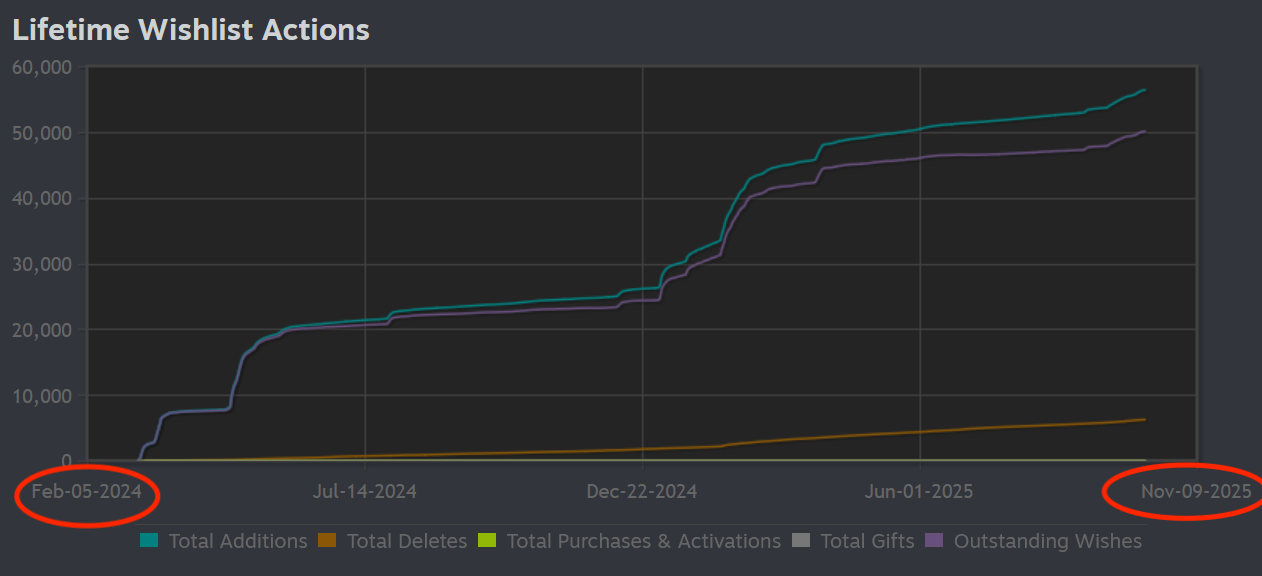
Furthermore, because you have a budget, you can invest in activities that not only bring in more wishlists but also build strong brand affinity around your game. The higher the budget, the higher-tier influencers you can work with, the more you can spend on ads, and the more recent your wishlists are, the more likely they are to convert at launch.
Less Than $10k in Marketing (2 years+)
If you have less than $10k in marketing spend, the more time you have to build wishlists, the better, even if some of those wishlists go stale. This means it is completely acceptable to launch your Steam page 3–5 years in advance and simply collect wishlists over that period.
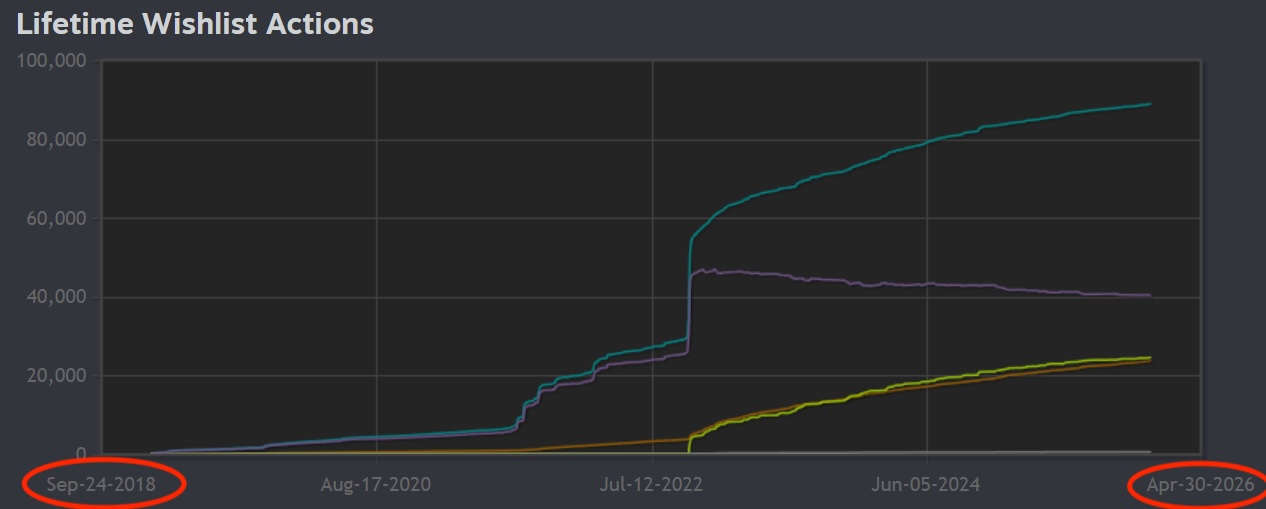
The longer your Steam page is live and consistently growing, the more it de-risks a failed launch. For example, let’s say you launch your page and get 150 wishlists per month. That is only 1,800 wishlists in a year. Now multiply that by five years and you are at 9,000 wishlists, excluding wishlists from any demo releases, playtesting, and other marketing activities that can be done along the way.
Prep Time: 2 Months
Before your launch, you want to have about two months of prep time to give all of your marketing channels the proper attention and to get all of your marketing assets together. Depending on what you do, this includes:
- Steam Page: You will need a strong trailer, capsule artwork, localized descriptions, and polished game screenshots.
- Social Media: Make sure you have your social media accounts set up, branded, and most importantly, not shadow banned.
- Influencers: If you decide to use influencers for your launch, make sure you reach out early and get them set up in advance.
- PR: If you are doing PR, put together your assets and pitch them early so press has time to cover your game.
All of this takes about two months. Some tasks will require a budget, while others can be completed for free and simply require time and effort.
Steam Page Setup
The first thing you are going to set up is your Steam page. Parts of this setup may require outsourcing to other professionals, and you want to make sure that you have multiple components moving at the same time.
How to Create High-Converting Steam Capsule Artwork for Your Game
The most important people to listen to when evaluating your capsule artwork are your potential customers and how the artwork is resonating with them. But how do you do that if you don’t know who is clicking through to your page? You use data and make data-driven decisions.
On Steam, navigate to Marketing & Visibility, and the first key metric you should examine is your click-through rate.
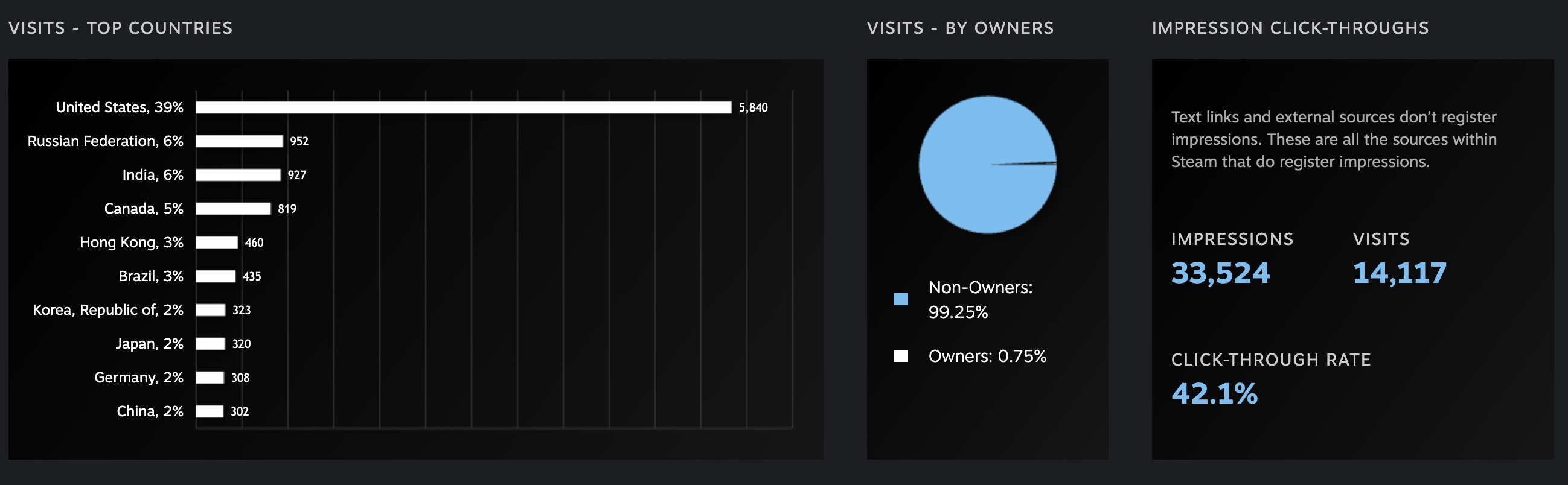
The primary click-through metric represents the average number of people who are clicking through to your Steam page. You can find this under Impression click-throughs. Typically, a CTR above 5% is considered good, but we have worked with games that achieved click-through rates as high as 40%, which is a strong signal that the artwork is resonating extremely well.
To identify specific areas for improvement, you need to drill down further. For this, you should look at the Breakdown of Pages section.
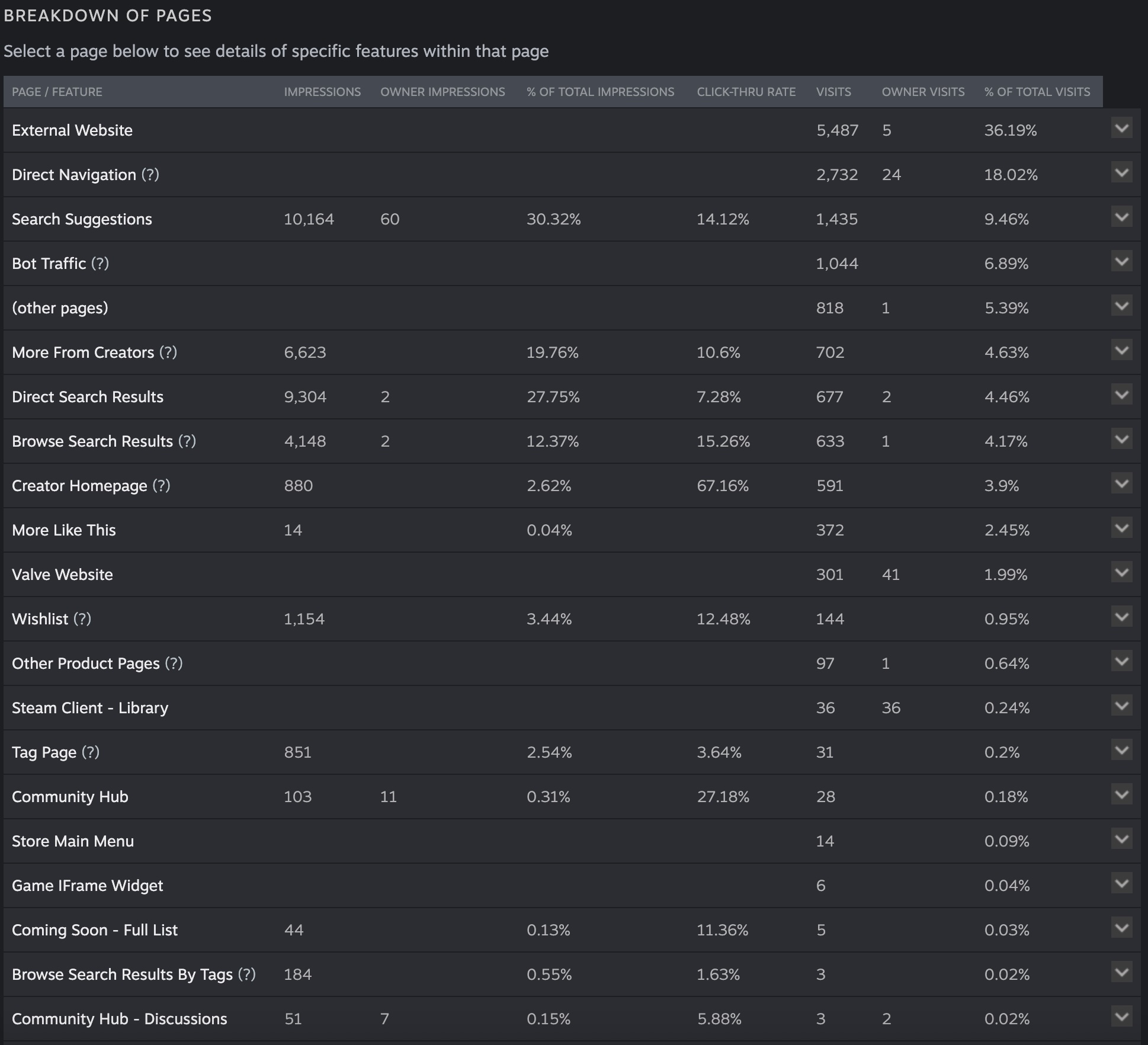
Overall, the game shown in the example image above has very strong click-through rates across most placements, except for a few areas. When we break this down further, we can see that Browse Search Results have the weakest click-through rates. This corresponds to the section shown below.

Normally, this would be a red flag, but in this case it may not be an issue. If you think critically about user behavior, players using the search box are often looking for something very specific that they already have in mind, rather than casually browsing. As a result, they are less likely to click through on results that do not exactly match their query.
If you find that you are getting a high number of impressions but your click-through rate is consistently below 5%, you should take that as clear feedback from users that your capsule artwork may not be captivating enough. Alternatively, it may indicate an issue with how your game is being categorized, such as incorrect Steam tags. For example, listing Dragon Sword under the Simulation tag would be a complete mismatch. Use your data to drill down and identify exactly where improvements are needed.
How To Prepare Your Game For NextFest
While I would NOT recommend launching your demo specifically at NextFest, but if you must, then I would strongly recommend conducting Alpha Testing beforehand. During this stage, watch for one critical factor: playtime.
Steam uses playtime as a key metric for curation, because playtime is a strong predictor of whether the masses might enjoy your game. Valve (Steam's parent company) published a detailed video explaining this concept:
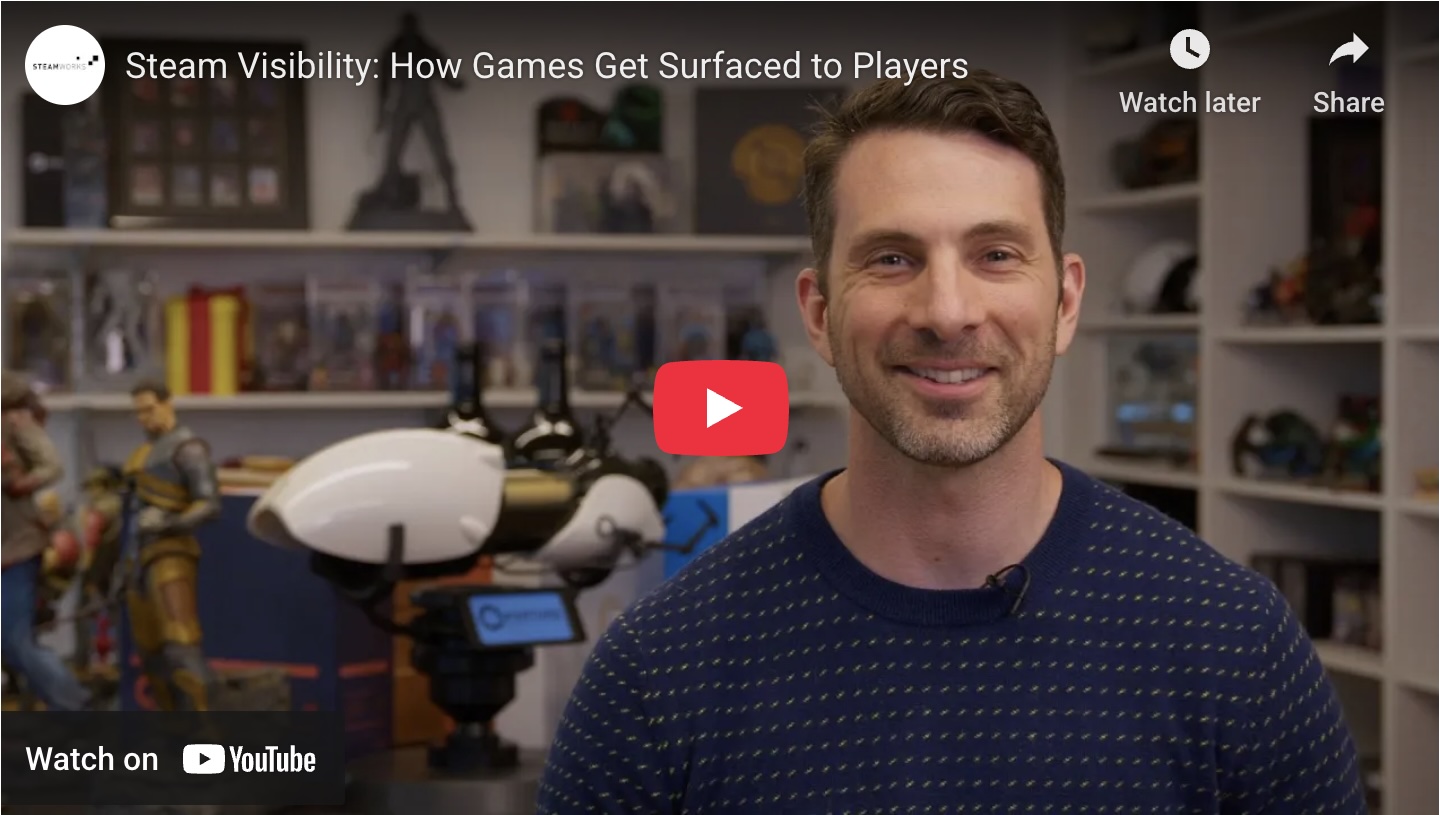
While the video is comprehensive, they have a direct quote in their presentation that states:
"When players spend time and money on your game, it's a strong signal to Steam that it could be interesting to other players, too."
If your playtime data looks problematic with your current demo or alpha tests, you're likely to not have your game promoted by Steam's algorithm. The algorithm favors games that demonstrate strong player engagement through extended play sessions.
Game marketer Erik Kovac of Tilt Games pointed out in his LinkedIn post what a healthy engagement curve looks like when players are truly engaged with a game. The data should show players spending meaningful time in your game rather than dropping off quickly.
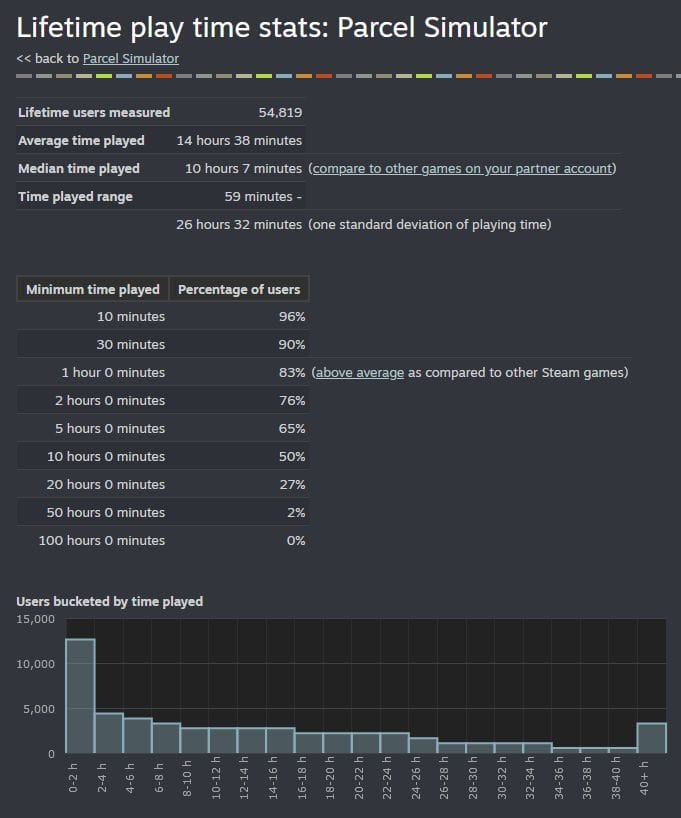
If your demo is already live and your playtime metrics are low, prioritize improving player retention. If your demo isn't released yet, conduct alpha testing to understand your playtime patterns. Focus on these critical aspects:
- Analytics Setup: Do you have analytics configured in your onboarding process that track how users funnel into your game? Understanding where players drop off is crucial for optimization.
- Onboarding Process: Do you have an onboarding experience that correctly introduces players to your game in an engaging way? Do they learn all the essential game mechanics needed to begin playing effectively?
- Bug-Free Experience: Is your game mostly free of critical bugs? How are you tracking bugs, and are you keeping players updated on bug fixes and improvements?
- Community Relationship: Have you begun building relationships with players through your social media channels, Discord community, or other communication methods?
If you're conducting Alpha tests, you should start this process at least 3 months out. Work backwards from how long it typically takes you to recruit players, analyze their gameplay results, gather direct feedback, implement fixes, and then conduct another test cycle to ensure the issues you identified are resolved and no new problems have emerged.
Steam Page Optimization
Is your Steam page optimized for converting visitors into wishlists? There are several critical elements to examine here. The first is localization—making your Steam page available in multiple languages. In fact, Valve has pointed out that localization is critical in how their algorithms choose what content to show to different regional audiences.
How To Use Steam Post Launch To Maximize Revenue
Steam has a complex communication system for how it can with players to alert them about your games key events and get them to purchase. Knowing how to correctly use these events can equate to $100ks to millions of dollars of revenue to being gained or lost post launch.
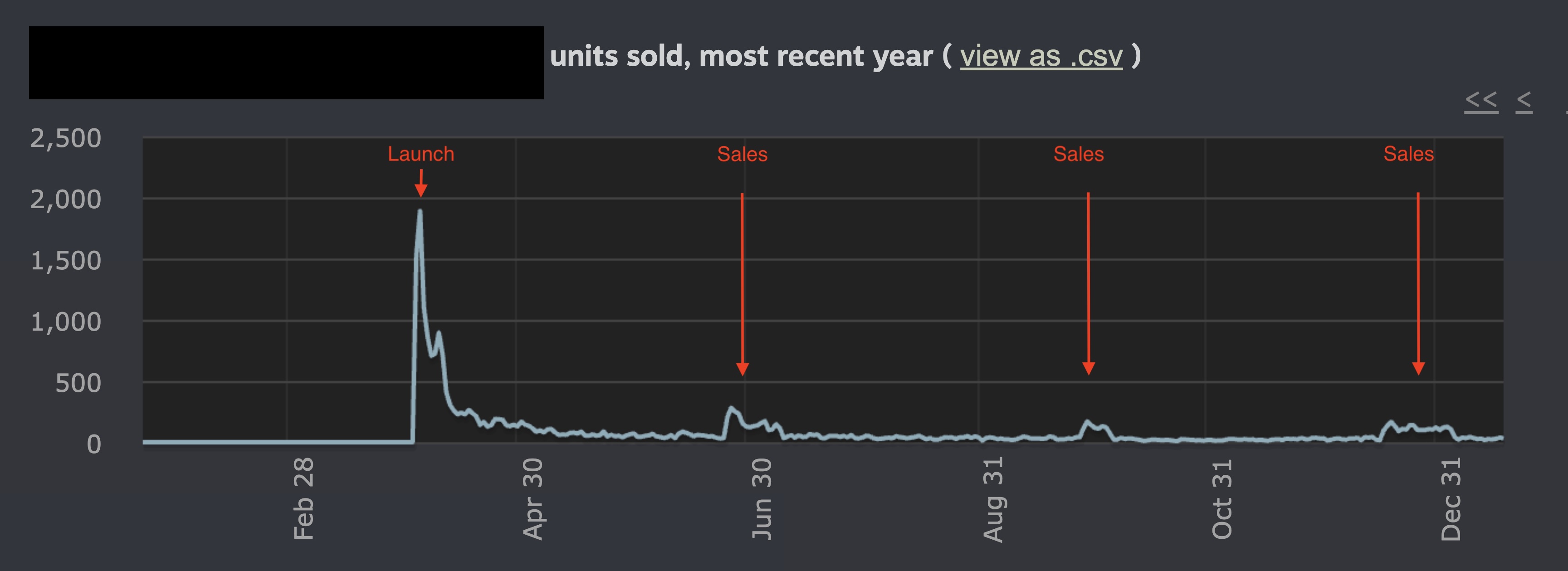
Below is a chart of events you should know and use.
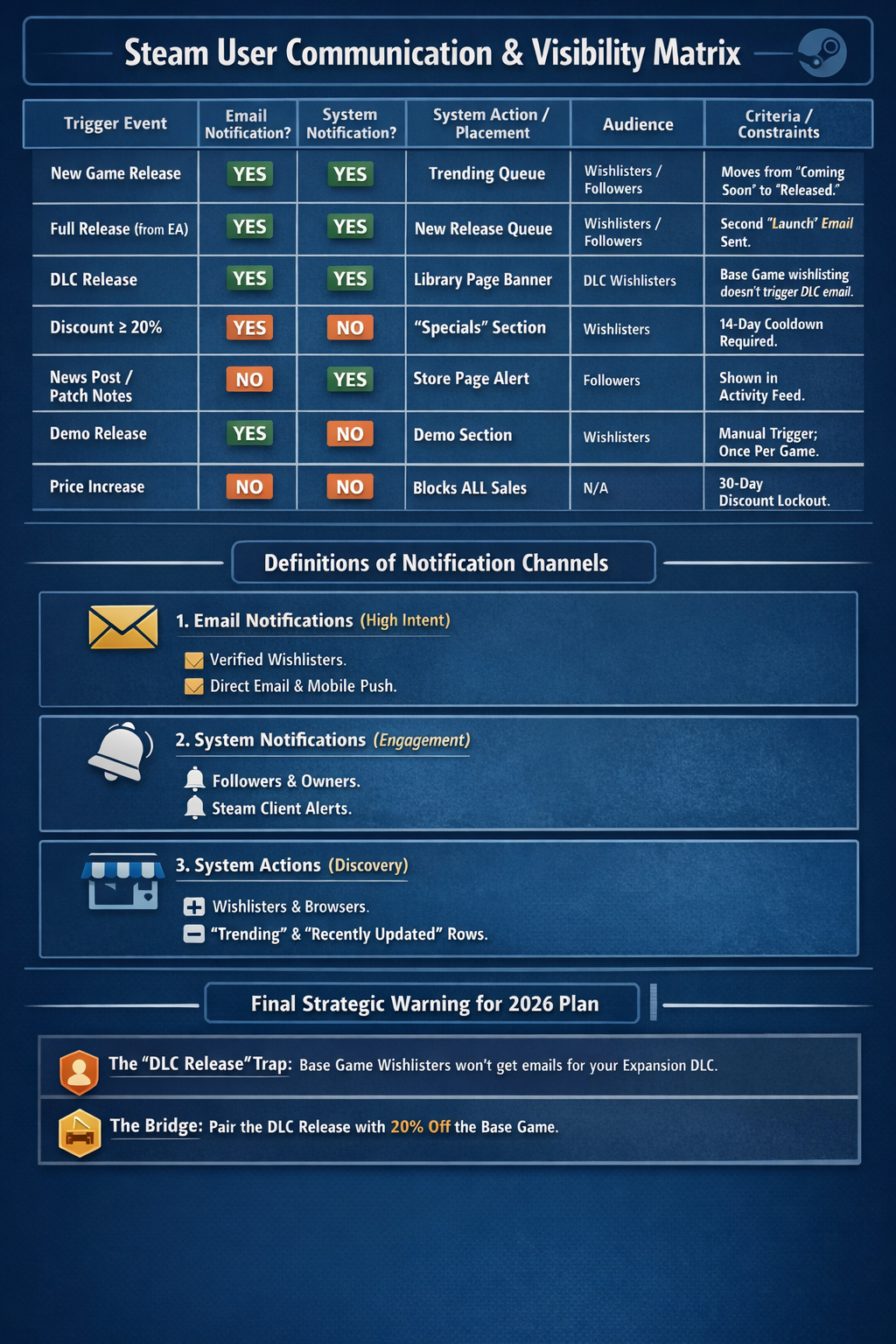
You want users to know about your game, when you ship updates, and when discounts are available to encourage them to buy. While you do not have direct access to users to make these announcements yourself, Steam will notify users about your game under the right conditions.
First, Steam uses two methods to communicate with users:
- Email: Users receive an email about your game delivered directly to their inbox, which is the most effective and high-intent form of communication.
- System Notifications: When users open Steam on their computers, they may receive a system notification inside the Steam client.
Based on the information available, here is a breakdown of what triggers user notifications on Steam, categorized by notification type and the specific criteria required.
1. Email Notifications
Email notifications are the most restrictive and are primarily sent to users who have wishlisted a specific app.
Game or DLC Launch
- Criteria: Sent when a game or DLC moves from “Coming Soon” to “Released,” including the transition from Early Access to Full Release.
- Constraint: For DLC, emails are only sent to users who wishlisted that specific DLC. Wishlisting the base game does not trigger an email for a new DLC release.
Discounts
- Criteria: The discount must be at least 20% to trigger a wishlist email.
- Constraint: There is a cooldown period for wishlist emails. If multiple events occur at once, such as a Winter Sale discount and a Full Release, Steam will typically only send one email.
What does NOT trigger an email:
- Major game updates or changelogs
- Organizing a third-party festival or event
- Visibility Rounds
- Announcing a DLC prior to its release
2. Steam System Notifications
System notifications, such as pop-ups in the Steam client or activity feed notifications, are generally sent to followers of a game rather than just wishlisters.
News Posts and Game Updates
- Criteria: Posting a news item or a major update changelog triggers a notification for users who follow the game.
Visibility Rounds
- Criteria: A specific marketing tool for major updates that places the game back on the front page and discovery queues for owners and wishlisters.
- Constraint: These do not work during major Steam sales like the Winter Sale. If activated during a sale, the round becomes invisible and the allotted days are lost.
What does NOT trigger a system notification:
- A price increase
- A standard price change without an accompanying news post
3. Critical Constraints to Keep in Mind
The 30-Day Cooldown
If you increase the price of your game in any currency, you cannot run any discounts for 30 days. This also means you cannot trigger wishlist emails for sales during that period.
Major Sales Interference
During major sales such as Summer or Winter Sales, the Steam front page is redesigned. This overrides Update Visibility Rounds, and the large volume of emails sent by Steam during these periods may suppress or de-prioritize your game’s release email due to cooldown rules.
Followers vs. Wishlisters
Following a game and wishlisting a game are two different actions. Update notifications target followers, while sales and release notifications target wishlisters. Now let's move onto the sales events.